Showing posts with label open source. Show all posts

Thursday, August 25, 2016

What is a Linux Distro?

We've got a number of folks in a Facebook Linux group I moderate who are playing around with the guts of their Linux by swapping around pieces from different distros. Which is cool--experimentation and tinkering are always good things.

It has raised a point that I think may require some background. Specifically, "What's a distro?"

Back in Ye Olden Days

When Linux first came around, those of us who wanted to play with it got source code. And that's all. We'd compile the kernel under some other operating system (Windows, another Unix, or maybe even the Mac of the time if you were a masochist!)

Then we'd start compiling binaries for our Linux kernel--a shell and cc would be a common place to start so that you could start compiling stuff for Linux under Linux.

After a while, we realized that we were duplicating a lot of effort. Many of us had fairly generic systems that we could swap binaries between without having to recompile absolutely everything.

With time, the concept of having a set of precompiled binaries for the kernel and applications as a starting point for a Linux system became the basis for a distro. Usually you'd install from a set of floppies or a CD. If the kernel you chose from the distro was close enough for your purposes, you'd just use one of the ones they'd precompiled. If you wanted something more suited to your hardware, you'd recompile the kernel with a few configuration changes and usually get much better performance and a more stable system, without having to recompile the application binaries for user space.

We still regularly compiled applications. Anything that wasn't bog standard usually would have to be compiled. As time went on, the list of precompiled binaries for each major distribution grew, and then distros started to have their own package managers to ease the installation and management of precompiled binaries.

The ability to do this is a large part of what has turned Linux from a tech toy used by a select few who are comfortable with compiling their own operating systems and applications to being the generally popular operating system it is today.

Stepping Into Today

Now it's not uncommon for users to choose a distro according to the application set they want for their system.

Different Linux distros have sprung up with selected sets of software precompiled and ready to install and run, or as part of their base installation.

The specialization has reached back into the kernel, too, as maintainers of the distros have improved their distro by compiling a kernel that suits the base suite of applications they provide. Distros that are intended to be more general-purpose likewise make changes to the Linux core to make the installation and hardware detection process simpler and more robust to make installing and setting up Linux easier for users.

More software is more easily available to everyone because of this. All the major distros are tied to a system of package management that provides users with almost limitless choices of software to install on their system.

Going outside the distro's own software repositories (repos) is certainly possible, especially in the instance of distros that are upstream of one's own.

For example, if you're running Mint, it's a snap to include repos for Ubuntu and Debian in your package manager's list of repos. And chances are almost all the software there will run without problems. For all I know (I haven't installed Mint in a while) Mint includes the Ubuntu repos by default, I seem to recall that being the case in the past.

However, if you're crossing over between branches, like wanting access to software compiled for Fedora that's not in the Debian-family distros, then you're starting to put yourself in a position of having more errors. The filesystem layout is different between Fedora and the Debians. There may be differences in the kernel configurations that will cause you problems.

If you want to get software that isn't in your distro's repos, or in a closely related distro (preferably upstream), then the correct answer is really to compile it yourself on your system, rather than use software someone has compiled on a different system configuration.

If you want to save other people the trouble, see about contributing your effort to your distro's repos. They'll probably have standards of what you have to do to do that, but you can be part of the team that makes your distro that much cooler pretty easily.

Kernel Swaps

I've seen discussions of turning one distro into another on the Facebook group. Hopefully a better understanding of what a distro is, and how it is defined, helps to show why "Turning Ubuntu into Kali" or some such is a misnomer. If you're grabbing another kernel then starting your system off it, you're no longer running either distro. You've gone custom.

That's not a bad thing, experimentation is a good thing. But you also want to look at how effective the technique of playing mix-and-match with precompiled system files and applications is versus just doing your own compilation with the stuff you want.

If there's a specific distro that you want the advantages of, it's best to install it rather than to build a sort of chimera by grabbing pieces then lashing them on to your current distro. You're asking for trouble by using binaries that haven't been compiled using the same assumptions at compile time.

If you want something truly custom, then rolling your own Linux is very probably the way to go. It's not hard, and that used to be the standard installation method. There are a number of systems out there to make it even easier than we had it in the old days (Linux From Scratch, Gentoo, etc.)

I hope this helps clear up some of the confusion about distros and their parts. :)

Monday, November 17, 2014

Microsoft's Cross-Platform Play

Microsoft has recently announced that they are moving .Net to open source and supporting Mac and Linux in addition to their Windows OS with Visual Studio Community 2013. Also, Visual Studio 2015 will support iOS and Android development.

Frankly, it's a little confusing because in some places MS mentions Mac and Linux, but very few, and they mention iOS and Android in lots of places, but not everywhere. So the support may be different than what I said.

Nevertheless, MS is opening up. Or at least seeming to.

Their timing couldn't be better, in my opinion.

Oracle is working hard to poison Java. I'm not entirely sure why, unless they think that ticking off any Java programmers and users outside those developing middleware for Oracle's products is a really great strategy. Their support for Java as a general programming language, as Sun did, has been piss-poor since day 1. Every so often they make a grand gesture to try to present themselves as interested, but the product they offer now is not something I could send someone out to install with a good conscience. What kind of an honest, large-scale company thinks that half-sneaking some crap software in under the cover of installing their own is a really great idea? Not one that really treasures the individual customers, I can tell you (and yes, Adobe is on this particular excrement list, too.)

Couple that with their poor responsiveness to security concerns, to the point where the Java language is treated as a sort of worm or virus by most software, and you've got a company that's decided to leave a hole in the cross-platform development market simply because their interests are elsewhere.

Cross Platform Alternatives

C# is Microsoft's outgrowth from their own attempt at embrace, extend, exterminate targeting Java. It's a very good language, including the good parts of Java while having a set of libraries (.Net) that don't have the Java API's less than useless historical cruft but do have everything good about the API, which made Microsoft look really cool to programmers when it came out as most were not familiar with the Java API itself.

Switching to C# from Java is an afternoon's exercise. But it and the .Net library started out wed to the Microsoft platform.

Enter Mono, a cross-platform implementation of .Net supporting the C# language based on Microsoft's ECMA standard for its products. It has been growing, at least in part on the back of the decline of Java, as well as bringing the good things about C# and .Net to Mac and Linux development. It doesn't hurt that it is the core that drives products like the Unity cross-platform game-development system, too.

Now Microsoft is combining their products with Mono, and extending their reach to Android and iOS.

There are a Couple of Ways This Could Go (and Possibly More)
In Future A, Microsoft does the excellent work they do in producing development tools, but now with a return to platform-agnosticism. This encourages programmers to develop for Windows and Windows Phone as well, since programmers who might otherwise have been targetting only iOS or Android will be selecting these tools for their intrinsic value as development tools to write programs for their favored OS, then decide to toss a Windows/WinPho version out there, too, since it's not costing them any significant extra effort and might end up fattening the coffers a bit.

Microsoft gains developers for its platforms, draws "thought leader" and technical leaders into their ecosystem, and the developers get the advantage of having good development tools for any major platform they choose.

In Future B, Microsoft uses this as a ploy to draw programmers in, but cross-platform support is sloppy, or delivered slowly, or lags behind the native capabilities of the non-MS platforms. Perhaps it doesn't play well with the various different versions of Android, or maybe the Mac and Linux native code suffers by comparison with code developed with native tools for those platforms.

It turns out to just be hype. Maybe there are forces within MS that fight the release of solid tools that are truly cross-platform, so they ensure that foreign platform support is sub-par, thinking that they're helping their own products by making it "harder" to develop for other platforms. The only point of cross-platform, to them, is to allow Windows patriots to proclaim themselves cross-platform developers without knowing anything about the competition.

In this future, Windows does not become the programmer's platform of choice, Windows has extra costs of development that make it less attractive as a development target when another platform is the one that's going to pay the bills (probably iOS), and life goes on as it does today with possibly the Microsoft touch putting some poison into Mono.

I can only hope that the upper management at MS is committed to Future A. because that's what it's going to take to keep Future B from stepping in any time it pleases.

Microsoft, Doing You Know What in Their Own Messkit for the Past Decade
Windows 7 was a boon for programmers when it came out. I and many other programmers I know had been feeling somewhat kicked about by Apple, didn't see tools with the same level of sophistication on Linux (and generally more system maintenance than the commercial OSes, and system maintenance doesn't pay bills), and Windows 7 was a viable place to go, or to at least have as a second OS on our desk for conducting development and testing.

Windows 8 added some nice stuff behind the scenes, but not without wrecking the usability of the platform, as well as making it a far less attractive target for development. In my case, I abandoned Windows as a target for native development about a decade ago, and was waiting on Windows 8 to see if I might add it to my repertoire again. The answer became "no". Windows 10 will determine whether I ever consider it a serious platform for anything at all in the future, as the professional applications that I currently use on Windows have all become multi-platform over the past several years, so I can move my licenses over to Mac OS or Linux for all of them.

If Microsoft gets it right with their development tools, and Windows 10 restores the power to the desktop that earlier versions provided--not just a false appearance of it as in Windows 8.1--then they stand to become the defacto professional desktop again.

Whither Mobile?

And given that the consumer desktop is the market that is dying in the face of mobile platforms, one would hope that they are bright enough to strategically commit to a powerful professional computer OS again. While the mass market computer is probably going away, there was a profitable professional/hobbyist market before the internet boom put a computer in practically every household. That professional market stands to be even larger than the historical one, as many professions that had nothing to do with computers now rely on them, and many new professions have arisen over the past 25 years that rely on the computer.

Also, there's a possibility that the mobile device as a computer replacement is just a flash in the pan. Most people bought their mobile devices in place of a routine upgrade to their home computer for one cycle. Now that they have tablets, the tablet market is going flat while computers are seeing a modest rise in sales. I think just about everyone has had a chance to discover that the touch interface is very limited in what it can do with current technology. It's severely error-prone and it's not well suited to complex activities. It's too soon to read now, but there's a chance the tablet may be relegated to specialty use status, with the keyboard-equipped computer regaining its status as the "real" computer behind the smartphone's limited purposes as a personal communication and light entertainment device. We'll see.

The phone isn't going to go away, though. It's going to be the most personal of personal computers, at least until it's replaced by a small tablet and a complete phone the size of an earpiece, or some other revolutionary turn that gets people to give up a screen for convenience. So supporting the mobile platforms is, for Microsoft, probably a must to their survival. At least until they can get real market share for Winpho.

Either way, if Microsoft plays their cards right, going to platform-agnosticism in their development tools could be a really good thing for everybody--including and especially Microsoft.

Tuesday, May 7, 2013

New Android Devices 1:A Samsung Phone Clone


I decided to finally dip my toe into the Android world a few months ago with the purchase of a new Android phone. I should have done this over a year ago, at least, but I decided to give a Blackberry phone a try, first. Boy, what a disappointment and waste of time that was!

So I went looking at different phones and their prices. I was looking for something on the economy end of the scale at first, but as time went on and my BB convinced me I really needed to just pull the trigger as even a low-spec candy bar feature phone would be less frustrating, I upped my commitment to the point where I was looking at bigger displays.

To stay within the price range I was looking at (less than $200 at the end, though originally I had been thinking less that $100), I went looking at clone phones from China.

Not My First China Phone

Those of you who've been reading here a while may recall a series of articles about a prior phone I owned, a Sciphone G2. This was a Java-based feature phone that had been skinned to look like Android. It was an excellent phone, and it's use of Java was a big advantage for me, as there were plenty of good Java phone apps and I could write my own J2ME apps as well. Calling it a mere "feature phone" was an insult, in fact, as I'd rather have one of these than any of the contemporary iPhones that were out at the time.

In fact, after mine went to the eWaste recovery site in the sky, I wished I still had it every day that I was using my Blackberry 8900.

When I went to get another, new China phone, I returned to where I'd bought my G2, hoping to find something equally good. Unfortunately, when I returned to the BlueLans site, I found more clothing than electronics. Their phone selection was ridiculously out of date. Yes, at the time, with the BB 8900 on my belt, I really did consider buying another SciPhone G2.

So I went looking for another supplier. I tried getting a phone from PandaWill. But that turned into a fiasco. It never even got past customs. I ordered a phone from them with a version of Android on a 4" display for about $80. It would have been a good deal, if it had been for real. Unfortunately, they sent me some runaround about not being labelled properly to be shipped with the shipper I chose. They wanted to change shippers, and from what they were saying it didn't sound as if the phone was what it had been represented as on their web page, as well.

Round and round we went. After over a month past the promised delivery date, still no phone. Still some incomprehensible messages from them that made no sense. I tried to cancel the deal with them. They said the phone was in transit (though they also said it wasn't, and that they wanted to change shippers. How can they change shippers if it's in transit? I know there's a logical explanation, and I can think of several possibilities, but they refused to be clear in their communications.) Finally I demanded cancellation of the deal or I'd dispute with Paypal. That did the trick. Suddenly, all their excuses for why the deal couldn't be completed as they told me it could until I actually paid my money disappeared and they cancelled it.

Stay clear of them. If they're not entirely dishonest, they're at least shady enough you don't want to have to sort out a problem with them. If there's a problem of any sort, they'll make it your problem, and my experience they'll at least lie through omission to do so.

Attempt 2

For the second try, I decided to go through a supplier on Amazon with a good track record and Amazon fulfillment. That would at least give some shielding against what I'd just been through with the first place. Initially, I looked for the phone I'd tried to order before. But, it had been a bit longer, and I decided to go with something with a newer version of Android and a larger display (there had also been several more checks deposited to the bank since my first try. I guess that's one good thing about the delay.)

The phone I finally opted for was an SIII clone. It has a display just short of 5", and claimed to be running the Jelly Bean version of Android. Fortunately for me, I didn't care if the phone had Jelly Bean or Ice Cream Sandwich.

When the phone arrived, it was running 4.0, ICS. The About This Phone page had been programmed to lie and say 4.1 (Jelly Bean), but the interface was clearly not JB, the phone reported 4.0.x when I hooked it up to my PC with the Android development software, and the "Easter Egg" on the phone is the ICS easter egg, not the one for JB.

Nevertheless, it's a great phone. The display is really good, the responsiveness was good. It had the right amount of memory and the processor and all the other technical bits were as promised on the Amazon page.

In fact, it was good enough I bought two more. I got one for my daughter about a month after I bought mine. Hers came with a version of ICS with more of JB hacked into it. The interface was more JB, and it had the JB Easter Egg. I guess someone saw my post on Amazon and updated the things I specifically mentioned. It even reported that it was 4.1.x to my PC with the Android Development System. There were still some pieces of ICS in it, though. But it still ran great.

About two months later I bought another for my wife. This time the OS really was Jelly Bean. 100%. And it was a different phone, though the mold lines were about the same. My wife's phone has a much brighter an more vibrant display. That's the first thing I noticed. Inside, the layout of SIMs and memory card is different, as is the battery. And while I had to buy the back with the flip cover screen protector as an add-on for the phones for my wife and daughter, it came in the package with my wife's phone.

One thing to note--while I ordered the same model of phone for my wife, the original supplier I bought from for myself and my daughter had stopped listing that model of phone, so I went with another source. Another source, a different phone.

I'm not disappointed, though, on any count. Everything important about each of these phones was as I wanted it.


Review

Bottom line: This is a great phone. The actual phone interface in Android isn't everything I could want in the way of usability, but that's an Android problem (and each version varies.) Once you get used to the Android Phone application, they work well as a phone. The important functions for me, beside the usual calling and logging, are speaker phone ability and good reception in marginal areas. While my old, lamented Nokia 3650 was a better phone in both these respects, the SIII clone has been better than any phone I've owned since the 3650. It certainly beats out my "name brand" Blackberry, which was purchased in large part because it was lauded on these points.

Processor:
The MTK6577 processor is really what's in it, and it's a great processor for a phone. I would say my tablet blows it away, but my tablet needs to drive a whole lot more screen, so as far as my feeble human perception is concerned, they're both fast.

Memory:
It's a phone. There's never enough, especially when you're like me, loading oodles of memory hog techie apps like the Spartacus Rex Terminal Emulator. That said, it provides easy and immediate use of the MicroSD card memory when you put one in. Unlike, say, Samsung, which treats MicroSD as "something else". If an app allows itself to be loaded on the SD card, this phone will let you put it there and execute it from there. (For those not familiar with some other Android devices, they only use the SD card as data memory, and won't execute apps off of them, or move them to them.)

Programmers take note: making your app run off an SD card takes nothing more than a single line in your manifest file for the app, unless you're doing something on a very short list of things that require the app to be on the phone's main memory. (In which case, write a small helper app that does that in the phone's memory, then put the bulk of your app in another package on the SD card, dangit!)

Display:
It's great. My wife's phone is "wipe your chin, the drool is showing" beautiful, but the ones on my phone and my daughter's are very nice and sharp. Here's an oversized image. The colors are stronger and sharper than in this image, I did my best with the camera:


I/O:
USB works great for recharging as well as for mounting the phone as a file system to Linux, Windows 7 or XP, and Mac OS X. I haven't tried Win8, nor am I likely to unless I have a powerful incentive deposited to my account.

The Wifi is also excellent. I've had several devices with disappointing Wifi, some that cost many times what I paid for this phone. It hooks up easily, and gets good reception no matter what mishandling I'm engaged in with the phone while browsing or whatever. I depend on Wifi, as I'm way too darned cheap to pay for phone-based data services ever since T-Mobile screwed me out of my grandfathered plan after lying to me when I changed service plans.

Both SIM slots work fine, and like most clones, this phone functions fine without a SIM if you're not planning on using it with a phone service. It has two SIM slots, I use one, but plan to add a second SIM card since we have a county nearby where normal phone service from outside the county doesn't operate.

The phone does not include Near Field Communications or IR, but it does have Bluetooth. This works well with headsets and for data file transfers. It's easy to set up and connect to devices, and the antenna on this phone is good enough to get it a good range (I send photos to my computer when outside and around the house without a problem.)

Accessories:
I picked up the flip cover to keep the screen protector from being scratched. My phone came with the screen protector already on, as did my wife's phone, but my daughter had to put hers on. Since mine floats around in my pocket now, and I occasionally put metal things in there before I think to pull them out and move them to the other pocket, I decided to get the flip cover.

The flip cover comes as a new back for the phone. The new back has the cover attached.


At first I found the flip cover annoying whenever I had it open and in my hand. It can get in the way of your fingers, or press into them when you're gripping the phone. After a while, the area around the hinge of the flap gets softened, and this problem becomes pretty much unnoticeable. At first, however, it's a pain in the tookus.

Covers made for the Samsung SIII don't fit, there is enough difference in the forms of the two phones that even the soft "jelly" covers don't fit this phone. So don't plan to add anything specifically designed for the SIII if you get one of these.

Needless to say (I hope), you'll also want to add a MicroSD card to the phone. It's good for up to 32GB. I've got a 16GB in mine, loaded with books and apps, but with still about 9GB free. If I put much music on, that would probably fill it. Personally I recommend the smallest size you think you can live with, as larger cards tend to respond more slowly, especially if you have lots and lots of files in a single directory. This is aside from the concern about speed of the MicroSD. Get the fastest you can find, at least Class 6, if you don't want to hate your phone because you bought a slow MicroSD (I used mine with a Class 4 until I bought a Class 10 for it, and the difference when the new card went in was like someone opening the windows in a stuffy room.)

Wrap Up
Finally, if you don't have a phone with a recent Android OS (4.0 or newer), I highly recommend getting one. It's a solid OS with plenty of tools to let your smartphone be really smart rather than just a parasite living off your PC or a toy trapped inside other people's apps. Load up a real file manager (I recommend ES File Manager, for a start, but get several as each will have its own strengths), a terminal program (several will do the trick without "rooting" your phone), one of the Scripting Languages for Android (which work through SL4A) and a cool old system emulator or two. You'll have a phone that you can really compute on.

This phone is the best pocket-sized device I've had since my old HP 200LX. Believe me, I've blown over a couple of thousand trying to replace my old 200LX with other mobile devices, trying to get something that I could do with a mobile computer from 1994. Now I'm there.

In fact, things went so well for me with this phone, that I decided I'd pick up an Android tablet, too.

But that's another story.

Wednesday, February 29, 2012

Installing Pygame on Mac OS X Lion (10.7)

I managed to trick pygame into installing on Leopard some time ago. Now, I've had the challenge of installing pygame on OS X Lion.

On my first several tries to install pygame on Lion, I got various errors. It couldn't find any such thing as pygame, at first, then when I installed a 32/64 bit version of Python 2.7 (Pygame doesn't work with Python 3.X out of the box) I got the more encouraging error that, while it could find pygaame, it couldn't find a matching architecture in pygame for it to use.

I tried about 5 different combinations of install with no luck. Today I finally hit on a working combination of Python and Pygame. These were installed on new, up-to-date Mac Minis of the present generation (only run Lion.)


Install the Wrong Python

First, install the 32-bit only Python that says that it's for i386/PPC, OS X versions 10.3 to 10.6:
http://python.org/ftp/python/2.7.2/python-2.7.2-macosx10.3.dmg

Then, install the Pygame for Python 2.7 for OS X 10.3:
http://pygame.org/ftp/pygame-1.9.1release-python.org-32bit-py2.7-macosx10.3.dmg

You should now be able to start IDLE (for the version of Python above) and enter "import pygame" at the prompt without getting any complaints in return.

Celebrate with a Hat

Now make yourself a hat that says "Lion Tamer" and celebrate.

Notes:
It appears to be possible to use pygame with Python 3, if you install the files in the right locations yourself--no easy install package here. You'll still need the 32 bit only version of Python if you use the precompiled binary files for pygame, above.

Compiling pygame for your system should solve the problem with the architecture mismatch error. But I didn't feel like opening that particular can of worms: installing Mac devtools on one of the 12 systems I'm installing on in our school's lab, not my personal system, hoping it would compile cleanly, then having to set up and test it with the installed version of Python. Etc.

I'm saving my feelings on this for my other blog that's Python-specific.

Friday, October 21, 2011

MeshCAM: An Inexpensive Commercial CAM Program

I was recently contacted by Robert Grzesek, developer of MeshCAM, a 3D CAM program. He'd seen my earlier article where I express some frustration with "free" software, particularly for CAM. The free software I tried usually did simple rasterized cuts of the object loaded, with the result that a lot of the design's detail was lost.

Robert offered me a free copy of MeshCAM if I'd blog about it. I took a look at the product information online and took him up on his offer.

MeshCAM is in the same price range as the other commercial CAM program I've been using--it's a hobbyist-affordable program. This is very nice, as so much of the available software is well beyond the budget of an amateur, or a small business where CAM work is a sideline without a large budget.

It's documentation and the tutorials are very good. Having recently gone through some tutorial-based training with some other programs that are from much larger companies in the past few days, I'm pretty well up to speed with what can go wrong with a tutorial. The MeshCAM tutorials are up to date and in sync with the current version of MeshCAM. They describe the process well from the basis of someone trying to get a specific task accomplished, they're not just a description of what appears in the menus.

At first, I wasn't sure that double-sided machining for full 3D objects was going to be covered, but it was, I just needed to stop anticipating possible problems quite so much.

Working with MeshCAM itself, I've opened up the provided files and a couple of files of my own. For the file types it accepts (STLs and DXFs, in addition to its own MCF format, plus a number of 2D image formats for image-based height maps), it opens the files without a problem and displays them properly. Wavefront OBJ files would be a nice addition, but then that's why I've got the open source program MeshLAB (which has no relation to the MeshCAM line of products) which is frustrating at times, but mostly does the job of object type conversion and it's free.

object display for MeshCAM
Above is an example of MeshCAM's display of an object. The way MeshCAM displays its axes is a bit cartoonish, but at least you won't have to worry about missing them. They can get in the way of small objects in the display screen. There may be a way to deal with that by changing the way they're displayed, but so far I've just moved or rotated my objects away to view detail then moved them back.

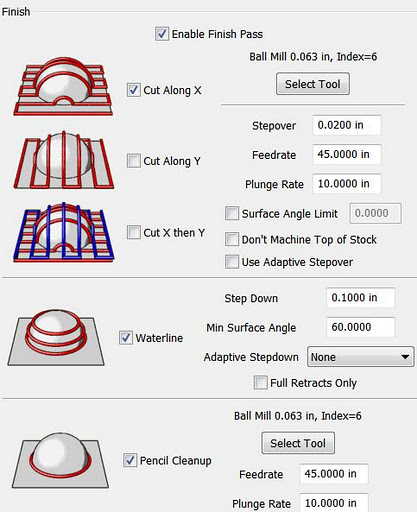
The thing that makes MeshCAM stand out for me at this point is its finishing abilities:
MeshCAM's many flexible finishing options.
It has built-in multi-pass finishing. I've managed to get the same results from Cut3D through a work-around. There, I create a finishing toolpath for one tool, save those toolpaths, then go back and define a different finishing pass, then save those toolpaths, and run them on the CNC one after the other.

MeshCAM doesn't require this. It gives a great set of finishing options for multiple tool passes right out of the box. I'm presently working on a model specifically to take advantage of these capabilities. Since much of what I'm doing is intended to have a high level of detail, I'm looking forward to seeing what comes off the CNC when I use MeshCAM to build the toolpaths.

MeshCAM displays the toolpaths it generates in the 3D view once they've been calculated, which gives a good first-look check to make sure that things came out right. There's no preview of the cutting operation built in to MeshCAM, however, as in Cut3D. Instead, a separate program, CutViewer is offered. Or you can do a "dry run" in most CNC control programs like EMC2 or Mach3 to see what the cutting will look like, at least as far as tool head movement is concerned.

The previews of the cutting operations have been one of my favorite features of Cut3D, so it's a feature I miss in a CAM program. I've gotten a higher degree of confidence from using this to see how the cutting operation will proceed ahead of time--the order of cuts is not always what you'd expect. The ability to check this during the CAM operation is very nice.

So I'd recommend planning to add CutViewer to your purchase if you buy MeshCAM, or make sure you're comfortable with your CNC control program's preview abilities. I'm using the preview abilities of EMC2's Axis view, myself.

Once I've finished the models I'll be trying out with MeshCAM, I'll be reporting on the final results. I'm planning both a flat relief object and a full 3D, 2-sided object.

Stay tuned...

Tuesday, May 24, 2011

My GCode Gets a Bit Tricker: Working with the microCarve A4 CNC

We collect souvenir spoons when we travel. Unfortunately, we overflowed the little wooden rack that holds our spoons several years ago:

A pretty wooden rack for holding little silver spoons from around the world.

We have almost twice as many little spoons as will fit on the rack. So I decided that a good CNC project would be making some additional racks that will hold the additional spoons, plus any extras we acquire in the near future.


Building the Toolchain

I've been using this project as a sort of pilot for putting together an automated toolchain for my CNC. You know, draw the object in CAD, convert it to gcode, and cut on the CNC. In the past I've just used image maps as depth maps and hand-written gcode to produce things. This project seemed to have about the right level of complexity for an initial project with a new set of tools.

At first, I had already designed the rack for the spoons themselves by hand on paper, and written gcode to match. But I laid this aside and tried out several CAD tools. The CAD tool that I ended up with a decent file from in the least time was Google Sketchup, running on my Mac. Unfortunately, Sketchup doesn't write in the CAM-friendly file formats. So I pulled MeshLab, which converted a Sketchup Collabra file to STL for CAM.

close-up of the spoon rack
Close-Up of the Item that Inspired my Project


The next step was CAM. After spending over a week trying out different free CAD packages (see below for why I'm starting with no-cost software), I was getting antsy to start cutting something. After three goes with different CAM packages on three OSes, and still no results worth cutting, I just decided to pull out the gcode and give it a once-over.

GCode FTW

I did a quick third pass over my gcode program on paper, then typed it in on my EMC2 system with gedit. The EMC2 preview was, as always, very helpful. It let me catch a bogus Z-value. Once that was fixed, I plunked down a piece of MDF for the trial run and let 'er rip.

The first go at cutting my own little spoon rack.
My first go at the spoon rack's shelf, the back is another piece. But I've got an idea for improving on this...

The piece cut out very nicely. I ran it in three passes, the support for the piece was pretty minimal, so you can see where each pass cut across. A bit of sandpaper would fix this well enough.

However, I think I'd rather do the little shelf out of 1/4" stock. I used 1/2" because my prototype uses that thickness. But it's not like there's a lot of stress on the part from the spoons. So I'm going to re-build my code for a 1/4" thick piece before making the "production" units (probably three of them.) Then I may try to use the automated toolchain again for the backs of the spoon racks (all I have in gcode at this point is the little shelf.)

Why Free?
I don't have any aversion to spending money for quality software. In fact, much the opposite. However, I've already spent the money I had budgeted for the CNC. Plus I've tread on my money set aside for travel this summer because of some unexpected household expenses.

For the time being, I'm being a bit hairshirt when it comes to software.

I'm very happy with EMC2 for my CNC software at this point.

Sketchup is pretty well doing OK for me for CAD right now, though there are things I will want to do later that I'm not sure it does easily or well. When money permits, what I'd really like to do is pick up ZBrush. Hopefully within a year or so. Sooner if possible.

For CAM, I'm thinking that I'll want to pick up something like Cut3D from Vectric. It seems to have the functions I want. Cut2D is a possibility, too. I'll be doing the free trial on each in the not-too-distant future.

In the meanwhile, if you know of some free CAM software that doesn't just treat an STL object as something to be rastered over, drop me a note. I'm completely OS-agnostic. Most recently I was doing CAD in MacOS, running CAM (FreeMill, a good package but didn't do what I needed) on Windows, and I'm driving the CNC with EMC2 on Linux.

Wednesday, May 4, 2011

Learning GCode with EMC2

I'm spending a lot of time with my new microCarve A4 CNC router this week. My first couple of items were made using a handy image to gcode converter that's built into the EMC2 control software I'm using.

But the image converter simply treats the image as a depth map which is cut by raster-scanning with the cutting head. For the designs I used, this was slow, and produced rougher results than would be produced using vector cuts.

So I looked at a couple of approaches to improve things. One is using CAD software that works well with a CAM package to covert the CAD design into machine control instructions to cut out the CAD shapes. The other is to go straight to writing my own machine control programs by hand. I know that I'll want to have both methods in my toolkit, but which to use first?

After a bit of back and forth yesterday morning, I decided to start with programming by hand first. So I dove into the EMC2 documentation for gcode, the programming language more properly called RS-274-NGC. What a catchy name, eh? You can bet that the folks who picked programming language names like "python" and "Java" are kicking themselves after seeing how "RS-274-NGC" rolls off the tongue.

Results of my first gcode program on my microCarve A4 CNC.
Results of My First GCode Program.

Well, the EMC2 site has a link for a gcode tutorial, but what's there is...not much. Maybe I'll pitch in, since that's what wikis are for, right? The I went an read the EMC2 documentation, which has the standard cart-before-horse format of discussing details before generalities. Then I found the excellent LumenLabs GCode Tutorial. Much better!

I read some bits, scanned others, then hit the keyboard on my CNC control system. It's an old Athlon 800 with 768MB of RAM loaded up with the EMC2 LiveCD install for Ubuntu Hardy Heron, with EMC2 upgraded to the current version after install.

I fired up EMC2 with the SIM-Axis configuration for developing the gcode. I've got three different configurations of EMC2 on my desktop. I've got the SIM-Axis setup, and two different configurations for my microCarve A4, each with different origins for the axes.

I used gedit to create an initial gcode file, then opened it in EMC2. The gcode preview window is great. Whenever I edited the gcode file and saved, I'd click the reload button in EMC2 and immediately see the changes. Likewise, the error messages were good enough to let me find my problems, though the problems were usually typos rather than what was reported.

I used iterative development, of course. No sense writing too much code before finding out that I didn't understand some element of syntax. I started with initializing the mode settings, lifting the head to a safe traversal height, traversing to a point in space, then returning to machine zero. After fixing a couple of problems, I got what I wanted. Then I added a few additional move commands, and got the simulated CNC to follow them. At that point I could see that things would get out of hand pretty quick if I didn't learn some basic flow control.

So I read up on subroutines in gcode. I laid out a simple key pattern on graph paper, and wrote the necessary routines. That's the border you see in the picture above. That was the easy part. It's all straight lines.

Next was curves. I read up on G2 and G3. I hadn't thought about the ability to shift the depth of cut across the curve when I started reading, but by the time I was done I was thinking, "Hmmm, if I vary the depth of the cut with a V groove bit, I can vary the width of the cut just as I would vary the width of a line with a calligraphy pen."

So I broke out a fresh sheet of graph paper, and started drawing some letters. Well, it took me about three times as long to lay out the letters as it took me to lay out the key pattern, but I managed that. Not only that, but I set things up with scaling factors and variable settings that allow me to easily scale and move the letters.

Results
The results you see above are what I got from the first "live" run of my first gcode program. The cuts are a bit deeper than I'd like, and the 90 degree bit I'm using right now doesn't help. Also, the cutting was a bit fast for the plywood, causing the wood to be frayed on the cross-grain cuts. Still, the varying of "line weight" on the letters turned out well. Overall I'm happy with it, and the defects should be easy to fix when I run it again. I'm planning on building a complete alphabet for this font and throwing it into a file for later use.

Monday, May 2, 2011

microCarve A4 CNC First Cut Complete!

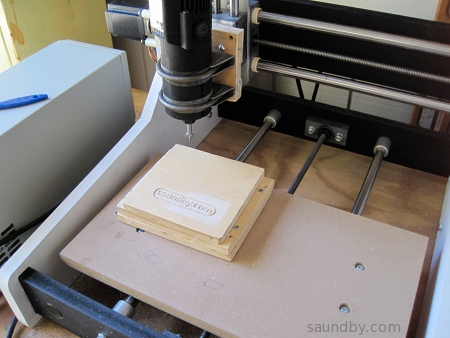
I got a router mounted on my microCarve A4 CNC machine this weekend. The router I'm using is an inexpensive 1/4" router from Harbor Freight. It's mounted on a base plate I made out of 3/4" plywood with a pair of muffler clamps holding the body of the router:

Harbor Freight drillmaster trim router on microCarve A4 CNC


I've got two bands wrapped around the body of the router cut out of a bicycle inner tube. They help mate up the muffler clamps to the router body. I was expecting to drill and tap a hole into the router for a screw through the base plate, but with the rubber straps everything is very firm and tight.

Today I spent some time "cutting air" to make sure the tool would run properly before I put a bit in. I had to invert the Z and Y axes in the setup I was using as it turned out. Then I tested twice more, once again with no bit or wood, then again with a bit and wood in the machine, but the Z axis set high enough the bit of the router wouldn't quite reach the wood.

Everything looked good, so I made my first cut:

saundby.com logo cut using micrCarve A4 CNC router.

Closer look at first cut made with microCarve A4 CNC.

Close-up of saundby.com logo cut into wood using microCarve A4 CNC router.


The material is some plywood I recovered from an old failed project. As you can see, it wasn't mounted completely flat. The top piece is held by some screws that hold it from underneath.

The G-Code was a raster pattern generated by an image-to-gcode converter that comes with the EMC2 software I'm using. That's why the bottoms of the letters look kinda scrappy, if they'd been cut continuously rather than raster-cut, they'd probably look a lot better.

The bit I used is a 1/2" 90 degree bit, I don't have any really nice bits yet. Now that I've got the machine actually cutting things out, I can work on refinements.

The depth of cut is 1/8".

Now I'm looking forward to getting some better bits, getting my CAM software in order, and so on.

Edit:

Had one more go with what I've got on hand this afternoon. It's a little more ambitious. Here you go:

CNC router cut of saundby.com surrounded by a key pattern.

Monday, March 28, 2011

CNC Machine: Microcarve A4

I've been looking at setting up my own CNC machine for about ten years now. I've worked with CNC and CMM machines off and on since the early 80s. I remember hooking up a CP/M computer to a CMM machine, wowing the lab with its ability to automatically record measurements then produce a compliance report on each part as it was inspected. The next day we went back to doing it manually. Everyone was impressed, but they weren't prepared to add computer infrastructure to the lab at that point.

In my case, I wasn't looking to add supporting a CNC machine to my workload before now. Whenever I read the online forums for adding computer control to milling machines, or building up simple hobbyist CNCs, it looked like working on the CNC itself became the prime object of the effort, rather than using the low-cost CNC for production.

There are a lot of bits and pieces to a CNC. There's also a lot of work represented by the physical machine's construction. I'm aware of this from the professional CNCs I've seen at work. They're high precision equipment, with a team of skilled people supporting their operation. Like a machinist, a machinist's assistant, an electronics tech, a programmer at least part time, and a metrology tech or two checking up on it periodically.

As a hobbyist, I have to do bits of all their jobs, plus the jobs of the design engineers, manufacturing engineers, materials engineers, and their technicians to produce things with a home CNC. Needless to say, I won't be trying to do quite the same thing.

I've started by purchasing an existing CNC machine bed rather than trying to design and build my own. I'm also purchasing a commercial motor controller system. My engineer ego is not in the least bit challenged. My engineer superego knows well the tremendous value of the design work that's gone into the pieces. Cookbook integration is good enough for me here. It's the stuff I make with it that I'll set my ego loose on.

The machine I've purchased is a Microcarve A4. The designer did the commercial Fireball V90 previously. The Microcarve A4 is a smaller unit built for high precision. Which suits me perfectly--a specialized machine is just what I'm looking for.

The controller I've purchased is the Gecko 540. It looks like a well integrated unit with a lot of design fine-tuning in it.

Both should arrive soon, the controller (driver in CNC terms) may come tomorrow if the USPS package tracker is telling me what I think it is. I've got a computer running EMC2 that I've been learning how to use to some degree, that I'll hook up the Gecko and motors to once they're here to shake out that element.

I've got some decent software for 2.5 dimensional conversion of images and such (including the image to gcode software included with EMC2), I'm still trying out CAD packages for real 3D work and CAM programs for converting those designs to tool control instructions on the CNC machine. I want to get that all shaken out to make for as little obstruction between idea and finished part as possible.

It'll be an exciting next couple of weeks. I'm looking forward to getting things assembled, functional, calibrated, and churning out parts. With breaks for infrastructure work (like dust/chip collection and an enclosure) between production runs..

Friday, December 18, 2009

Nokia Ovi: Epic Fail

I decided to download some new apps to my sorta-new Nokia E63 today. My normal approach for putting apps on my phones is to go out looking for open source apps on the web using one of my regular computers, then transfer it onto the phone via memory card or Bluetooth. Today, I made the mistake of deciding to try out Nokia's Ovi software service instead.

First I went out via Wifi on the phone itself. Initially, I had the "Download!" item on the phone as it came from the factory. Upon contacting Nokia I got a message telling me I needed to upgrade to the new Ovi software.

OK. I upgraded. Then I tried connecting to Ovi. I got a message telling me Ovi wasn't available. Wonderful. At that point I had no idea whether that meant I'd just happened to hit some time when site maintenance was going on, or if my new software was no good.

Later I was able to connect (two days later. I should have mentioned I didn't just start this process today...)

You can go along, looking at possible downloads at Ovi, but you can't download without an account. The advice I got was to create an account on my PC, then sync with the phone so that it could use that account to connect to Ovi. *sigh*

I went to the only PC I have that runs a current version of Windows as required by Nokia's sync software. I logged into Ovi and created my account. I downloaded the software (after fighting my way through Nokia's awful website--I'm sure the Flash crud works fine on Nokia's LAN, but on my broadband it takes forever and you can't even tell what it's doing then once it's downloaded you get an error more than half the time. And don't even try to connect to Nokia's website from one of their phones!)

I got the software downloaded while I left the house for errands, came back, installed it, and discovered that I had no data cable and that none of my present USB cables was the right one for this phone. My cheap, half-the-price Chinese phones came with data cables, Nokia! What's the matter, can't turn a profit without trying to milk your customers for an overpriced data cable? Not only that, my Windows system is the only one in the house without Bluetooth. I didn't feel like burning more time on a wasted effort by trying to find a driver for the dongle I've got, so after the website, download, and install I just gave up. I'll recover the hard disk space another day.

I went back to Ovi on the phone, and found that I could just log in directly. Then I selected that I wanted to see only free apps. Then I changed catagories. And it started showing me for-pay apps. When you change categories you then have to go back and choose to see just free apps again. And even if you do, if they've got a "featured" app that's for pay, it stays there at the top of your list.

Four pages of apps in, the stuff I was finding for free was garbage. Adware and crippleware, mostly. About what I expected, I'm afraid, and why I usually just go looking for free open source software right off the bat. I was hoping to find a few decent simple time-killer games, though. They may be there, but I can't find them among the cruft.

What a waste of time and effort.

Do yourself a favor, if you do end up with one of Nokia's phones, learn to install apps without going through Ovi if you don't already know how. It'll be time far better spent than doing what I did, and you'll still know how to do it when you get a different phone. Like a cool, inexpensive little Sciphone, maybe.

My Articles on cell phones:

Thursday, June 18, 2009

A Semester with Greenfoot

This last semester I used the Greenfoot framework as an integral part of my high school computer class. It was an experiment to see what it could do for the students compared to the way that I've taught my class in the past. Based on the results that the students achieved, I'd have to say that Greenfoot was a very good addition to our class, with only a few reservations.

In my high school computer class, I spend the fall semester on basic computer skills, background knowledge, horizontal applications, and basic networking and communications knowledge. The highlights of the semester are class-produced websites (last year's are visible here), and a document including text, graphics, and tables which is a proposal for a video game concept. For the websites, I have each student produce a basic set of linked web pages individually while we learn rudimentary HTML and CSS, then the students are grouped into teams for the main website project. The game proposals are produced individually, and I have each student give a presentation to the class of their proposal.


The Problem: Getting Graphics

The second semester of the class moves on to computer programming. For this we use the Java programming language. It's not perfect for our needs in class, but it works well enough, as I've discussed before. One problem I've had with using Java as a teaching language is that while it has graphical abilities, they are so generalized that the learning curve for using them is difficult to manage in the limited class time we have. I want to provide at least a basic sense of what's happening in the computer when programming--all that stuff about data types, data structures, algorithms and so on--but still have sound and graphics available for the students since they provide a lot of motivation, as well as giving a source of feedback to students on what their program is doing that is more visceral than text. Likewise, different students respond to different stimuli. Some can perceive patterns in text, but more often they're more prepared for perceiving them in images or sounds. So this sort of program output can be critical in whether a student "gets" what a program is doing when it runs. I've discussed this in more detail before.

With the simple, constrained systems of the past, e.g. Apple II, Commodore 64, Atari 800, etc., accessing basic sound and graphics was easy compared to present day systems. There are still BASICs available today that provide the same sort of access, but they're also more divorced from mainstream programming than was the case 20 years ago. Java, while a relatively simple language in many respects, takes a very generalized approach toward graphics and requires a substantial amount of program infrastructure for graphics which is a distraction and source of confusion to new programmers.

Greenfoot: The Answer?

Enter Greenfoot, a framework for Java with design goals directly in line with my needs, it would seem. I admit to having some concerns and misgivings as I was preparing to use Greenfoot in class. Prior to the start of the year, I had two students try out Greenfoot over the summer. At the end of the first semester, the class members gave their video game proposal presentations and the class selected four games for development.

Now the semester is over and I've got time to reflect on the results of the year.

The games have been completed and posted to the Greenfoot Gallery. You can see what the students themselves had to say in their development blogs, linked below.


Army of One: Stoner Wombats

One of my students was having trouble meshing with a working group. After trying a few different arrangements, I ended up putting him on his own to work on an individual project. Since he was working alone, and had less time on his project than the other students, his project is far less developed than the others. Still, once on his own he was able to apply himself and showed the initiative to solve some programming problems he ran into in attempting to implement his ideas in his game. Here's his game:

Stoner Wombats


Never Say Die: Offroad Xtravagaanza Becomes The Art of Clay Pigeons

One of the groups started with an ambitious idea for a motorcycle simulation. They wanted something like the popular side-scrollers that simulate a motorcycle's balance and suspension while traveling over an obstacle course. I allowed the group to go ahead with the idea, and we worked hard on trying to divide the problems in implementing the simulation down to a scope that they could implement. However, the problems with learning the details of programming and debugging coupled with the difficulty they had in developing mathematical models for the simulation stymied them. They made significant progress along some paths, only to be stopped on others.

They then changed their objectives, changing the game to a top-view track racing game. Again they made substantial progress, only to run into problems with movement control and collision detection in their code that they weren't able to beat within a reasonable time.

So they stepped back once more, started with a working codebase (the ballon-popping demo scenario), and began modifying it and adding features. Even though they were weeks behind the other teams at this point, and shorthanded, they made good progress and turned out a good game.

The Art of Clay Pigeons

Art of Clay Pigeons Development Blog

Overall, I'd say this group had the most "educational" experience. As I mentioned, they did solve a lot of problems toward each of their prior goals. Though the process was very frustrating for them, they managed to maintain a good attitude and positively move forward from each failure.

Modularity is Our Friend: Day 3


Another group started out with a very basic idea for a shooter that needed a lot of fleshing out. They also ran into development problems, with collision detection and with hitting a mental limit on data structures. They managed to maintain a central base of working code, however, so their game didn't change as much through the course of development as the Art of Clay Pigeons/Offroad Xtravagaanza team. They began development of several different sets of possible features in parallel, then used the advantages of OO programming to add each to the central codebase, experiment with it, test interactions with other features, and then decide where to go.

They followed a very iterative process and learned to be fairly conservative about connecting ideas with their ability to implement them. They managed to apply some basic data structures to their game, notably Lists. They had other ideas for which I suggested more sophisticated data structures, but they decided they'd rather "limit their risks". Some of the students who worked on this game, "Day 3", have stayed in contact, and I know at least one update has been worked on since school ended, so this game may continue to develop. I know one thing they'd like to do is put one of the lines of work they had near completion that didn't quite make it in by the end of class into the game. So Day 3 may continue to develop:

Day 3

Day 3 Development Blog

Success by Design: Farm Frenzy

The remaining project ended up looking almost exactly like its original design. It was consciously designed as a modification of a classic video game (Pac-Man), and it avoided some of the problems the other teams ran into by sticking with large cells in the playfield. The team did a great job with this, with one of the team working out many of the little details outside of class, then coming in with sheets of layout information on graph paper and pseudocode ready for implementation.

Farm Frenzy, a.k.a. The Purple Piggy Game

Farm Frenzy Development Blog

Results: Positive

I have to say that I'm really pleased with how things turned out. All class members were able to contribute constructively to their team projects, and all teams were able to complete a game that actually runs and get it posted on the Greenfoot Gallery. I had my doubts, especially when one team was halfway through the last class without having yet even gone through the process of exporting their game from Greenfoot, much less posting it online. They rallied, however, and managed to get in under the wire.

Greenfoot worked well for giving students visual feedback on their program work, and it made the class fun and interesting for them. Overall I'd say motivation levels were higher than in my prior classes, in that a higher proportion of students were engaged with developing new ideas and seeking to implement them in code.

Greenfoot didn't prevent me from teaching more sophisticated programming concepts in class, but it did somewhat limit the scope with which I could approach them. Students were willing to follow discussions of the use of data structure objects, but they also wanted to "get back to work", so we weren't able to dig in as deeply in these area as I have with prior classes. We did manage to cover the basics, however, and I didn't see any reluctance to open up the Java API reference, or the API reference for Greenfoot, either. Overall, I'd say that the class moved into using data Objects faster than before, but didn't go as deep or into as broad a range of data structures as in previous classes. They did show that they understood what they were doing when they used Objects and Interfaces like List, though. They were able to deal with types, iterators, and selection of elements. So I'm satisfied that the important lessons were learned.


Problems Encountered

Our problems with implementing ideas in Greenfoot were a mix of things. In part, it was through our collective inexperience with Greenfoot that we didn't always conceive of things in a way congruent with how Greenfoot handles them. In other cases, we ran into problems when trying to implement things in ways that I've used in the past, particularly collision detection, that for whatever reason didn't appear to work in Greenfoot. Greenfoot is well suited for cell-based game models, it is more difficult to implement what might be called "small cell" models with pixel-level movement and control, or something close to it. Small cell models without "terrain" effects, such as space simulations don't seem to be as much of a problem. Other than that, for new programmers it seems best to stick with large cell games, where each player or game object occupies one cell on the playfield, and all interactions are based on occupation of the same cell or adjacent cells.

I had to write a fair bit of code myself outside of class to assist students with solving problems or developing implementations. I'll be writing more code before we start again next year, so that I've got a better handle on what it takes to solve some of the problems that we ran into last year. Especially dealing with collision detection. With this I'll be better able to guide the students in understanding how much work it'll take to implement their ideas, and help them make better decisions on how they design their games.

I expect to write more on my experiences using Greenfoot in class as time goes on, and provide some of the example scenarios I've developed. For now however, I have to say that I've quite happy with how Greenfoot worked in my class and I'm looking forward to using it again next year.

You Can't Argue with the Price (or License)

On top of that, thanks to the fact that Greenfoot is free, it allows me to have students create video games without using one of the commercial instructional development systems that have license fees that come out of our school's limited budget. And in this case the lower cost does not result in a reduction in the value of the product, much the opposite. The commercial systems that have been used by other instructors at our school in the past have no connection to real world programming languages, and the games require the system's runtime package to operate. My student's Greenfoot games, on the other hand, are written with their logic in Java, and are easily packaged for independent distribution as Java executables as well as web distribution.

Thumbs Up

Final word: Greenfoot's good stuff. If you're teaching introductory level computer programming, it's worth giving a try.

Saturday, February 14, 2009

WOPR was Right--The Only Way to Win is Not to Play the (Copy-Protection) Game

The only way to win is not to play the game.

I was looking at picking up a copy of Spore. I've enjoyed a fair few simulations in the past. I still play a fair few old ones on my older computers. I set up a new old G3 Macintosh over the holidays so that I could keep playing Civilization and several other games. The Aluminum iMac that I got as a replacement for the iMac G5 that Apple failed to repair properly doesn't do Classic, so I lost immediate access to a bunch of old games with the "upgrade."

Aside from that, I'd seen Spore in various stores, and read a couple of blogs about folks stretching the capabilities of the game. Today I took a look at some reviews and such, and found out what the box and the initial articles I read didn't tell me about. The copy protection.

Those of you who already know the story are probably telling your computer screen that I should know that the copy protection has been scaled back from the original draconian copy protection system. Yeah, I saw those articles. They were all from last September. And I've seen plenty of unhappy buyers listing copy protection problems in the months since then. I've also read the terms of the "looser" anti-copying scheme. I'm not buying it. I'm still enjoying playing games I bought many years ago. I'd like to buy new games and get years of enjoyment from them, no matter how old and tired someone else thinks they are.

I decided to forego Half-Life 2 because of Steam. I loved Half-Life and its spin-offs. But I wasn't going to deal with paying full price for what is in essence software rental. I've not bought many games since. I used to buy about ten games a year, and get three or four more as gifts. Back when the companies felt the CD format was protection enough. Then the companies decided they needed to protect themselves from CD writers with tricky internet-based copy protection. And I left the marketplace.

Enter Spore. I was tempted. It looks like fun. Will I be able to play it on my vintage Aluminum iMac ten years from now? (I'm assuming my aluminum iMac lives longer than all the other bum Macs I've gone through since I got my wife's old PowerMac G4 tower. But that's material for a future blog entry.) The answer appears to be no, at least not without loading up on crackware now while it's available (and risking a plenitude of security problems while getting it.)

So, as WOPR said, I'm not going to play the game.

What's my alternative?

Well, there aren't many A-titles out in the free world, but there's plenty of B and C level stuff to stay occupied. And the free titles keep getting better. Free as in freedom, not just price. Though it's a lot easier to risk my time on something that didn't cost me cash out of pocket.

I've turned up some possibilities with the following Google search string:
freeware site:http://www.apple.com/downloads/macosx/

I'm also poking around here on Java Game Tome.

There's also Free Mac OS X Games.

Gog.com and Stardock are worth a look. I'd recommend g4g if it weren't for the fact that all the garbage on the site crashes my browser whenever I try to look. I don't know what all they've got there and whether it's legit stuff they've got in the ad spaces or bot-herder crap, so I recommend staying away.

And if you want a slightly dated A-title first person shooter, I recommend Nexuiz. I'm not sure of the correct pronunciation, but I say "necks-wiz." It plays a lot like the old Unreal Tournament. I like it a lot more than Sauerbraten and World of Padman, though those are worth checking out, too, if you're looking for an FPS.

The free/open software copies of popular commercial games haven't been so hot, in my opinion. There are open clones of Civilization and WarCraft II out there. They don't fill the bill well enough to keep me from restoring an old beige G3 Mac to service and installing the originals.

Maybe somebody will do an open copy of Spore that I'll be able to play someday. Or maybe they'll make a half-a-loaf version that starts a package dependency spiral on install, like some other things I've tried. Really, the open games I've liked the best have been those that aren't so much trying to copy a game as give a fresh take on it.

Many years ago, when the world was younger than it is today, I picked up a couple of really great games. The first was F-15 Strike Eagle. Its copy protection beat my disk drive heads out of alignment. It cost me half again as much as the game to get the repair. Just Microprose's way of thanking me for my business.

Another was Psi-5 Trading Company. My wife loved that game. She doesn't like a lot of computer games, so when she likes one, I try to make sure she gets to enjoy it. We got about three plays out of the first copy before it refused to play any more because its sensors detected that my store-bought disk had transformed into an evil pirated copy. A call to the publishers reassured me that they'd be happy to swap out my disk, for a price. Not including shipping and handling charges. All together about the price of the game. And in only two or three weeks, so long as holidays, employee vacations, and snow days didn't interfere. Or whatever. For the game my wife wanted to play tonight.

So I went out and bought copy number 2 at our local retail outlet. (Yes, I guess they "saw me coming.") It ran about twice before cosmic rays from the planet Skyron in the galaxy Andromeda turned my store-bought disk into a "pirate copy." If it weren't for a cracked copy a friend gave me, we would never have played the game again.

I'd like to say I learned my lesson at that point, but no, hope (and foolishness) springs eternal.

Or nearly so.

I quit.

I'm not going to play the copy protection game.

So there you are. Make it free of copy protection, then I'll play the game.