Microsoft has recently announced that they are moving .Net to open source and supporting Mac and Linux in addition to their Windows OS with Visual Studio Community 2013. Also, Visual Studio 2015 will support iOS and Android development.
Frankly, it's a little confusing because in some places MS mentions Mac and Linux, but very few, and they mention iOS and Android in lots of places, but not everywhere. So the support may be different than what I said.
Nevertheless, MS is opening up. Or at least seeming to.
Their timing couldn't be better, in my opinion.
Oracle is working hard to poison Java. I'm not entirely sure why, unless they think that ticking off any Java programmers and users outside those developing middleware for Oracle's products is a really great strategy. Their support for Java as a general programming language, as Sun did, has been piss-poor since day 1. Every so often they make a grand gesture to try to present themselves as interested, but the product they offer now is not something I could send someone out to install with a good conscience. What kind of an honest, large-scale company thinks that half-sneaking some crap software in under the cover of installing their own is a really great idea? Not one that really treasures the individual customers, I can tell you (and yes, Adobe is on this particular excrement list, too.)
Couple that with their poor responsiveness to security concerns, to the point where the Java language is treated as a sort of worm or virus by most software, and you've got a company that's decided to leave a hole in the cross-platform development market simply because their interests are elsewhere.
Cross Platform Alternatives
C# is Microsoft's outgrowth from their own attempt at embrace, extend, exterminate targeting Java. It's a very good language, including the good parts of Java while having a set of libraries (.Net) that don't have the Java API's less than useless historical cruft but do have everything good about the API, which made Microsoft look really cool to programmers when it came out as most were not familiar with the Java API itself.
Switching to C# from Java is an afternoon's exercise. But it and the .Net library started out wed to the Microsoft platform.
Enter Mono, a cross-platform implementation of .Net supporting the C# language based on Microsoft's ECMA standard for its products. It has been growing, at least in part on the back of the decline of Java, as well as bringing the good things about C# and .Net to Mac and Linux development. It doesn't hurt that it is the core that drives products like the Unity cross-platform game-development system, too.
Now Microsoft is combining their products with Mono, and extending their reach to Android and iOS.
There are a Couple of Ways This Could Go (and Possibly More)
In Future A, Microsoft does the excellent work they do in producing development tools, but now with a return to platform-agnosticism. This encourages programmers to develop for Windows and Windows Phone as well, since programmers who might otherwise have been targetting only iOS or Android will be selecting these tools for their intrinsic value as development tools to write programs for their favored OS, then decide to toss a Windows/WinPho version out there, too, since it's not costing them any significant extra effort and might end up fattening the coffers a bit.
Microsoft gains developers for its platforms, draws "thought leader" and technical leaders into their ecosystem, and the developers get the advantage of having good development tools for any major platform they choose.
In Future B, Microsoft uses this as a ploy to draw programmers in, but cross-platform support is sloppy, or delivered slowly, or lags behind the native capabilities of the non-MS platforms. Perhaps it doesn't play well with the various different versions of Android, or maybe the Mac and Linux native code suffers by comparison with code developed with native tools for those platforms.
It turns out to just be hype. Maybe there are forces within MS that fight the release of solid tools that are truly cross-platform, so they ensure that foreign platform support is sub-par, thinking that they're helping their own products by making it "harder" to develop for other platforms. The only point of cross-platform, to them, is to allow Windows patriots to proclaim themselves cross-platform developers without knowing anything about the competition.
In this future, Windows does not become the programmer's platform of choice, Windows has extra costs of development that make it less attractive as a development target when another platform is the one that's going to pay the bills (probably iOS), and life goes on as it does today with possibly the Microsoft touch putting some poison into Mono.
I can only hope that the upper management at MS is committed to Future A. because that's what it's going to take to keep Future B from stepping in any time it pleases.
Microsoft, Doing You Know What in Their Own Messkit for the Past Decade
Windows 7 was a boon for programmers when it came out. I and many other programmers I know had been feeling somewhat kicked about by Apple, didn't see tools with the same level of sophistication on Linux (and generally more system maintenance than the commercial OSes, and system maintenance doesn't pay bills), and Windows 7 was a viable place to go, or to at least have as a second OS on our desk for conducting development and testing.
Windows 8 added some nice stuff behind the scenes, but not without wrecking the usability of the platform, as well as making it a far less attractive target for development. In my case, I abandoned Windows as a target for native development about a decade ago, and was waiting on Windows 8 to see if I might add it to my repertoire again. The answer became "no". Windows 10 will determine whether I ever consider it a serious platform for anything at all in the future, as the professional applications that I currently use on Windows have all become multi-platform over the past several years, so I can move my licenses over to Mac OS or Linux for all of them.
If Microsoft gets it right with their development tools, and Windows 10 restores the power to the desktop that earlier versions provided--not just a false appearance of it as in Windows 8.1--then they stand to become the defacto professional desktop again.
Whither Mobile?
And given that the consumer desktop is the market that is dying in the face of mobile platforms, one would hope that they are bright enough to strategically commit to a powerful professional computer OS again. While the mass market computer is probably going away, there was a profitable professional/hobbyist market before the internet boom put a computer in practically every household. That professional market stands to be even larger than the historical one, as many professions that had nothing to do with computers now rely on them, and many new professions have arisen over the past 25 years that rely on the computer.
Also, there's a possibility that the mobile device as a computer replacement is just a flash in the pan. Most people bought their mobile devices in place of a routine upgrade to their home computer for one cycle. Now that they have tablets, the tablet market is going flat while computers are seeing a modest rise in sales. I think just about everyone has had a chance to discover that the touch interface is very limited in what it can do with current technology. It's severely error-prone and it's not well suited to complex activities. It's too soon to read now, but there's a chance the tablet may be relegated to specialty use status, with the keyboard-equipped computer regaining its status as the "real" computer behind the smartphone's limited purposes as a personal communication and light entertainment device. We'll see.
The phone isn't going to go away, though. It's going to be the most personal of personal computers, at least until it's replaced by a small tablet and a complete phone the size of an earpiece, or some other revolutionary turn that gets people to give up a screen for convenience. So supporting the mobile platforms is, for Microsoft, probably a must to their survival. At least until they can get real market share for Winpho.
Either way, if Microsoft plays their cards right, going to platform-agnosticism in their development tools could be a really good thing for everybody--including and especially Microsoft.
Showing posts with label OS. Show all posts
Showing posts with label OS. Show all posts
Monday, November 17, 2014

Monday, January 16, 2012
8085 Resurgent: Back to the MAG-85
I took a look at my own website the other day and realized it's been far too long since I have updated certain items there. Most noticeable to me was my MAG-85 project, an 8085-based micro trainer. There are a bunch of things I thought I'd posted over a year ago, but the information isn't there.
Obviously I never did it. Sorry about that.
The front page image for the 8085 project is was a really ugly thing I took at a very interim stage while I was doing regular updates on the project. If I wanted to scare someone off the project, I think that picture is what I'd use. What a rat's nest!

Shortly after that picture was taken I built a real front panel and enclosure. It's been happily living in that enclosure for well over a year, but I never posted the info on it. In fact, I've just started taking it apart in preparation for making some improvements. Since I like to take pictures of my work for documentation purposes (like getting the right connectors back in the right places), I took some photos of the partially-disassembled unit as it is before I make the updates. Here's one:

Here you can see that it's not so ugly as before. The LED to the left of the LCD display is controlled by the 8085's SOD output. The eight LEDs below the display are controlled by the 8085's OUT 01 command and held in their state by a register. The eight switches below that are on the 8085's IN 01 port.
The program that's running currently reads the position of the switches and outputs a byte to the LED bank to match what it sees on the input. It also reads the keyboard and sends the ASCII + 0x30 character to the screen that it reads from the keyboard (which is in IN 00). The LCD display is on the OUT 00 port.
The four push buttons above the keyboard are, from left (red) to right:
RESET
TRAP
RST7.5
RST5.5
In the crude OS/monitor I have running on the MAG-85 now, TRAP acts as an "Escape" key that returns control to the OS. This allows miscreant programs to be stopped and memory examined any time, since TRAP isn't maskable.
RST7.5 is used as the user vector to the start of the application program in memory. In essence, this is the "GO" or "Execute" button.
RST5.5 is also a user vector that should point to a subroutine that does something and returns. Either the application program should initialize it, or it has to be initialized by hand in the monitor.
The keyboard itself uses RST6.5 to read a key value into a buffer, where an OS routine can pick it up/translate it, etc. The keycap legends allow for several uses of the keys. The typical use of the yellow keys is hexadecimal number entry. But they can also be used as arrow keys and fire button (9) for games.
The top row has the IN or Enter key in red, the backspace (BK) in blue, the (M) mode and edit/view (e/v) keys in gray. The edit/view key toggles a flag in the OS that switches between a memory protecting mode (view) and editing mode in the various modes. The mode key modifies the mode variable in the system to switch between Memory, Register, and I/O port viewing or editing. It's possible to change from editing to viewing and back again while in any of the modes.
Current Rework
My current plans for reworking the MAG-85 have to do with replacing the buttons used for RESET, TRAP and the RSTs, plus improving the ergonomics of the unit a bit by replacing the top and bottom panels, which were hand-made on hardboard, with some nicer CNC'd panels that reposition some of the controls (I switched off the unit more than once when I meant to switch on or off the backlight for the LCD.)
The four pushbuttons above the keyboard are some really awful buttons. They ring like bells, causing all sorts of debounce problems. I have both hardware and software debouncing on them right now, and it *mostly* works. I think part of why I stopped posting before was that I wanted to kill this problem before I posted, so as to avoid causing anyone else the headaches I've had with these switches. And, as you can see, those switches are still in there.
A sideline on the current work is also preparing for a couple of improvements that have been planned since the beginning, but haven't happened yet. One is to put a nice little door in so that the NOVRAM/EEPROM/EPROM memory can be swapped out without opening the whole unit. Right now I unscrew the end pieces then pop out the face panel to get at the memory socket. Which is not clean, quick, or easy. I have to get the cables all to go back to their places each time I put it back together. A couple of times I've pulled out one of the input cables by accident, then wondered why the keyboard or switches aren't talking when I get it back together.
The other is preparing to mount a battery pack inside, so that I can go cordless with this thing. A lot of what I've been doing in design tweaks is reducing the power used by the system. Finding a good brightness for the backlight, putting a switch on the backlight so that I can turn it off when I'm in good light, reducing the brightness of the power LED and the I/O LEDs, that sort of thing. As well as looking at my nascent OS to see if there are things I can do there that will reduce power while staying out of the way of the user's programs.
I'm also planning on adding another memory socket for an EPROM. It won't have a ZIF socket in it like the one that's there now, but I'm getting to the point of wanting a more permanent memory for the OS, with the NOVRAM left for user space programs. This may involve some rejiggering of the memory map, since for mechanical reasons I'd like to have the removable memory in the center of the PCB side to side.
I'm also looking at adding an expansion port or two on the new end plates, which begs the question of whether to use a standard connector with a more or less standard wiring for the port (like a PC's bidirectional parallel port) or whether to roll my own for the sake of less constraint on how the lines are used. Basically just bringing the lines from the I/O buffer registers straight out of the box along with power and ground. This is my preference for a number of reasons, but there's an appeal to letting the MAG-85 drive standard I/O devices, too.
The addition of a serial port, either at TTL levels or a standard RS-232C port is another possibility I keep playing with. I've kept SID available for this possibility, though I was tempted to use it as either a user digital I/O or a memory bankswitch I/O or something of the sort. Being able to connect the MAG-85 straight to a terminal would be really nice, so I'm leaning toward an RS-232C port.
But if I do that, I'll need a separate set of I/O routines for that port that allow it to be the primary user I/O for the OS. So if I do that, it'll probably be deferred until some other things happen first.
Like finishing the OS well enough to post it.
Finishing the MAG-85 Operating System
I haven't posted the OS yet because it's still in a fairly yucky developmental state. That and my test hardware still has the crummy switches that do nasty things to me at times, and there's lots of code in the OS just to try to deal with them that can probably come out once I've got decent switches in.
So my present software objective is to clean up the OS and put a bow on it so that I can "ship" it to a download on my site. I may end up cutting some of the features, but there's also the possibility that I'll end up cleaning them up because I've already got too much other code running around that uses them. The core basics are the ability to view and edit the system's memory, and execute a program starting at some given address. I'll guarantee that much.
I think the ability to view and edit register values is pretty well sewn, too. It's possible to bork the OS by doing something stupid here, but I'm not trying to protect the user from being stupid. Press TRAP (probably to be labelled ESC) and the OS will restart and reset any values it needs to function (I hope!)
The ability to view inputs and edit outputs interactively shouldn't be a problem, either, but it's not an immediate priority. If it happens effortlessly, it'll be in the initial release. Otherwise, I won't hold up the release for it.
I've also got another mode that is enabled in some versions for viewing/setting user variables in the OS, such as the RST5.5 and RST7.5 vectors, selecting different display formats, setting the size of the LCD, and so on. I can pretty well guarantee that the full-up version of this will not be in the initial release, though a cut-rate version of it may be. That would mean that you would set these variables yourself when putting the code on your own MAG-85.
If I do go to a design that uses two memories, one rewritable in system and the other not, I'll have to put these variables in RAM, or expect that they be set once and for all in the firmware. I'd like to be able to provide an EPROM at some point for people who want to build a MAG-85 and get up and running without having to put the OS in themselves. But if I do, I either need to put some system information in the NOVRAM memory space (like the height/width of the LCD display) or require that only one size of LCD be used with a specific version of the OS. Since I'm looking forward to building another MAG-85 with a larger display (perhaps 32 characters wide by 4 lines high), I'd like to keep the OS flexible. The initial display routines will only use a portion of displays larger than 20x2, but the user programs can use the larger displays and the OS can be updated later to have multiple display formats that the user can select.
But right now, I just need to drive a stake through its heart and get a workable version out the door. :)
Tweet
Obviously I never did it. Sorry about that.
The front page image for the 8085 project
A Very Ugly Looking 8085 Computer
Shortly after that picture was taken I built a real front panel and enclosure. It's been happily living in that enclosure for well over a year, but I never posted the info on it. In fact, I've just started taking it apart in preparation for making some improvements. Since I like to take pictures of my work for documentation purposes (like getting the right connectors back in the right places), I took some photos of the partially-disassembled unit as it is before I make the updates. Here's one:
A bit ugly with the top and bottom panels off, connectors and wires trailing out, but not so bad at the first photo.
Here you can see that it's not so ugly as before. The LED to the left of the LCD display is controlled by the 8085's SOD output. The eight LEDs below the display are controlled by the 8085's OUT 01 command and held in their state by a register. The eight switches below that are on the 8085's IN 01 port.
The program that's running currently reads the position of the switches and outputs a byte to the LED bank to match what it sees on the input. It also reads the keyboard and sends the ASCII + 0x30 character to the screen that it reads from the keyboard (which is in IN 00). The LCD display is on the OUT 00 port.
The four push buttons above the keyboard are, from left (red) to right:
RESET
TRAP
RST7.5
RST5.5
In the crude OS/monitor I have running on the MAG-85 now, TRAP acts as an "Escape" key that returns control to the OS. This allows miscreant programs to be stopped and memory examined any time, since TRAP isn't maskable.
RST7.5 is used as the user vector to the start of the application program in memory. In essence, this is the "GO" or "Execute" button.
RST5.5 is also a user vector that should point to a subroutine that does something and returns. Either the application program should initialize it, or it has to be initialized by hand in the monitor.
The keyboard itself uses RST6.5 to read a key value into a buffer, where an OS routine can pick it up/translate it, etc. The keycap legends allow for several uses of the keys. The typical use of the yellow keys is hexadecimal number entry. But they can also be used as arrow keys and fire button (9) for games.
The top row has the IN or Enter key in red, the backspace (BK) in blue, the (M) mode and edit/view (e/v) keys in gray. The edit/view key toggles a flag in the OS that switches between a memory protecting mode (view) and editing mode in the various modes. The mode key modifies the mode variable in the system to switch between Memory, Register, and I/O port viewing or editing. It's possible to change from editing to viewing and back again while in any of the modes.
Current Rework
My current plans for reworking the MAG-85 have to do with replacing the buttons used for RESET, TRAP and the RSTs, plus improving the ergonomics of the unit a bit by replacing the top and bottom panels, which were hand-made on hardboard, with some nicer CNC'd panels that reposition some of the controls (I switched off the unit more than once when I meant to switch on or off the backlight for the LCD.)
The four pushbuttons above the keyboard are some really awful buttons. They ring like bells, causing all sorts of debounce problems. I have both hardware and software debouncing on them right now, and it *mostly* works. I think part of why I stopped posting before was that I wanted to kill this problem before I posted, so as to avoid causing anyone else the headaches I've had with these switches. And, as you can see, those switches are still in there.
A sideline on the current work is also preparing for a couple of improvements that have been planned since the beginning, but haven't happened yet. One is to put a nice little door in so that the NOVRAM/EEPROM/EPROM memory can be swapped out without opening the whole unit. Right now I unscrew the end pieces then pop out the face panel to get at the memory socket. Which is not clean, quick, or easy. I have to get the cables all to go back to their places each time I put it back together. A couple of times I've pulled out one of the input cables by accident, then wondered why the keyboard or switches aren't talking when I get it back together.
The other is preparing to mount a battery pack inside, so that I can go cordless with this thing. A lot of what I've been doing in design tweaks is reducing the power used by the system. Finding a good brightness for the backlight, putting a switch on the backlight so that I can turn it off when I'm in good light, reducing the brightness of the power LED and the I/O LEDs, that sort of thing. As well as looking at my nascent OS to see if there are things I can do there that will reduce power while staying out of the way of the user's programs.
I'm also planning on adding another memory socket for an EPROM. It won't have a ZIF socket in it like the one that's there now, but I'm getting to the point of wanting a more permanent memory for the OS, with the NOVRAM left for user space programs. This may involve some rejiggering of the memory map, since for mechanical reasons I'd like to have the removable memory in the center of the PCB side to side.
I'm also looking at adding an expansion port or two on the new end plates, which begs the question of whether to use a standard connector with a more or less standard wiring for the port (like a PC's bidirectional parallel port) or whether to roll my own for the sake of less constraint on how the lines are used. Basically just bringing the lines from the I/O buffer registers straight out of the box along with power and ground. This is my preference for a number of reasons, but there's an appeal to letting the MAG-85 drive standard I/O devices, too.
The addition of a serial port, either at TTL levels or a standard RS-232C port is another possibility I keep playing with. I've kept SID available for this possibility, though I was tempted to use it as either a user digital I/O or a memory bankswitch I/O or something of the sort. Being able to connect the MAG-85 straight to a terminal would be really nice, so I'm leaning toward an RS-232C port.
But if I do that, I'll need a separate set of I/O routines for that port that allow it to be the primary user I/O for the OS. So if I do that, it'll probably be deferred until some other things happen first.
Like finishing the OS well enough to post it.
Finishing the MAG-85 Operating System
I haven't posted the OS yet because it's still in a fairly yucky developmental state. That and my test hardware still has the crummy switches that do nasty things to me at times, and there's lots of code in the OS just to try to deal with them that can probably come out once I've got decent switches in.
So my present software objective is to clean up the OS and put a bow on it so that I can "ship" it to a download on my site. I may end up cutting some of the features, but there's also the possibility that I'll end up cleaning them up because I've already got too much other code running around that uses them. The core basics are the ability to view and edit the system's memory, and execute a program starting at some given address. I'll guarantee that much.
I think the ability to view and edit register values is pretty well sewn, too. It's possible to bork the OS by doing something stupid here, but I'm not trying to protect the user from being stupid. Press TRAP (probably to be labelled ESC) and the OS will restart and reset any values it needs to function (I hope!)
The ability to view inputs and edit outputs interactively shouldn't be a problem, either, but it's not an immediate priority. If it happens effortlessly, it'll be in the initial release. Otherwise, I won't hold up the release for it.
I've also got another mode that is enabled in some versions for viewing/setting user variables in the OS, such as the RST5.5 and RST7.5 vectors, selecting different display formats, setting the size of the LCD, and so on. I can pretty well guarantee that the full-up version of this will not be in the initial release, though a cut-rate version of it may be. That would mean that you would set these variables yourself when putting the code on your own MAG-85.
If I do go to a design that uses two memories, one rewritable in system and the other not, I'll have to put these variables in RAM, or expect that they be set once and for all in the firmware. I'd like to be able to provide an EPROM at some point for people who want to build a MAG-85 and get up and running without having to put the OS in themselves. But if I do, I either need to put some system information in the NOVRAM memory space (like the height/width of the LCD display) or require that only one size of LCD be used with a specific version of the OS. Since I'm looking forward to building another MAG-85 with a larger display (perhaps 32 characters wide by 4 lines high), I'd like to keep the OS flexible. The initial display routines will only use a portion of displays larger than 20x2, but the user programs can use the larger displays and the OS can be updated later to have multiple display formats that the user can select.
But right now, I just need to drive a stake through its heart and get a workable version out the door. :)
Wednesday, November 9, 2011
Low Level Computer Teaching Options
We have a current discussion on the COSMAC Elf Discussion Group that centers on the idea of a small computer to teach low level computer concepts. Many of us in the group got our start with the COSMAC Elf as our first home computer. It is a small, simple, inexpensive computer. One of its finest points is that it is simple enough that a person of ordinary intelligence can understand how every part of it works, down to the lowest detail.
The place for a small teaching computer, as we're discussing it, lies somewhere between electronics and the standard non-computer science introductory computer programming class. It's a matter of teaching what the components in the system do, and how they do it. This becomes a model of what happens inside more powerful modern computers at larger scale. Such as in current desktops, laptops, tablets, and smartphones.
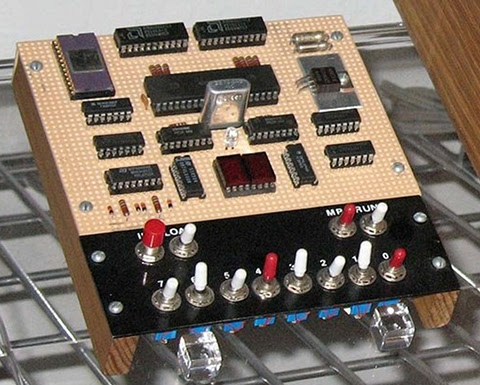
Is anyone using something along the lines of a microprocessor trainer in the classroom today outside a college level EE class?
Personally I can see two general approaches to this, with several possible variations on the two themes. Let's look at them, then I'll go into Blue Sky mode to talk about what I sort of wish for.
Some Ways to Bring Computer Hardware into Class
One is to fake it entirely with present-day hardware. After all, if it's possible to do a complete chip-level simulation of an 8-bit processor in Javascript, it shouldn't be much of a stretch to simulate an entire simple 8-bit microcomputer in a program with the ability to "see" all the operations inside simulated on the screen.
The problem is that this still really fails to make what's being taught "real". To the students, it becomes just another show to watch--one with no particular interest to most of them.
The other approach is to use an actual old microcomputer in class, like the Elf, with the students handling the system, measuring voltages or using logic probes to "see" the signals in the computer. Something more sophisticated would be using chip clips with LEDs on the various lines as a sort of multi-line logic probe. (Here is a place where an Elf or other RCA1802-based system would shine. The 1802 is a fully static processor. It can run at clocks speeds from 0Hz on up to its maximum clock speed, with clock changes on the fly. I have literally clocked 1802 systems by hand by connecting and disconnecting the clock line to +5V and Ground lines, counting out machine cycles as displays show the status of various system lines. There are not a lot of computer systems that can do that!)

Between these two lie many other options. One would be to have a hardware board that connects to a modern computer through a common interface, like USB, where some I/O devices could be visible controlled by the computer (via lights, motors, etc.) and with lines exposed that can safely be probed by the students.
Another would be using a more modern hardware platform, perhaps based on one or more microcontrollers that emulate the function of an older system, exposing such things as memory access, control signals, and so on to the students. The board could include displays and LEDs to show the status of the lines, internal pseudo-registers, and so on. The operation of the entire system, both inside and outside the simulated ICs, could be made available to the student's eyes.
Part of what needs definition is the acceptable limitations of the system. In my own case, I see such a system as being an introduction to low-level hardware operation and control of that operation through software.
Blue Sky Dreaming
If I could have what I wanted without any effort on my part or a significant amount of the school's money, here's what I'd like:
Step 1
I would want to introduce a basic system that's very similar to the original Elf of 1976.
It would have:
Step 2
After the first few lessons, the toggle switches would get old and I'd want to introduce a hexadecimal keypad. This would teach hexadecimal, and continue the association of computer instructions with numeric values in the computer. Presumably the connection between signal levels and numbers has been made using toggle switches.
With the easier input technique, it'd be nice to add some more memory, up to something like 512 bytes to 1 kilobyte.
Step 3
Next, a keyboard would be attached. Perhaps writing software to interface the keyboard to the system would be one of the Step 2 projects. While I'd be tempted to use an ASCII keyboard, I think a raw matrix keyboard would teach more. On this keyboard, machine language instructions and hexadecimal numbers would be mapped to each key. This would again speed programming, and reduce errors. The simple machine language I envision has a particular addressing mode associated with each mnemonic, so there's still no assembling of code required.
Step 4: A larger step
Next, I'd move to a more abstract level. I believe that the activities prior to this point would teach low level operations well enough to take this jump and still be able to show the connection between the two.
For step 4, the computer would get:
The point at this step would be writing high level programs to perform low level actions like those seen in the earlier steps. Seeing line levels and I/O operations performed, using bitwise operators, seeing the signals represented as numbers of various bases within the language (which I'd expect to support at least binary, hex, and decimal for representation and constants.)
Step 5
The final step with the low level computer would be to produce more sophisticated programs. These would be longer programs, probably projects done by groups of students over a few weeks in class. At this point the understanding of the program control structures and data structures should be a bridge to programming in the chosen language directly on the modern computer.
Final Thoughts
These thoughts are somewhat half-baked as they stand. I or someone would have to do some more work to really define this and turn it into hardware and software and a curriculum to go with it. Some points that need considering are the demarcation between this and a robotics class, common in many schools now (including the one at which I teach.) Also, how much class time does this merit? And so on.
Personally I think that using a micro trainer level system is simple enough to be mastered by most middle-school level students. I've got some actual experience with students to back that up, in addition to my own experience (I was 14 when I constructed my own Elf.) For the students, the information not only gives them an understanding of the underlying technologies of current systems, but would open the doors to embedded systems, far more common than conventional general purpose computers. Either way, it would make the computer far less a piece of technical magic controlled by somebody else and far more something comprehensible, and therefore controllable, by themselves.
Some related work--a 4 bit TTL Processor.
The fact is, all the steps above would probably be unnecessary and involve too many changes to the hardware platform to be practical in class. A more reasonable approach would probably be to go from a slightly more capable Step 1 computer directly to Step 4. This would reduce the opportunity for student disorientation as a result of seemingly constant hardware changes, and still be enough to get the key points across.
The activities I envision for Steps 2 and 3 could be either dropped or performed in either the initial or final configuration of the system. This would also simplify the system itself.
Tweet
The place for a small teaching computer, as we're discussing it, lies somewhere between electronics and the standard non-computer science introductory computer programming class. It's a matter of teaching what the components in the system do, and how they do it. This becomes a model of what happens inside more powerful modern computers at larger scale. Such as in current desktops, laptops, tablets, and smartphones.
The COSMAC Elf, this version includes video graphics.
Is anyone using something along the lines of a microprocessor trainer in the classroom today outside a college level EE class?
Personally I can see two general approaches to this, with several possible variations on the two themes. Let's look at them, then I'll go into Blue Sky mode to talk about what I sort of wish for.
Some Ways to Bring Computer Hardware into Class
One is to fake it entirely with present-day hardware. After all, if it's possible to do a complete chip-level simulation of an 8-bit processor in Javascript, it shouldn't be much of a stretch to simulate an entire simple 8-bit microcomputer in a program with the ability to "see" all the operations inside simulated on the screen.
The problem is that this still really fails to make what's being taught "real". To the students, it becomes just another show to watch--one with no particular interest to most of them.
The other approach is to use an actual old microcomputer in class, like the Elf, with the students handling the system, measuring voltages or using logic probes to "see" the signals in the computer. Something more sophisticated would be using chip clips with LEDs on the various lines as a sort of multi-line logic probe. (Here is a place where an Elf or other RCA1802-based system would shine. The 1802 is a fully static processor. It can run at clocks speeds from 0Hz on up to its maximum clock speed, with clock changes on the fly. I have literally clocked 1802 systems by hand by connecting and disconnecting the clock line to +5V and Ground lines, counting out machine cycles as displays show the status of various system lines. There are not a lot of computer systems that can do that!)
Between these two lie many other options. One would be to have a hardware board that connects to a modern computer through a common interface, like USB, where some I/O devices could be visible controlled by the computer (via lights, motors, etc.) and with lines exposed that can safely be probed by the students.
Another would be using a more modern hardware platform, perhaps based on one or more microcontrollers that emulate the function of an older system, exposing such things as memory access, control signals, and so on to the students. The board could include displays and LEDs to show the status of the lines, internal pseudo-registers, and so on. The operation of the entire system, both inside and outside the simulated ICs, could be made available to the student's eyes.
Part of what needs definition is the acceptable limitations of the system. In my own case, I see such a system as being an introduction to low-level hardware operation and control of that operation through software.
Blue Sky Dreaming
If I could have what I wanted without any effort on my part or a significant amount of the school's money, here's what I'd like:
Step 1
I would want to introduce a basic system that's very similar to the original Elf of 1976.
It would have:
- Toggle switch inputs (to associate signals with data and to help teach binary),
- A binary LED display and a two-digit hexadecimal display,
- Very limited memory (about 128 to 256 bytes)(to teach how much can be done in limited memory, and to limit the size of early programs to sane sizes.
- Exposed memory and I/O lines, possibly with LED monitors
- Extra monitors, like maybe dual color LEDs to show data direction on I/O ports, etc.
- A simple machine language with whole-word mnemonics.
- The ability to operate at extremely low clock speeds (0-100Hz) as well as higher speeds (1-10MHz or something like.)
Step 2
- Hexadecimal Keyboard
- 512B to 1024B of RAM
After the first few lessons, the toggle switches would get old and I'd want to introduce a hexadecimal keypad. This would teach hexadecimal, and continue the association of computer instructions with numeric values in the computer. Presumably the connection between signal levels and numbers has been made using toggle switches.
With the easier input technique, it'd be nice to add some more memory, up to something like 512 bytes to 1 kilobyte.
Step 3
- Keyboard with instruction mnemonics and hex digits
- Perhaps more memory, up to about 4K
Next, a keyboard would be attached. Perhaps writing software to interface the keyboard to the system would be one of the Step 2 projects. While I'd be tempted to use an ASCII keyboard, I think a raw matrix keyboard would teach more. On this keyboard, machine language instructions and hexadecimal numbers would be mapped to each key. This would again speed programming, and reduce errors. The simple machine language I envision has a particular addressing mode associated with each mnemonic, so there's still no assembling of code required.
Step 4: A larger step
Next, I'd move to a more abstract level. I believe that the activities prior to this point would teach low level operations well enough to take this jump and still be able to show the connection between the two.
For step 4, the computer would get:
- More memory. Anywhere from 4K to 64K. Perhaps it would start at 4K and grow as the students hit the limitations of each memory size.
- A terminal connection to a current generation computer for keyboard and display, or an encoded keyboard and some other form of text display.
- New firmware (probably activated from on-board with a mode switch), which would provide a fairly sophisticated command line interface with command editing, recall, etc., as well as an interactive programming language. The specific language doesn't matter too much, it could be a BASIC, a bash-alike, a LOGO, or an interactive form of some other compiled language.
- Mass storage. Probably some modern semiconductor memory.
The point at this step would be writing high level programs to perform low level actions like those seen in the earlier steps. Seeing line levels and I/O operations performed, using bitwise operators, seeing the signals represented as numbers of various bases within the language (which I'd expect to support at least binary, hex, and decimal for representation and constants.)
Step 5
The final step with the low level computer would be to produce more sophisticated programs. These would be longer programs, probably projects done by groups of students over a few weeks in class. At this point the understanding of the program control structures and data structures should be a bridge to programming in the chosen language directly on the modern computer.
Final Thoughts
These thoughts are somewhat half-baked as they stand. I or someone would have to do some more work to really define this and turn it into hardware and software and a curriculum to go with it. Some points that need considering are the demarcation between this and a robotics class, common in many schools now (including the one at which I teach.) Also, how much class time does this merit? And so on.
Personally I think that using a micro trainer level system is simple enough to be mastered by most middle-school level students. I've got some actual experience with students to back that up, in addition to my own experience (I was 14 when I constructed my own Elf.) For the students, the information not only gives them an understanding of the underlying technologies of current systems, but would open the doors to embedded systems, far more common than conventional general purpose computers. Either way, it would make the computer far less a piece of technical magic controlled by somebody else and far more something comprehensible, and therefore controllable, by themselves.
Some related work--a 4 bit TTL Processor.
The fact is, all the steps above would probably be unnecessary and involve too many changes to the hardware platform to be practical in class. A more reasonable approach would probably be to go from a slightly more capable Step 1 computer directly to Step 4. This would reduce the opportunity for student disorientation as a result of seemingly constant hardware changes, and still be enough to get the key points across.
The activities I envision for Steps 2 and 3 could be either dropped or performed in either the initial or final configuration of the system. This would also simplify the system itself.
Sunday, August 29, 2010
A First Look at Windows 7 and Snow Leopard (Finally)
OK, so I tore myself away from CP/M and my Atari 2600 long enough to get my first exposure to Windows 7 and Snow Leopard today. We got my older daughter a new Eee PC laptop to replace one she drop-kicked (accidentally, by all reports), the replacement runs Windows 7. Last week I decided I to do upgrades of some of the Macs around the house to Snow Leopard. So I picked up a family pack of that, and did an install on one of my systems while Windows 7 was "initializing" on the new computer.
Windows 7
Let me be upfront about it. While I'm not a Windows "hater", I don't have any great love for it as an operating system. I don't think it's got any particular technical excellence about it, it's got a legacy of problems that tend to persist from version to version, but by and large it gets the job done when the job has been written to do its thing in Windows in a fairly competent fashion. I run Win XP on one of my boxes, I may upgrade someday when some particular need drives me to do so. It's not that I resist it, it's just that right now I've pretty well got that system whipped into shape, and I don't feel the need to repeat the work just to be on the latest and greatest.
When the time comes, I'll move on. That time isn't now.
My daughter, however, has her new Eee PC. I ended up being the one who got the machine started up for the first time today. I wanted to make sure it was functional within a time frame that would allow me to take it back to the store for a replacement if it turned out there was a problem. So I got to start up and use Windows 7 for the first time.
First Impressions
My first impression is that it's not all that different from earlier versions of Windows. The first image that comes to mind with Windows 7 is "new curtains in a miner's shack." It's still got that sort of clunky, crunchy Windows feel of how it does things, with some new art slapped in in those places where new art is easy to slap in. It doesn't feel all that new.
Of course, I think "new" is something the Windows audience felt they had enough of with Vista (which I found usable but somewhat more annoying than XP, and certainly no real improvement on its predecessor, at least for what I use it for.) So the retro feel may be intentional. Or it may just have been easy.
It's got a slight case of "I wanna look like a Mac"-itis, but not obsessively so. It still looks and feels like Windows, with half-melted icons being more the norm than when they first started appearing in the days of Windows 98.
Overall impression: Meh.
I won't be rushing to upgrade any time soon.
Snow Leopard
I'll preface this by saying that I think the user experience for Leopard has been a big step backward for the Mac. Tiger still sits at the top of the Mac OS X versions for me. Leopard's ability to deal with networking, both by itself and in conjunction with other Mac and non-Mac systems, is a big step backward from the "it just works" standard of Tiger.
Over the past few years, Macs have declined from being my multiple primary systems to being ancillaries in terms of my regular use. My little Eee PCs, originally purchased for use when travelling or at my easy chair, have supplanted my Macs. Given that I can buy 3 Eee PCs for the price of a single Mac, I'm in no hurry to go out and buy a new Mac.
(scroll down to skip Mac rants)
Add to that the fact that my current Mac systems are all replacements for hardware that failed under coverage by AppleCare. I bought my original systems at full price--well, I get the minimal educator discount. It meant something once, but my desktop I got as a refurb from Apple with no educator discount because it was cheaper than the educator discount. Apple had actually not solved the problem with the "refurb" when I received it. Fortunately I found it easily enough. The CTRL keycap was inverted on the keyboard and sticking, preventing the machine from booting until I pulled it off and put it back on properly.
That was the last of the G5 iMacs, and it was a great system for years. Then it started having problems. It had also had a problem I'd lived with for years--the headset plug didn't put out audio. I took it in to the Apple Store for both problems, having stated that it had both problems in every call prior, and stating so again in the store while the "Genius" was filling out the repair sheet. After about a week, Apple insisted my computer had no problems. I asked if they'd fixed the audio, they were ambiguous. I insisted that the system did have a problem that was causing it to go into thermal shutdown, even on moderately demanding app. I told them to keep looking. Some too-long period later they called back and told me they'd replaced the power supply. I asked after the audio. They said the audio output was fine.
I got the computer back, it ran great. But the audio jack was still dead. I'd given up substantial work time to go to and fro to the Apple store at the far end of Sacramento (the one in Roseville didn't exist yet), and I was ticked as can be about the audio jack still not working. When I called AppleCare they said there was no record, anywhere, of me stating that problem. I only said it on, like, EVERY call and interaction I'd had with them, repeatedly, with special EMPHASIS to make sure it didn't get lost in the face of the other shutdown problem.
(still ranting, scroll down to skip)
Apple refused to let me ship it back and forth for repairs, the way I have for the repairs for my PowerBook and MacBook (3 and 2 times, respectively.) The only offer they could give me was to replace it with a current model.
I should have stuck with the bad audio output. I've hated the new iMac ever since I've got it. Yeah, it's got "better" graphics chips, a Core 2 Duo processor as opposed to a G5, but the shiney screen shows me nothing but the window in my office. Fat load of good that does me. What am I supposed to do, work in a darkroom? My G5 worked great in the same location, this aluminum thing is an abomination. I often consider picking up a used older white iMac, and donating this thing to my school. Assuming I don't throw it out a window, first.
I suppose you can say that it was good of Apple to replace my systems. And it was. But I would much rather that the original systems just worked, or maybe even got repaired as I asked.
Both replacements are significantly worse than the original systems I bought in terms of usability. I say they're lower quality, too. Even though they contain newer technology components.
(end of Mac rants, you may safely continue reading)
So, I'm certainly no Apple fanboi. I've been distressed at the general direction they've gone over the past few years, though I think the Unibody laptops are a big improvement over the floppy sloppy Macbook they sent me to replace my third-time-broken PowerBook G4 (after much sturm and drang and wrangling over the phone over the course of several weeks, but that's another story.)
So...Snow Leopard.
Part of the reason I wanted it was that Leopard is limited in its video modes. My MacBook lives in my living room, since it's too fragile to use as a regular travelling notebook computer. It went back to Apple twice while it was covered under AppleCare for problems. I used that system with utmost care when I was going places with it. I put it in a padded case, didn't overload the case, set it with good airflow on a flat surface. It broke, not once but twice.
So now it's sitting on my entertainment center, pretending to be a much cheaper Mac Mini. So far, it's still working though I have to be careful since it runs hot as the devil--the airflow with the screen either closed or open is not nearly enough. It's a botched design.
OK, so Leopard and the older versions of Mac OS won't do a stretched display to fit my widescreen TV. The graphics chipset in the MacBook is certainly capable of it, but the OSes refuse to acknowledge this. I get 4x3 display resolutions listed for my TV, nothing else. I tried a third party solution. It hosed my system's display settings so bad I was afraid it was going to end up bricked. Fortunately, I managed to recover by booting off an external backup drive and get the system restored. And I got rid of the third party solution.
Last week I wandered into the Apple Store. I've been considering Snow Leopard for a while. Whenever I gripe about Leopard my other Mac user friends tell me I need to go to Snow Leopard. They're short on details, however, so I've been dragging my feet. I've heard such things before.
I walked up to one of the Macs in the Apple Store, one hooked up to an external display (not a TV, though. I didn't see anything with a VGA adapter on it) and opened up Display Preferences. I see the option "1024x768 (stretched)". Aha, I think, maybe now I can make the Mac use my widescreen as a widescreen without looking entirely wrong. (Isn't looking good supposed to be one of the Mac's strong points?)
(minor Apple Store rant in next paragraph, but it's brief)
That, with what else I've heard, and the relatively low price, had me picking up a copy of Snow Leopard at Fry's the other day. No, not the Apple Store. I don't know what was up there, but when I walked up to the front of the store looking like I wanted to buy something, none of the Apple associates even so much as looked at me. I have no idea what was going on. I considered banging on the counter then yelling "I want to give Apple my MONEY, does anybody here care?", but I decided to leave rather than risk an encounter with the mall police. So I closed the deal at Fry's a few days later.
(I finally get to the Snow Leopard install here!)
The install went pretty well, except when I got to the "optional installs." I felt like the installer was rushing me into doing something to my drive that I didn't even know what it would be. I hit a point where I was afraid to click to move on any further, since I expected it to give me a choice of what software packages I would and wouldn't want to install. I felt like it was going to go ahead and put who knows what on my system without my say-so. So I stopped and hit Firefox to find out what was up.
It turned out that I did get a choice, two screens past the point where I felt like it was going to commit me to installing 30 pieces of trial crapware on my system. There weren't 30 pieces of trialware in the package, it was the sort of thing I expected, X11 and the base Mac apps like Calendar and so on. But from the point where I balked, I couldn't tell that.
I also couldn't tell if I should have selected things I already had on my system, like X11 and the new Safari. Had it upgraded the old packages during the main OS install or not? I had no idea, and ended up just selecting Rosetta, figuring I could check version numbers on the other stuff and come back later.
So far as I can tell, I have the latest versions of the other software, but within the installer I had no way of knowing that based on what I was being told by the installer and the choices it gave me.
Once Burned, Twice Shy
I'm pretty goosey about OS upgrades on the Mac. An iLife upgrade on my wife's G4 tower a few years ago turned a fine system into a haunted system that never worked properly ever again. It left her with a bunch of corrupted family video files, and stopped her in her tracks from doing a wide range of video related tasks.
At this point Snow Leopard is pretty well indistinguishable from Leopard. There's a slider on Finder to adjust the sizes of the icons in icon view, but otherwise Finder still appears to be as stupid as it's ever been.
Video Modes?
And the video modes. No luck. Sure, I can stretch the display on my built-in LCD display. Whoop de doo. But I'm still stuck with nothing but 4x3 aspect ratio display options on my TV. This infuriates me. I've been able to make this adjustment in Windows since Win98, possibly even Win 95. The chipset is capable of it. The computer shouldn't need the screen to tell it what aspect ratios it has, it's the computer that does the stretching, not the TV. I'm going to call AppleCare and ask to make sure I'm not missing something, but at this point it looks like my MacBook won't even be up to the job of media computer.
Maybe I'll trade my daughter my MacBook for her new Eee PC, and put that on the TV instead.
Snow Leopard Overall Impression: Bleah.
Here's a Quarter, Kid. Go Get Yourself a Real Computer
Where's my Amiga 500? I need some quality computer time. The 21st century is waaaay over-rated.
Does it say anything that I get more excited over new browsers these days than new OSes?
Tweet
Windows 7
Let me be upfront about it. While I'm not a Windows "hater", I don't have any great love for it as an operating system. I don't think it's got any particular technical excellence about it, it's got a legacy of problems that tend to persist from version to version, but by and large it gets the job done when the job has been written to do its thing in Windows in a fairly competent fashion. I run Win XP on one of my boxes, I may upgrade someday when some particular need drives me to do so. It's not that I resist it, it's just that right now I've pretty well got that system whipped into shape, and I don't feel the need to repeat the work just to be on the latest and greatest.
When the time comes, I'll move on. That time isn't now.
My daughter, however, has her new Eee PC. I ended up being the one who got the machine started up for the first time today. I wanted to make sure it was functional within a time frame that would allow me to take it back to the store for a replacement if it turned out there was a problem. So I got to start up and use Windows 7 for the first time.
First Impressions
My first impression is that it's not all that different from earlier versions of Windows. The first image that comes to mind with Windows 7 is "new curtains in a miner's shack." It's still got that sort of clunky, crunchy Windows feel of how it does things, with some new art slapped in in those places where new art is easy to slap in. It doesn't feel all that new.
Of course, I think "new" is something the Windows audience felt they had enough of with Vista (which I found usable but somewhat more annoying than XP, and certainly no real improvement on its predecessor, at least for what I use it for.) So the retro feel may be intentional. Or it may just have been easy.
It's got a slight case of "I wanna look like a Mac"-itis, but not obsessively so. It still looks and feels like Windows, with half-melted icons being more the norm than when they first started appearing in the days of Windows 98.
Overall impression: Meh.
I won't be rushing to upgrade any time soon.
Snow Leopard
I'll preface this by saying that I think the user experience for Leopard has been a big step backward for the Mac. Tiger still sits at the top of the Mac OS X versions for me. Leopard's ability to deal with networking, both by itself and in conjunction with other Mac and non-Mac systems, is a big step backward from the "it just works" standard of Tiger.
Over the past few years, Macs have declined from being my multiple primary systems to being ancillaries in terms of my regular use. My little Eee PCs, originally purchased for use when travelling or at my easy chair, have supplanted my Macs. Given that I can buy 3 Eee PCs for the price of a single Mac, I'm in no hurry to go out and buy a new Mac.
(scroll down to skip Mac rants)
Add to that the fact that my current Mac systems are all replacements for hardware that failed under coverage by AppleCare. I bought my original systems at full price--well, I get the minimal educator discount. It meant something once, but my desktop I got as a refurb from Apple with no educator discount because it was cheaper than the educator discount. Apple had actually not solved the problem with the "refurb" when I received it. Fortunately I found it easily enough. The CTRL keycap was inverted on the keyboard and sticking, preventing the machine from booting until I pulled it off and put it back on properly.
That was the last of the G5 iMacs, and it was a great system for years. Then it started having problems. It had also had a problem I'd lived with for years--the headset plug didn't put out audio. I took it in to the Apple Store for both problems, having stated that it had both problems in every call prior, and stating so again in the store while the "Genius" was filling out the repair sheet. After about a week, Apple insisted my computer had no problems. I asked if they'd fixed the audio, they were ambiguous. I insisted that the system did have a problem that was causing it to go into thermal shutdown, even on moderately demanding app. I told them to keep looking. Some too-long period later they called back and told me they'd replaced the power supply. I asked after the audio. They said the audio output was fine.
I got the computer back, it ran great. But the audio jack was still dead. I'd given up substantial work time to go to and fro to the Apple store at the far end of Sacramento (the one in Roseville didn't exist yet), and I was ticked as can be about the audio jack still not working. When I called AppleCare they said there was no record, anywhere, of me stating that problem. I only said it on, like, EVERY call and interaction I'd had with them, repeatedly, with special EMPHASIS to make sure it didn't get lost in the face of the other shutdown problem.
(still ranting, scroll down to skip)
Apple refused to let me ship it back and forth for repairs, the way I have for the repairs for my PowerBook and MacBook (3 and 2 times, respectively.) The only offer they could give me was to replace it with a current model.
I should have stuck with the bad audio output. I've hated the new iMac ever since I've got it. Yeah, it's got "better" graphics chips, a Core 2 Duo processor as opposed to a G5, but the shiney screen shows me nothing but the window in my office. Fat load of good that does me. What am I supposed to do, work in a darkroom? My G5 worked great in the same location, this aluminum thing is an abomination. I often consider picking up a used older white iMac, and donating this thing to my school. Assuming I don't throw it out a window, first.
I suppose you can say that it was good of Apple to replace my systems. And it was. But I would much rather that the original systems just worked, or maybe even got repaired as I asked.
Both replacements are significantly worse than the original systems I bought in terms of usability. I say they're lower quality, too. Even though they contain newer technology components.
(end of Mac rants, you may safely continue reading)
So, I'm certainly no Apple fanboi. I've been distressed at the general direction they've gone over the past few years, though I think the Unibody laptops are a big improvement over the floppy sloppy Macbook they sent me to replace my third-time-broken PowerBook G4 (after much sturm and drang and wrangling over the phone over the course of several weeks, but that's another story.)
So...Snow Leopard.
Part of the reason I wanted it was that Leopard is limited in its video modes. My MacBook lives in my living room, since it's too fragile to use as a regular travelling notebook computer. It went back to Apple twice while it was covered under AppleCare for problems. I used that system with utmost care when I was going places with it. I put it in a padded case, didn't overload the case, set it with good airflow on a flat surface. It broke, not once but twice.
So now it's sitting on my entertainment center, pretending to be a much cheaper Mac Mini. So far, it's still working though I have to be careful since it runs hot as the devil--the airflow with the screen either closed or open is not nearly enough. It's a botched design.
OK, so Leopard and the older versions of Mac OS won't do a stretched display to fit my widescreen TV. The graphics chipset in the MacBook is certainly capable of it, but the OSes refuse to acknowledge this. I get 4x3 display resolutions listed for my TV, nothing else. I tried a third party solution. It hosed my system's display settings so bad I was afraid it was going to end up bricked. Fortunately, I managed to recover by booting off an external backup drive and get the system restored. And I got rid of the third party solution.
Last week I wandered into the Apple Store. I've been considering Snow Leopard for a while. Whenever I gripe about Leopard my other Mac user friends tell me I need to go to Snow Leopard. They're short on details, however, so I've been dragging my feet. I've heard such things before.
I walked up to one of the Macs in the Apple Store, one hooked up to an external display (not a TV, though. I didn't see anything with a VGA adapter on it) and opened up Display Preferences. I see the option "1024x768 (stretched)". Aha, I think, maybe now I can make the Mac use my widescreen as a widescreen without looking entirely wrong. (Isn't looking good supposed to be one of the Mac's strong points?)
(minor Apple Store rant in next paragraph, but it's brief)
That, with what else I've heard, and the relatively low price, had me picking up a copy of Snow Leopard at Fry's the other day. No, not the Apple Store. I don't know what was up there, but when I walked up to the front of the store looking like I wanted to buy something, none of the Apple associates even so much as looked at me. I have no idea what was going on. I considered banging on the counter then yelling "I want to give Apple my MONEY, does anybody here care?", but I decided to leave rather than risk an encounter with the mall police. So I closed the deal at Fry's a few days later.
(I finally get to the Snow Leopard install here!)
The install went pretty well, except when I got to the "optional installs." I felt like the installer was rushing me into doing something to my drive that I didn't even know what it would be. I hit a point where I was afraid to click to move on any further, since I expected it to give me a choice of what software packages I would and wouldn't want to install. I felt like it was going to go ahead and put who knows what on my system without my say-so. So I stopped and hit Firefox to find out what was up.
It turned out that I did get a choice, two screens past the point where I felt like it was going to commit me to installing 30 pieces of trial crapware on my system. There weren't 30 pieces of trialware in the package, it was the sort of thing I expected, X11 and the base Mac apps like Calendar and so on. But from the point where I balked, I couldn't tell that.
I also couldn't tell if I should have selected things I already had on my system, like X11 and the new Safari. Had it upgraded the old packages during the main OS install or not? I had no idea, and ended up just selecting Rosetta, figuring I could check version numbers on the other stuff and come back later.
So far as I can tell, I have the latest versions of the other software, but within the installer I had no way of knowing that based on what I was being told by the installer and the choices it gave me.
Once Burned, Twice Shy
I'm pretty goosey about OS upgrades on the Mac. An iLife upgrade on my wife's G4 tower a few years ago turned a fine system into a haunted system that never worked properly ever again. It left her with a bunch of corrupted family video files, and stopped her in her tracks from doing a wide range of video related tasks.
At this point Snow Leopard is pretty well indistinguishable from Leopard. There's a slider on Finder to adjust the sizes of the icons in icon view, but otherwise Finder still appears to be as stupid as it's ever been.
Video Modes?
And the video modes. No luck. Sure, I can stretch the display on my built-in LCD display. Whoop de doo. But I'm still stuck with nothing but 4x3 aspect ratio display options on my TV. This infuriates me. I've been able to make this adjustment in Windows since Win98, possibly even Win 95. The chipset is capable of it. The computer shouldn't need the screen to tell it what aspect ratios it has, it's the computer that does the stretching, not the TV. I'm going to call AppleCare and ask to make sure I'm not missing something, but at this point it looks like my MacBook won't even be up to the job of media computer.
Maybe I'll trade my daughter my MacBook for her new Eee PC, and put that on the TV instead.
Snow Leopard Overall Impression: Bleah.
Here's a Quarter, Kid. Go Get Yourself a Real Computer
Where's my Amiga 500? I need some quality computer time. The 21st century is waaaay over-rated.
Does it say anything that I get more excited over new browsers these days than new OSes?
Subscribe to:
Posts (Atom)


 Posts
Posts


 Webomator.com: Backward into the