Microsoft has recently announced that they are moving .Net to open source and supporting Mac and Linux in addition to their Windows OS with Visual Studio Community 2013. Also, Visual Studio 2015 will support iOS and Android development.
Frankly, it's a little confusing because in some places MS mentions Mac and Linux, but very few, and they mention iOS and Android in lots of places, but not everywhere. So the support may be different than what I said.
Nevertheless, MS is opening up. Or at least seeming to.
Their timing couldn't be better, in my opinion.
Oracle is working hard to poison Java. I'm not entirely sure why, unless they think that ticking off any Java programmers and users outside those developing middleware for Oracle's products is a really great strategy. Their support for Java as a general programming language, as Sun did, has been piss-poor since day 1. Every so often they make a grand gesture to try to present themselves as interested, but the product they offer now is not something I could send someone out to install with a good conscience. What kind of an honest, large-scale company thinks that half-sneaking some crap software in under the cover of installing their own is a really great idea? Not one that really treasures the individual customers, I can tell you (and yes, Adobe is on this particular excrement list, too.)
Couple that with their poor responsiveness to security concerns, to the point where the Java language is treated as a sort of worm or virus by most software, and you've got a company that's decided to leave a hole in the cross-platform development market simply because their interests are elsewhere.
Cross Platform Alternatives
C# is Microsoft's outgrowth from their own attempt at embrace, extend, exterminate targeting Java. It's a very good language, including the good parts of Java while having a set of libraries (.Net) that don't have the Java API's less than useless historical cruft but do have everything good about the API, which made Microsoft look really cool to programmers when it came out as most were not familiar with the Java API itself.
Switching to C# from Java is an afternoon's exercise. But it and the .Net library started out wed to the Microsoft platform.
Enter Mono, a cross-platform implementation of .Net supporting the C# language based on Microsoft's ECMA standard for its products. It has been growing, at least in part on the back of the decline of Java, as well as bringing the good things about C# and .Net to Mac and Linux development. It doesn't hurt that it is the core that drives products like the Unity cross-platform game-development system, too.
Now Microsoft is combining their products with Mono, and extending their reach to Android and iOS.
There are a Couple of Ways This Could Go (and Possibly More)
In Future A, Microsoft does the excellent work they do in producing development tools, but now with a return to platform-agnosticism. This encourages programmers to develop for Windows and Windows Phone as well, since programmers who might otherwise have been targetting only iOS or Android will be selecting these tools for their intrinsic value as development tools to write programs for their favored OS, then decide to toss a Windows/WinPho version out there, too, since it's not costing them any significant extra effort and might end up fattening the coffers a bit.
Microsoft gains developers for its platforms, draws "thought leader" and technical leaders into their ecosystem, and the developers get the advantage of having good development tools for any major platform they choose.
In Future B, Microsoft uses this as a ploy to draw programmers in, but cross-platform support is sloppy, or delivered slowly, or lags behind the native capabilities of the non-MS platforms. Perhaps it doesn't play well with the various different versions of Android, or maybe the Mac and Linux native code suffers by comparison with code developed with native tools for those platforms.
It turns out to just be hype. Maybe there are forces within MS that fight the release of solid tools that are truly cross-platform, so they ensure that foreign platform support is sub-par, thinking that they're helping their own products by making it "harder" to develop for other platforms. The only point of cross-platform, to them, is to allow Windows patriots to proclaim themselves cross-platform developers without knowing anything about the competition.
In this future, Windows does not become the programmer's platform of choice, Windows has extra costs of development that make it less attractive as a development target when another platform is the one that's going to pay the bills (probably iOS), and life goes on as it does today with possibly the Microsoft touch putting some poison into Mono.
I can only hope that the upper management at MS is committed to Future A. because that's what it's going to take to keep Future B from stepping in any time it pleases.
Microsoft, Doing You Know What in Their Own Messkit for the Past Decade
Windows 7 was a boon for programmers when it came out. I and many other programmers I know had been feeling somewhat kicked about by Apple, didn't see tools with the same level of sophistication on Linux (and generally more system maintenance than the commercial OSes, and system maintenance doesn't pay bills), and Windows 7 was a viable place to go, or to at least have as a second OS on our desk for conducting development and testing.
Windows 8 added some nice stuff behind the scenes, but not without wrecking the usability of the platform, as well as making it a far less attractive target for development. In my case, I abandoned Windows as a target for native development about a decade ago, and was waiting on Windows 8 to see if I might add it to my repertoire again. The answer became "no". Windows 10 will determine whether I ever consider it a serious platform for anything at all in the future, as the professional applications that I currently use on Windows have all become multi-platform over the past several years, so I can move my licenses over to Mac OS or Linux for all of them.
If Microsoft gets it right with their development tools, and Windows 10 restores the power to the desktop that earlier versions provided--not just a false appearance of it as in Windows 8.1--then they stand to become the defacto professional desktop again.
Whither Mobile?
And given that the consumer desktop is the market that is dying in the face of mobile platforms, one would hope that they are bright enough to strategically commit to a powerful professional computer OS again. While the mass market computer is probably going away, there was a profitable professional/hobbyist market before the internet boom put a computer in practically every household. That professional market stands to be even larger than the historical one, as many professions that had nothing to do with computers now rely on them, and many new professions have arisen over the past 25 years that rely on the computer.
Also, there's a possibility that the mobile device as a computer replacement is just a flash in the pan. Most people bought their mobile devices in place of a routine upgrade to their home computer for one cycle. Now that they have tablets, the tablet market is going flat while computers are seeing a modest rise in sales. I think just about everyone has had a chance to discover that the touch interface is very limited in what it can do with current technology. It's severely error-prone and it's not well suited to complex activities. It's too soon to read now, but there's a chance the tablet may be relegated to specialty use status, with the keyboard-equipped computer regaining its status as the "real" computer behind the smartphone's limited purposes as a personal communication and light entertainment device. We'll see.
The phone isn't going to go away, though. It's going to be the most personal of personal computers, at least until it's replaced by a small tablet and a complete phone the size of an earpiece, or some other revolutionary turn that gets people to give up a screen for convenience. So supporting the mobile platforms is, for Microsoft, probably a must to their survival. At least until they can get real market share for Winpho.
Either way, if Microsoft plays their cards right, going to platform-agnosticism in their development tools could be a really good thing for everybody--including and especially Microsoft.
Showing posts with label Mac. Show all posts
Showing posts with label Mac. Show all posts
Monday, November 17, 2014
Monday, August 12, 2013
A New MacBook Pro
About two weeks ago, one of my computers stopped working properly. By "one of my", I mean one of my sit down and type on a real keyboard style computers. It's a netbook that has been my "easy chair" computer for several years. First it stopped booting into Ubuntu properly. Then software started acting odd, or refusing to start. It's other OS, Windows XP, was still working fine. For a while. Then it started getting odd on me, too.
I started out trying to back up the data in the Ubuntu partition by booting off a newer Linux (Mint 15 MATE, in this case.) I was having kernel panics in the midst of moving data off. Then the keyboard got strange on me--in other words, it became erratic. It was becoming more and more a case of diminishing returns.
A New Netbook?
First, I tried purchasing a new Asus netbook. I've bought seven of these for myself and my family since the original Eee PC 701 came out. They've all been great. I was looking forward to moving up to a 10" model, the dying computer has a chassis that's the same size as a 10" one, but it only had a 9" screen in it (it's a 904HD.) I've been envious of my daughters' 10" models, and the larger chassis has a keyboard that's a better size than in my 901 (9" screen with a smaller chassis and keyboard.)
Since I do a lot of writing in my easy chair (these blogs, for one), that wider keyboard really paid off.
So I find the Asus 1015 models are the current incarnation of the old Eee PC netbook. I order one sight unseen.
What a mistake!
Welcome to the New Netbook, NOT the Same as the Old Netbook
The first thing I noticed was the trackpad. They wanted to make it look like a Mac's trackpad, hiding the buttons underneath the solid trackpad surface. Unfortunately, their trackpad surface is not flexible like the Mac's. It's a stiff piece of plastic. It doesn't flex, it rocks. It rubs on the edges of the trackpad recess it sits in. It's cheap, it's cruddy, it's noisy, and it doesn't work well at all. The earlier models with their mouse buttons molded outside the trackpad were much, much, much better. Even the relatively noisy ones on my 701.
That alone would have been reason to return the thing. There's no way I'd sit and use that crappy trackpad every day. But there was another killer in the deal. The fan. The whole time I was using the Asus 1015, the fan was blowing like a turbojet. Noisy as all get-out, and totally unnecessary. It started up with the system and never slowed down. I didn't even run anything more demanding than a browser on a non-JavaScript web page. My 904 and 901 have fans, but they never get that loud even when I'm trying to force them into doing work way above their pay grade, like CAD/CAM. And when I'm just running the usual stuff, editors and what-not, their fans quiet down and become unnoticeable.
Not the piece of garbage that calls itself the 1015.
Yeah, it's got a higher spec processor. So what? If the human interface sucks, and that includes the noise it makes, then it's worthless as a netbook.
It went back to Amazon the day after it arrived.
Round and Round and Back and Forth
The problem then became, what else could I get. I wan't excited about the idea of a Chromebook, though they've pretty well moved into the niche vacated by netbooks (not, contrary to popular statement, tablets. I've got an excellent tablet, and I still need a real clamshell with a real keyboard.)
I didn't have the budget right now for the "Ultrabooks", and they're just jumped-up netbooks at four times the price. By the time you pay the price, you might as well have gotten the thing they're pretending to be--a MacBook.
So I was looking at just bringing my old Eee PC 901 upstairs, as it gets less use now that I do have a fine tablet. I wasn't doing a lot of keyboard typing with the 901, it was mostly used for reading and light text entry--a job my tablet has mostly taken over. Of course, the 901 has a keyboard I don't like nearly as much. That would likely cut into my writing time, if I ended up avoiding serious writing.
Family to the Rescue
Fortunately, my family decided to find a way out for me. My birthday was near, so they got me a new computer for my birthday. It's a MacBook Pro. Granted, it's not the Retina Display model, but frankly for this purpose I wouldn't get much from that. This is a secondary computer (though still an important one). It's more than I could afford on my own, and a great computer.
They let me pick it out. They know how picky I am about keyboards and other ergonomics. I tried a Surface Pro (ugh!) with both keyboards. No dice. I played with some other computers in the size range I'm looking for (under 14", the smaller the better.)
I also tried the MacBook Air.
The MacBook Pro won on the basis of its keyboard. The angle and feel of it suit me more than the one on the Air. The Pro is almost twice as heavy as the Air, but still light enough to handle with one hand, easily.
Fits with History
The first computer I started using here regularly, was my beloved and lost Aluminum PowerBook 12". For size, weight, and usability it set the standard for me getting work done in my easy chair. Unfortunately, it has a graphics chip that ran hot. Three times it went back to Apple with a dead hard disk drive. Rather than replacing the logic board with the hot chip (yes, it was reported) as well as the dead hard disk, they kept replacing the hard disk and sending it back to die on me again.
The last time it went in, it turned into a complete mess. While it was in for service, I was chasing it around by phone trying to make sure they'd solve the root problem, rather than just swap out the hard disk again. They assured me that they were going to replace it, as it was its third strike. I was looking forward to a processor speed bump with a new 12" Powerbook (about the only change that had occurred since I bought mine, other than some options I'd purchased becoming standard pack-ins.)
Instead, Apple went incommunicado on me. Every prior repair through AppleCare had turned around in about a week. Now it'd been three weeks, and they couldn't even tell me my computer's replacement status.
It was the very time when the Intel-based Macs came out.
Finally, after weeks of calling and getting no information, my case got escalated to someone who could actually speak to me rather than just tell me what their computer screen told them to say. He was helpful and assured me that Apple would make good. I had already gotten to the point of talking legal action before that--my work schedule had been severely impacted by the loss of my main engineering computer at the time. Aside from the time I was spending on the phone with Apple trying to figure out what they'd done with my computer (I was ready to have them renege on their AppleCare agreement and send the broken computer back to me so that I could just buy the replacement parts myself), I was scrambling to get my work done (I made most of my calls to AppleCare while I was driving around to and from work sites on extra trips necessitated by the lack of my laptop.)
Well, they offered to replace it with one of the new MacBooks. Even a Black model, with all the matching extras I'd had for my Powerbook. I accepted, but it turned out to be a bum deal.
The first MacBook was junk compared to my 12" Powerbook.
It ran hot. There's hardly any airflow, so no surprise. They really botched the design on the first model. It was floppy as a floppy disk. This was before the Unibody models, remember? I hardly trusted moving the thing from desktop to desktop, never mind using it on a lap desk at my chair.
The MacBook went to my entertainment center, where it would sit on a hard, unmoving, practically unmovable surface and put video into my big screen TV. I'd originally planned to buy the cheaper Mac Mini for that purpose, but now I had my relatively expensive work computer doing that job.
Shortly after that is when I got the Eee PC 904. Originally it and its companion 901 were intended to be replacements for my Eee PC 701. I wasn't sure which size would work for me, so I got one of each. I planned to pass the other one on to a family member once I figured that out.
Well, the 904 turned out to be the solid little replacement I needed for my PowerBook. It was about the same processor power (Celeron M vs. PowerPC G4, about the same clock speed), small, rugged, and light with a good keyboard. I could also throw it into my book bag and take it with when I went to teach classes at a local school.
It kept at that job for almost five years.
And now, I've come full circle. I've got a nice solid little Mac here. It's larger than my old 12" PowerBook, but not by too much. It's Unibody, so it feels just as rigid and solid as the older Mac. The keyboard is illuminated, which is a plus. And it's modern in its other aspects. The only way it suffers by comparison is the type of screen. It's glossy, not matte, as my old PowerBook was.
Ah, well. I hate glossy screens, but I hate matte overlays more. I guess I'll deal with it. ;)
Tweet
I started out trying to back up the data in the Ubuntu partition by booting off a newer Linux (Mint 15 MATE, in this case.) I was having kernel panics in the midst of moving data off. Then the keyboard got strange on me--in other words, it became erratic. It was becoming more and more a case of diminishing returns.
A New Netbook?
First, I tried purchasing a new Asus netbook. I've bought seven of these for myself and my family since the original Eee PC 701 came out. They've all been great. I was looking forward to moving up to a 10" model, the dying computer has a chassis that's the same size as a 10" one, but it only had a 9" screen in it (it's a 904HD.) I've been envious of my daughters' 10" models, and the larger chassis has a keyboard that's a better size than in my 901 (9" screen with a smaller chassis and keyboard.)
Since I do a lot of writing in my easy chair (these blogs, for one), that wider keyboard really paid off.
So I find the Asus 1015 models are the current incarnation of the old Eee PC netbook. I order one sight unseen.
What a mistake!
Welcome to the New Netbook, NOT the Same as the Old Netbook
The first thing I noticed was the trackpad. They wanted to make it look like a Mac's trackpad, hiding the buttons underneath the solid trackpad surface. Unfortunately, their trackpad surface is not flexible like the Mac's. It's a stiff piece of plastic. It doesn't flex, it rocks. It rubs on the edges of the trackpad recess it sits in. It's cheap, it's cruddy, it's noisy, and it doesn't work well at all. The earlier models with their mouse buttons molded outside the trackpad were much, much, much better. Even the relatively noisy ones on my 701.
That alone would have been reason to return the thing. There's no way I'd sit and use that crappy trackpad every day. But there was another killer in the deal. The fan. The whole time I was using the Asus 1015, the fan was blowing like a turbojet. Noisy as all get-out, and totally unnecessary. It started up with the system and never slowed down. I didn't even run anything more demanding than a browser on a non-JavaScript web page. My 904 and 901 have fans, but they never get that loud even when I'm trying to force them into doing work way above their pay grade, like CAD/CAM. And when I'm just running the usual stuff, editors and what-not, their fans quiet down and become unnoticeable.
Not the piece of garbage that calls itself the 1015.
Yeah, it's got a higher spec processor. So what? If the human interface sucks, and that includes the noise it makes, then it's worthless as a netbook.
It went back to Amazon the day after it arrived.
Round and Round and Back and Forth
The problem then became, what else could I get. I wan't excited about the idea of a Chromebook, though they've pretty well moved into the niche vacated by netbooks (not, contrary to popular statement, tablets. I've got an excellent tablet, and I still need a real clamshell with a real keyboard.)
I didn't have the budget right now for the "Ultrabooks", and they're just jumped-up netbooks at four times the price. By the time you pay the price, you might as well have gotten the thing they're pretending to be--a MacBook.
So I was looking at just bringing my old Eee PC 901 upstairs, as it gets less use now that I do have a fine tablet. I wasn't doing a lot of keyboard typing with the 901, it was mostly used for reading and light text entry--a job my tablet has mostly taken over. Of course, the 901 has a keyboard I don't like nearly as much. That would likely cut into my writing time, if I ended up avoiding serious writing.
Family to the Rescue
Fortunately, my family decided to find a way out for me. My birthday was near, so they got me a new computer for my birthday. It's a MacBook Pro. Granted, it's not the Retina Display model, but frankly for this purpose I wouldn't get much from that. This is a secondary computer (though still an important one). It's more than I could afford on my own, and a great computer.
They let me pick it out. They know how picky I am about keyboards and other ergonomics. I tried a Surface Pro (ugh!) with both keyboards. No dice. I played with some other computers in the size range I'm looking for (under 14", the smaller the better.)
I also tried the MacBook Air.
The MacBook Pro won on the basis of its keyboard. The angle and feel of it suit me more than the one on the Air. The Pro is almost twice as heavy as the Air, but still light enough to handle with one hand, easily.
Fits with History
The first computer I started using here regularly, was my beloved and lost Aluminum PowerBook 12". For size, weight, and usability it set the standard for me getting work done in my easy chair. Unfortunately, it has a graphics chip that ran hot. Three times it went back to Apple with a dead hard disk drive. Rather than replacing the logic board with the hot chip (yes, it was reported) as well as the dead hard disk, they kept replacing the hard disk and sending it back to die on me again.
The last time it went in, it turned into a complete mess. While it was in for service, I was chasing it around by phone trying to make sure they'd solve the root problem, rather than just swap out the hard disk again. They assured me that they were going to replace it, as it was its third strike. I was looking forward to a processor speed bump with a new 12" Powerbook (about the only change that had occurred since I bought mine, other than some options I'd purchased becoming standard pack-ins.)
Instead, Apple went incommunicado on me. Every prior repair through AppleCare had turned around in about a week. Now it'd been three weeks, and they couldn't even tell me my computer's replacement status.
It was the very time when the Intel-based Macs came out.
Finally, after weeks of calling and getting no information, my case got escalated to someone who could actually speak to me rather than just tell me what their computer screen told them to say. He was helpful and assured me that Apple would make good. I had already gotten to the point of talking legal action before that--my work schedule had been severely impacted by the loss of my main engineering computer at the time. Aside from the time I was spending on the phone with Apple trying to figure out what they'd done with my computer (I was ready to have them renege on their AppleCare agreement and send the broken computer back to me so that I could just buy the replacement parts myself), I was scrambling to get my work done (I made most of my calls to AppleCare while I was driving around to and from work sites on extra trips necessitated by the lack of my laptop.)
Well, they offered to replace it with one of the new MacBooks. Even a Black model, with all the matching extras I'd had for my Powerbook. I accepted, but it turned out to be a bum deal.
The first MacBook was junk compared to my 12" Powerbook.
It ran hot. There's hardly any airflow, so no surprise. They really botched the design on the first model. It was floppy as a floppy disk. This was before the Unibody models, remember? I hardly trusted moving the thing from desktop to desktop, never mind using it on a lap desk at my chair.
The MacBook went to my entertainment center, where it would sit on a hard, unmoving, practically unmovable surface and put video into my big screen TV. I'd originally planned to buy the cheaper Mac Mini for that purpose, but now I had my relatively expensive work computer doing that job.
Shortly after that is when I got the Eee PC 904. Originally it and its companion 901 were intended to be replacements for my Eee PC 701. I wasn't sure which size would work for me, so I got one of each. I planned to pass the other one on to a family member once I figured that out.
Well, the 904 turned out to be the solid little replacement I needed for my PowerBook. It was about the same processor power (Celeron M vs. PowerPC G4, about the same clock speed), small, rugged, and light with a good keyboard. I could also throw it into my book bag and take it with when I went to teach classes at a local school.
It kept at that job for almost five years.
And now, I've come full circle. I've got a nice solid little Mac here. It's larger than my old 12" PowerBook, but not by too much. It's Unibody, so it feels just as rigid and solid as the older Mac. The keyboard is illuminated, which is a plus. And it's modern in its other aspects. The only way it suffers by comparison is the type of screen. It's glossy, not matte, as my old PowerBook was.
Ah, well. I hate glossy screens, but I hate matte overlays more. I guess I'll deal with it. ;)
Wednesday, December 19, 2012
Age of Mythology for Mac, Network Address Wrongness
Well, I've lost a chunk of my life to a really stupid problem with Age of Mythology for the Macintosh.
My family and I like to play network games on the home LAN around the holidays. We have several old favorites, most of them were bought when they were old, too. We save dollars that way, plus we can buy enough for everyone's system without going broke.
One of those is Age of Mythology, from MacSoft.
Unfortunately, it tries to be intelligent with its network configuration. To simplify things, ya know? And it simplifies things to the point where you can't configure which network it uses, or any other network settings.
We have it on four systems. Two worked just fine right away. The third we saw was choosing its wired ethernet address over its wireless address. Unplug the wired network and hey, presto, it works. Number four, my own system, didn't respond to that.
I poked around through config files and tried editing them by hand, scanned the file system (find does more than Spotlight), and so on. All four games had been installed the same. They'd patched up to version 2.01, which fixes problems with an "out of sync" error in versions of OS X of Leopard and above. I looked on the internet, went many pages deep into various Google searches, and spelunked my computer's file system, hoping that I wouldn't wreck anything.
Nothing was working for me.
Finally, after chewing at it for literally hours, I stumbled into it.
Mamas Don't Let Your Babies Grow Up to Share Internet
Under System Preferences, there's a setting for Internet Sharing. I have it turned on, so that my beige G3 can reach the internet though my iMac's wireless connection.
Age of Mythology hates me for it.
Once I turned Internet Sharing off, and unplugged the wired Ethernet, I was able to connect to the other three computers with the game.
Sheesh!
Tweet
My family and I like to play network games on the home LAN around the holidays. We have several old favorites, most of them were bought when they were old, too. We save dollars that way, plus we can buy enough for everyone's system without going broke.
One of those is Age of Mythology, from MacSoft.
Unfortunately, it tries to be intelligent with its network configuration. To simplify things, ya know? And it simplifies things to the point where you can't configure which network it uses, or any other network settings.
We have it on four systems. Two worked just fine right away. The third we saw was choosing its wired ethernet address over its wireless address. Unplug the wired network and hey, presto, it works. Number four, my own system, didn't respond to that.
I poked around through config files and tried editing them by hand, scanned the file system (find does more than Spotlight), and so on. All four games had been installed the same. They'd patched up to version 2.01, which fixes problems with an "out of sync" error in versions of OS X of Leopard and above. I looked on the internet, went many pages deep into various Google searches, and spelunked my computer's file system, hoping that I wouldn't wreck anything.
Nothing was working for me.
Finally, after chewing at it for literally hours, I stumbled into it.
Mamas Don't Let Your Babies Grow Up to Share Internet
Under System Preferences, there's a setting for Internet Sharing. I have it turned on, so that my beige G3 can reach the internet though my iMac's wireless connection.
Age of Mythology hates me for it.
Once I turned Internet Sharing off, and unplugged the wired Ethernet, I was able to connect to the other three computers with the game.
Sheesh!
Thursday, September 2, 2010
Installing Pygame on Mac OS X Leopard
In my ongoing campaign to broaden my programming abilities I decided to install
Pygame and play around with it. I want to try it out as something to present to my students this year. I've decided to add a small programming segment to the first semester of my high school computer class this year where we do a quick survey of several languages by doing tutorials in them before we go into Java programming in spring semester.
Pygame is an add-on package for python that makes it easy to develop games using Python. Python has no built-in support for native graphics, sound, etc.--Pygame adds that to Python.
When I went to install Pygame on my Mac, I ran into a couple of hitches. I managed to work around them without too much problem, but I thought what I did to get things going was worth sharing.
First, Pygame requires the python.org version of Python. Even though my Mac already came with Python installed (hurray for Apple for that), the version isn't one that Pygame is happy with. So I went out to python.org, clicked on downloads, and pulled the first thing I saw for my OS version. This turned out to be Python 2.7 for Mac OS X 10.5 or later. Yeah, I could have gone with 3.1, but to be honest I didn't look that far down the page at first.
Once I had it downloaded, I started the download of Pygame. I installed Python 2.7 from the Mac installer while that was going.
Once the Python install finished, I did python -V at the command line in Terminal. My answer:
Hmmm. That's the Mac preinstalled version, not the new one. OK, fine:
Aha! I needed to set up the appropriate links to make the new Python the current one.
Hurray! Next I went to install Pygame. I unzip the zip, then run the installer.
No Install
Pygame then complained that it wanted Python 2.6! Python 2.7 wasn't good enough for it. I took a look at the dependency settings by right clicking on the Pygame installer in Finder, selecting "Show Package Contents", then opening "Contents" and double-clicking on info.plist there to open it in the Property List Editor. I expanded the Root item (the only top level item), then expanding "IFRequirementDicts" and expanding item "0". There I saw the Python version requirements properties. I considered changing it to require Python 2.7 by editing the SpecArgument field to 2.7 instead of 2.6.
But, it's not like my hard disk is mine to control, so I wimped out and installed Python 2.6 by going back to the Python All Releases download page, finding the 2.6 version, downloading and installing it.
Once it was in place, I went back to Terminal:
Now Pygame will install just fine.
Tweet
Pygame and play around with it. I want to try it out as something to present to my students this year. I've decided to add a small programming segment to the first semester of my high school computer class this year where we do a quick survey of several languages by doing tutorials in them before we go into Java programming in spring semester.
Pygame is an add-on package for python that makes it easy to develop games using Python. Python has no built-in support for native graphics, sound, etc.--Pygame adds that to Python.
When I went to install Pygame on my Mac, I ran into a couple of hitches. I managed to work around them without too much problem, but I thought what I did to get things going was worth sharing.
First, Pygame requires the python.org version of Python. Even though my Mac already came with Python installed (hurray for Apple for that), the version isn't one that Pygame is happy with. So I went out to python.org, clicked on downloads, and pulled the first thing I saw for my OS version. This turned out to be Python 2.7 for Mac OS X 10.5 or later. Yeah, I could have gone with 3.1, but to be honest I didn't look that far down the page at first.
Once I had it downloaded, I started the download of Pygame. I installed Python 2.7 from the Mac installer while that was going.
Once the Python install finished, I did python -V at the command line in Terminal. My answer:
#python -V
Python 2.5.1
Hmmm. That's the Mac preinstalled version, not the new one. OK, fine:
#whereis python
/usr/bin/python
#ls -l /usr/bin/python
lrwxr-xr-x 1 root wheel 72 Feb 21 2008 /usr/bin/python -> ../../System/Library/Frameworks/Python.framework/Versions/2.5/bin/python
Aha! I needed to set up the appropriate links to make the new Python the current one.
#cd /System/Library/Framework/Python.framework/Versions/
#ls
2.3 2.5 Current
#ls -l Current
lrwxr-xr-x 1 root wheel 3 Feb 21 2008 Current -> 2.5
#ls /Library/Frameworks/Python.framework/Versions/
2.7
#ln -s /Library/Frameworks/Python.framework/Versions/2.7 ./2.7
#ls
2.3 2.5 2.7 Current
#rm Current
#ln -s 2.7 Current
#ls -l Current
lrwxr-xr-x 1 root wheel 3 Sep 2 12:45 Current -> 2.7
#python -V
Python 2.7
Hurray! Next I went to install Pygame. I unzip the zip, then run the installer.
No Install
Pygame then complained that it wanted Python 2.6! Python 2.7 wasn't good enough for it. I took a look at the dependency settings by right clicking on the Pygame installer in Finder, selecting "Show Package Contents", then opening "Contents" and double-clicking on info.plist there to open it in the Property List Editor. I expanded the Root item (the only top level item), then expanding "IFRequirementDicts" and expanding item "0". There I saw the Python version requirements properties. I considered changing it to require Python 2.7 by editing the SpecArgument field to 2.7 instead of 2.6.
But, it's not like my hard disk is mine to control, so I wimped out and installed Python 2.6 by going back to the Python All Releases download page, finding the 2.6 version, downloading and installing it.
Once it was in place, I went back to Terminal:
#cd /System/Library/Framework/Python.framework/Versions/
#ls
2.3 2.5 2.7 Current
#ln -s /Library/Frameworks/Python.framework/Versions/2.6 ./2.6
#ls
2.3 2.5 2.6 2.7 Current
Now Pygame will install just fine.
Wednesday, September 1, 2010
Old Computer Orphanage
Computers on my Doorstep
I got up this morning to find a G3 iMac sitting on the floor of my living room. My wife told me a friend of ours had come by earlier to drop it on our doorstep.
What a fun little surprise for the day!
G3 iMac
It's a 450MHz G3--the top of the line--with Mac OS X Jaguar loaded (10.2, one of the best versions of that OS), and it has Classic, which lets it run the OS9 stuff within X. 128MB of memory (remember when that was plenty? What do you do now that you didn't do then? We had web browsers and MP3 players back then, you know.) All in all a very sweet little all-in-one system.
Aside from some cosmetic dings and a missing keycap (up arrow), it's in great shape.
Unfortunately, it's a little too old for me to donate to my school--we'd need at least an Intel processor there, we need to teach on Windows as well as MacOS. But I have plans for building a G3/G4 based game network here at home so that the family and guests can enjoy some of the old games like WarCraft II that we miss so much. I just need to reclaim some space in the garage from my overflowing heap of Apple II stuff. ;)
Tweet
I got up this morning to find a G3 iMac sitting on the floor of my living room. My wife told me a friend of ours had come by earlier to drop it on our doorstep.
What a fun little surprise for the day!
G3 iMac
It's a 450MHz G3--the top of the line--with Mac OS X Jaguar loaded (10.2, one of the best versions of that OS), and it has Classic, which lets it run the OS9 stuff within X. 128MB of memory (remember when that was plenty? What do you do now that you didn't do then? We had web browsers and MP3 players back then, you know.) All in all a very sweet little all-in-one system.
Aside from some cosmetic dings and a missing keycap (up arrow), it's in great shape.
Unfortunately, it's a little too old for me to donate to my school--we'd need at least an Intel processor there, we need to teach on Windows as well as MacOS. But I have plans for building a G3/G4 based game network here at home so that the family and guests can enjoy some of the old games like WarCraft II that we miss so much. I just need to reclaim some space in the garage from my overflowing heap of Apple II stuff. ;)
Sunday, August 29, 2010
A First Look at Windows 7 and Snow Leopard (Finally)
OK, so I tore myself away from CP/M and my Atari 2600 long enough to get my first exposure to Windows 7 and Snow Leopard today. We got my older daughter a new Eee PC laptop to replace one she drop-kicked (accidentally, by all reports), the replacement runs Windows 7. Last week I decided I to do upgrades of some of the Macs around the house to Snow Leopard. So I picked up a family pack of that, and did an install on one of my systems while Windows 7 was "initializing" on the new computer.
Windows 7
Let me be upfront about it. While I'm not a Windows "hater", I don't have any great love for it as an operating system. I don't think it's got any particular technical excellence about it, it's got a legacy of problems that tend to persist from version to version, but by and large it gets the job done when the job has been written to do its thing in Windows in a fairly competent fashion. I run Win XP on one of my boxes, I may upgrade someday when some particular need drives me to do so. It's not that I resist it, it's just that right now I've pretty well got that system whipped into shape, and I don't feel the need to repeat the work just to be on the latest and greatest.
When the time comes, I'll move on. That time isn't now.
My daughter, however, has her new Eee PC. I ended up being the one who got the machine started up for the first time today. I wanted to make sure it was functional within a time frame that would allow me to take it back to the store for a replacement if it turned out there was a problem. So I got to start up and use Windows 7 for the first time.
First Impressions
My first impression is that it's not all that different from earlier versions of Windows. The first image that comes to mind with Windows 7 is "new curtains in a miner's shack." It's still got that sort of clunky, crunchy Windows feel of how it does things, with some new art slapped in in those places where new art is easy to slap in. It doesn't feel all that new.
Of course, I think "new" is something the Windows audience felt they had enough of with Vista (which I found usable but somewhat more annoying than XP, and certainly no real improvement on its predecessor, at least for what I use it for.) So the retro feel may be intentional. Or it may just have been easy.
It's got a slight case of "I wanna look like a Mac"-itis, but not obsessively so. It still looks and feels like Windows, with half-melted icons being more the norm than when they first started appearing in the days of Windows 98.
Overall impression: Meh.
I won't be rushing to upgrade any time soon.
Snow Leopard
I'll preface this by saying that I think the user experience for Leopard has been a big step backward for the Mac. Tiger still sits at the top of the Mac OS X versions for me. Leopard's ability to deal with networking, both by itself and in conjunction with other Mac and non-Mac systems, is a big step backward from the "it just works" standard of Tiger.
Over the past few years, Macs have declined from being my multiple primary systems to being ancillaries in terms of my regular use. My little Eee PCs, originally purchased for use when travelling or at my easy chair, have supplanted my Macs. Given that I can buy 3 Eee PCs for the price of a single Mac, I'm in no hurry to go out and buy a new Mac.
(scroll down to skip Mac rants)
Add to that the fact that my current Mac systems are all replacements for hardware that failed under coverage by AppleCare. I bought my original systems at full price--well, I get the minimal educator discount. It meant something once, but my desktop I got as a refurb from Apple with no educator discount because it was cheaper than the educator discount. Apple had actually not solved the problem with the "refurb" when I received it. Fortunately I found it easily enough. The CTRL keycap was inverted on the keyboard and sticking, preventing the machine from booting until I pulled it off and put it back on properly.
That was the last of the G5 iMacs, and it was a great system for years. Then it started having problems. It had also had a problem I'd lived with for years--the headset plug didn't put out audio. I took it in to the Apple Store for both problems, having stated that it had both problems in every call prior, and stating so again in the store while the "Genius" was filling out the repair sheet. After about a week, Apple insisted my computer had no problems. I asked if they'd fixed the audio, they were ambiguous. I insisted that the system did have a problem that was causing it to go into thermal shutdown, even on moderately demanding app. I told them to keep looking. Some too-long period later they called back and told me they'd replaced the power supply. I asked after the audio. They said the audio output was fine.
I got the computer back, it ran great. But the audio jack was still dead. I'd given up substantial work time to go to and fro to the Apple store at the far end of Sacramento (the one in Roseville didn't exist yet), and I was ticked as can be about the audio jack still not working. When I called AppleCare they said there was no record, anywhere, of me stating that problem. I only said it on, like, EVERY call and interaction I'd had with them, repeatedly, with special EMPHASIS to make sure it didn't get lost in the face of the other shutdown problem.
(still ranting, scroll down to skip)
Apple refused to let me ship it back and forth for repairs, the way I have for the repairs for my PowerBook and MacBook (3 and 2 times, respectively.) The only offer they could give me was to replace it with a current model.
I should have stuck with the bad audio output. I've hated the new iMac ever since I've got it. Yeah, it's got "better" graphics chips, a Core 2 Duo processor as opposed to a G5, but the shiney screen shows me nothing but the window in my office. Fat load of good that does me. What am I supposed to do, work in a darkroom? My G5 worked great in the same location, this aluminum thing is an abomination. I often consider picking up a used older white iMac, and donating this thing to my school. Assuming I don't throw it out a window, first.
I suppose you can say that it was good of Apple to replace my systems. And it was. But I would much rather that the original systems just worked, or maybe even got repaired as I asked.
Both replacements are significantly worse than the original systems I bought in terms of usability. I say they're lower quality, too. Even though they contain newer technology components.
(end of Mac rants, you may safely continue reading)
So, I'm certainly no Apple fanboi. I've been distressed at the general direction they've gone over the past few years, though I think the Unibody laptops are a big improvement over the floppy sloppy Macbook they sent me to replace my third-time-broken PowerBook G4 (after much sturm and drang and wrangling over the phone over the course of several weeks, but that's another story.)
So...Snow Leopard.
Part of the reason I wanted it was that Leopard is limited in its video modes. My MacBook lives in my living room, since it's too fragile to use as a regular travelling notebook computer. It went back to Apple twice while it was covered under AppleCare for problems. I used that system with utmost care when I was going places with it. I put it in a padded case, didn't overload the case, set it with good airflow on a flat surface. It broke, not once but twice.
So now it's sitting on my entertainment center, pretending to be a much cheaper Mac Mini. So far, it's still working though I have to be careful since it runs hot as the devil--the airflow with the screen either closed or open is not nearly enough. It's a botched design.
OK, so Leopard and the older versions of Mac OS won't do a stretched display to fit my widescreen TV. The graphics chipset in the MacBook is certainly capable of it, but the OSes refuse to acknowledge this. I get 4x3 display resolutions listed for my TV, nothing else. I tried a third party solution. It hosed my system's display settings so bad I was afraid it was going to end up bricked. Fortunately, I managed to recover by booting off an external backup drive and get the system restored. And I got rid of the third party solution.
Last week I wandered into the Apple Store. I've been considering Snow Leopard for a while. Whenever I gripe about Leopard my other Mac user friends tell me I need to go to Snow Leopard. They're short on details, however, so I've been dragging my feet. I've heard such things before.
I walked up to one of the Macs in the Apple Store, one hooked up to an external display (not a TV, though. I didn't see anything with a VGA adapter on it) and opened up Display Preferences. I see the option "1024x768 (stretched)". Aha, I think, maybe now I can make the Mac use my widescreen as a widescreen without looking entirely wrong. (Isn't looking good supposed to be one of the Mac's strong points?)
(minor Apple Store rant in next paragraph, but it's brief)
That, with what else I've heard, and the relatively low price, had me picking up a copy of Snow Leopard at Fry's the other day. No, not the Apple Store. I don't know what was up there, but when I walked up to the front of the store looking like I wanted to buy something, none of the Apple associates even so much as looked at me. I have no idea what was going on. I considered banging on the counter then yelling "I want to give Apple my MONEY, does anybody here care?", but I decided to leave rather than risk an encounter with the mall police. So I closed the deal at Fry's a few days later.
(I finally get to the Snow Leopard install here!)
The install went pretty well, except when I got to the "optional installs." I felt like the installer was rushing me into doing something to my drive that I didn't even know what it would be. I hit a point where I was afraid to click to move on any further, since I expected it to give me a choice of what software packages I would and wouldn't want to install. I felt like it was going to go ahead and put who knows what on my system without my say-so. So I stopped and hit Firefox to find out what was up.
It turned out that I did get a choice, two screens past the point where I felt like it was going to commit me to installing 30 pieces of trial crapware on my system. There weren't 30 pieces of trialware in the package, it was the sort of thing I expected, X11 and the base Mac apps like Calendar and so on. But from the point where I balked, I couldn't tell that.
I also couldn't tell if I should have selected things I already had on my system, like X11 and the new Safari. Had it upgraded the old packages during the main OS install or not? I had no idea, and ended up just selecting Rosetta, figuring I could check version numbers on the other stuff and come back later.
So far as I can tell, I have the latest versions of the other software, but within the installer I had no way of knowing that based on what I was being told by the installer and the choices it gave me.
Once Burned, Twice Shy
I'm pretty goosey about OS upgrades on the Mac. An iLife upgrade on my wife's G4 tower a few years ago turned a fine system into a haunted system that never worked properly ever again. It left her with a bunch of corrupted family video files, and stopped her in her tracks from doing a wide range of video related tasks.
At this point Snow Leopard is pretty well indistinguishable from Leopard. There's a slider on Finder to adjust the sizes of the icons in icon view, but otherwise Finder still appears to be as stupid as it's ever been.
Video Modes?
And the video modes. No luck. Sure, I can stretch the display on my built-in LCD display. Whoop de doo. But I'm still stuck with nothing but 4x3 aspect ratio display options on my TV. This infuriates me. I've been able to make this adjustment in Windows since Win98, possibly even Win 95. The chipset is capable of it. The computer shouldn't need the screen to tell it what aspect ratios it has, it's the computer that does the stretching, not the TV. I'm going to call AppleCare and ask to make sure I'm not missing something, but at this point it looks like my MacBook won't even be up to the job of media computer.
Maybe I'll trade my daughter my MacBook for her new Eee PC, and put that on the TV instead.
Snow Leopard Overall Impression: Bleah.
Here's a Quarter, Kid. Go Get Yourself a Real Computer
Where's my Amiga 500? I need some quality computer time. The 21st century is waaaay over-rated.
Does it say anything that I get more excited over new browsers these days than new OSes?
Tweet
Windows 7
Let me be upfront about it. While I'm not a Windows "hater", I don't have any great love for it as an operating system. I don't think it's got any particular technical excellence about it, it's got a legacy of problems that tend to persist from version to version, but by and large it gets the job done when the job has been written to do its thing in Windows in a fairly competent fashion. I run Win XP on one of my boxes, I may upgrade someday when some particular need drives me to do so. It's not that I resist it, it's just that right now I've pretty well got that system whipped into shape, and I don't feel the need to repeat the work just to be on the latest and greatest.
When the time comes, I'll move on. That time isn't now.
My daughter, however, has her new Eee PC. I ended up being the one who got the machine started up for the first time today. I wanted to make sure it was functional within a time frame that would allow me to take it back to the store for a replacement if it turned out there was a problem. So I got to start up and use Windows 7 for the first time.
First Impressions
My first impression is that it's not all that different from earlier versions of Windows. The first image that comes to mind with Windows 7 is "new curtains in a miner's shack." It's still got that sort of clunky, crunchy Windows feel of how it does things, with some new art slapped in in those places where new art is easy to slap in. It doesn't feel all that new.
Of course, I think "new" is something the Windows audience felt they had enough of with Vista (which I found usable but somewhat more annoying than XP, and certainly no real improvement on its predecessor, at least for what I use it for.) So the retro feel may be intentional. Or it may just have been easy.
It's got a slight case of "I wanna look like a Mac"-itis, but not obsessively so. It still looks and feels like Windows, with half-melted icons being more the norm than when they first started appearing in the days of Windows 98.
Overall impression: Meh.
I won't be rushing to upgrade any time soon.
Snow Leopard
I'll preface this by saying that I think the user experience for Leopard has been a big step backward for the Mac. Tiger still sits at the top of the Mac OS X versions for me. Leopard's ability to deal with networking, both by itself and in conjunction with other Mac and non-Mac systems, is a big step backward from the "it just works" standard of Tiger.
Over the past few years, Macs have declined from being my multiple primary systems to being ancillaries in terms of my regular use. My little Eee PCs, originally purchased for use when travelling or at my easy chair, have supplanted my Macs. Given that I can buy 3 Eee PCs for the price of a single Mac, I'm in no hurry to go out and buy a new Mac.
(scroll down to skip Mac rants)
Add to that the fact that my current Mac systems are all replacements for hardware that failed under coverage by AppleCare. I bought my original systems at full price--well, I get the minimal educator discount. It meant something once, but my desktop I got as a refurb from Apple with no educator discount because it was cheaper than the educator discount. Apple had actually not solved the problem with the "refurb" when I received it. Fortunately I found it easily enough. The CTRL keycap was inverted on the keyboard and sticking, preventing the machine from booting until I pulled it off and put it back on properly.
That was the last of the G5 iMacs, and it was a great system for years. Then it started having problems. It had also had a problem I'd lived with for years--the headset plug didn't put out audio. I took it in to the Apple Store for both problems, having stated that it had both problems in every call prior, and stating so again in the store while the "Genius" was filling out the repair sheet. After about a week, Apple insisted my computer had no problems. I asked if they'd fixed the audio, they were ambiguous. I insisted that the system did have a problem that was causing it to go into thermal shutdown, even on moderately demanding app. I told them to keep looking. Some too-long period later they called back and told me they'd replaced the power supply. I asked after the audio. They said the audio output was fine.
I got the computer back, it ran great. But the audio jack was still dead. I'd given up substantial work time to go to and fro to the Apple store at the far end of Sacramento (the one in Roseville didn't exist yet), and I was ticked as can be about the audio jack still not working. When I called AppleCare they said there was no record, anywhere, of me stating that problem. I only said it on, like, EVERY call and interaction I'd had with them, repeatedly, with special EMPHASIS to make sure it didn't get lost in the face of the other shutdown problem.
(still ranting, scroll down to skip)
Apple refused to let me ship it back and forth for repairs, the way I have for the repairs for my PowerBook and MacBook (3 and 2 times, respectively.) The only offer they could give me was to replace it with a current model.
I should have stuck with the bad audio output. I've hated the new iMac ever since I've got it. Yeah, it's got "better" graphics chips, a Core 2 Duo processor as opposed to a G5, but the shiney screen shows me nothing but the window in my office. Fat load of good that does me. What am I supposed to do, work in a darkroom? My G5 worked great in the same location, this aluminum thing is an abomination. I often consider picking up a used older white iMac, and donating this thing to my school. Assuming I don't throw it out a window, first.
I suppose you can say that it was good of Apple to replace my systems. And it was. But I would much rather that the original systems just worked, or maybe even got repaired as I asked.
Both replacements are significantly worse than the original systems I bought in terms of usability. I say they're lower quality, too. Even though they contain newer technology components.
(end of Mac rants, you may safely continue reading)
So, I'm certainly no Apple fanboi. I've been distressed at the general direction they've gone over the past few years, though I think the Unibody laptops are a big improvement over the floppy sloppy Macbook they sent me to replace my third-time-broken PowerBook G4 (after much sturm and drang and wrangling over the phone over the course of several weeks, but that's another story.)
So...Snow Leopard.
Part of the reason I wanted it was that Leopard is limited in its video modes. My MacBook lives in my living room, since it's too fragile to use as a regular travelling notebook computer. It went back to Apple twice while it was covered under AppleCare for problems. I used that system with utmost care when I was going places with it. I put it in a padded case, didn't overload the case, set it with good airflow on a flat surface. It broke, not once but twice.
So now it's sitting on my entertainment center, pretending to be a much cheaper Mac Mini. So far, it's still working though I have to be careful since it runs hot as the devil--the airflow with the screen either closed or open is not nearly enough. It's a botched design.
OK, so Leopard and the older versions of Mac OS won't do a stretched display to fit my widescreen TV. The graphics chipset in the MacBook is certainly capable of it, but the OSes refuse to acknowledge this. I get 4x3 display resolutions listed for my TV, nothing else. I tried a third party solution. It hosed my system's display settings so bad I was afraid it was going to end up bricked. Fortunately, I managed to recover by booting off an external backup drive and get the system restored. And I got rid of the third party solution.
Last week I wandered into the Apple Store. I've been considering Snow Leopard for a while. Whenever I gripe about Leopard my other Mac user friends tell me I need to go to Snow Leopard. They're short on details, however, so I've been dragging my feet. I've heard such things before.
I walked up to one of the Macs in the Apple Store, one hooked up to an external display (not a TV, though. I didn't see anything with a VGA adapter on it) and opened up Display Preferences. I see the option "1024x768 (stretched)". Aha, I think, maybe now I can make the Mac use my widescreen as a widescreen without looking entirely wrong. (Isn't looking good supposed to be one of the Mac's strong points?)
(minor Apple Store rant in next paragraph, but it's brief)
That, with what else I've heard, and the relatively low price, had me picking up a copy of Snow Leopard at Fry's the other day. No, not the Apple Store. I don't know what was up there, but when I walked up to the front of the store looking like I wanted to buy something, none of the Apple associates even so much as looked at me. I have no idea what was going on. I considered banging on the counter then yelling "I want to give Apple my MONEY, does anybody here care?", but I decided to leave rather than risk an encounter with the mall police. So I closed the deal at Fry's a few days later.
(I finally get to the Snow Leopard install here!)
The install went pretty well, except when I got to the "optional installs." I felt like the installer was rushing me into doing something to my drive that I didn't even know what it would be. I hit a point where I was afraid to click to move on any further, since I expected it to give me a choice of what software packages I would and wouldn't want to install. I felt like it was going to go ahead and put who knows what on my system without my say-so. So I stopped and hit Firefox to find out what was up.
It turned out that I did get a choice, two screens past the point where I felt like it was going to commit me to installing 30 pieces of trial crapware on my system. There weren't 30 pieces of trialware in the package, it was the sort of thing I expected, X11 and the base Mac apps like Calendar and so on. But from the point where I balked, I couldn't tell that.
I also couldn't tell if I should have selected things I already had on my system, like X11 and the new Safari. Had it upgraded the old packages during the main OS install or not? I had no idea, and ended up just selecting Rosetta, figuring I could check version numbers on the other stuff and come back later.
So far as I can tell, I have the latest versions of the other software, but within the installer I had no way of knowing that based on what I was being told by the installer and the choices it gave me.
Once Burned, Twice Shy
I'm pretty goosey about OS upgrades on the Mac. An iLife upgrade on my wife's G4 tower a few years ago turned a fine system into a haunted system that never worked properly ever again. It left her with a bunch of corrupted family video files, and stopped her in her tracks from doing a wide range of video related tasks.
At this point Snow Leopard is pretty well indistinguishable from Leopard. There's a slider on Finder to adjust the sizes of the icons in icon view, but otherwise Finder still appears to be as stupid as it's ever been.
Video Modes?
And the video modes. No luck. Sure, I can stretch the display on my built-in LCD display. Whoop de doo. But I'm still stuck with nothing but 4x3 aspect ratio display options on my TV. This infuriates me. I've been able to make this adjustment in Windows since Win98, possibly even Win 95. The chipset is capable of it. The computer shouldn't need the screen to tell it what aspect ratios it has, it's the computer that does the stretching, not the TV. I'm going to call AppleCare and ask to make sure I'm not missing something, but at this point it looks like my MacBook won't even be up to the job of media computer.
Maybe I'll trade my daughter my MacBook for her new Eee PC, and put that on the TV instead.
Snow Leopard Overall Impression: Bleah.
Here's a Quarter, Kid. Go Get Yourself a Real Computer
Where's my Amiga 500? I need some quality computer time. The 21st century is waaaay over-rated.
Does it say anything that I get more excited over new browsers these days than new OSes?
Thursday, August 26, 2010
Making the Mac Speak in Java
The Mac "say" program is an endless source of fun and mischief. In class, I like to make the Macs talk to the students sometimes using the say command from an ssh login from across the room.
While preparing an article on calling system commands in Java, I decided to combine that with the Mac "say" command in my Simple Video Game Kernel.
I'm posting this here, since I avoid posting platform-specific code at my Java programming blog.
Give it a try, if you've got a Mac handy, and enjoy.
The funny looking [[pbas +18]] type things in the "say" commands are inline commands to the Mac speech synthesizer to change the characteristics of the voice. You can omit these if you want to make the commands easier to read, then add them back in to see what affect they have (or play with the numbers.) You can find out more about using the Mac speech synthesizer at Apple's developer site.
Tweet
While preparing an article on calling system commands in Java, I decided to combine that with the Mac "say" command in my Simple Video Game Kernel.
I'm posting this here, since I avoid posting platform-specific code at my Java programming blog.
Give it a try, if you've got a Mac handy, and enjoy.
/* A simple video game style kernel
   by Mark Graybill, August 2010
   Uses the Timer Class to move a ball on a playfield
   30 times per second. Add additional "players" to
   the playfield with appropriate control routines to
   make a full game.

  This version adds speech to the poor little ball getting
  bounced off the walls. Mac-only, I'm afraid.
*/

// Import Timer and other useful stuff:
import java.util.*;
// Import the basic graphics classes.
import java.awt.*;
import javax.swing.*;
// import java.lang.Math;

public class VGKernel extends JPanel{

// This is not a recommended coding practice, just a shortcut.
public Rectangle screen, ball; // The screen area and ball location/size.
public Rectangle bounds;  // The boundaries of the drawing area.
public JFrame frame; // A JFrame to put the graphics into.
public VGTimerTask vgTask; // The TimerTask that runs the game.
public boolean down, right; // Direction of ball's travel.

// Create a constructor method:
  public VGKernel(){
    super();
    screen = new Rectangle(0, 0, 600, 400);
    ball   = new Rectangle(0, 0, 20, 20);
    bounds = new Rectangle(0, 0, 600, 400); // Give some temporary values.
    frame = new JFrame("VGKernel");
    vgTask = new VGTimerTask();
}

  // Create an inner TimerTask class that has access to the
  // members of the VGKernel.
  class VGTimerTask extends TimerTask{
    public void run(){
      moveBall();
      frame.repaint();
    }
  }

// Now the instance methods:
  public void paintComponent(Graphics g){
    // Get the drawing area bounds for game logic.
    bounds = g.getClipBounds();
    // Clear the drawing area, then draw the ball.
    g.clearRect(screen.x, screen.y, screen.width, screen.height);
    g.fillRect(ball.x, ball.y, ball.width, ball.height);
  }

  public void moveBall(){
  // Ball should really be its own class.
    if (right) ball.x+=ball.width/4; // If right is true, move ball right,
    else ball.x-=ball.width/4;       // otherwise move left.
    if (down)  ball.y+=ball.height/4; // Same for up/down.
    else ball.y-=ball.width/4;
    if (ball.x > (bounds.width - ball.width)) // Detect edges and bounce.
      { right = false; ball.x = bounds.width -  ball.width;
        try { Process p = new ProcessBuilder("say", "-v", "Ralph",
                         "[[pbas +18]] [[rate +70]] Ow").start();}
        catch(java.io.IOException io){}
      }
    if (ball.y > (bounds.height - ball.height))
      { down  = false; ball.y = bounds.height - ball.height;
        try { Process p = new ProcessBuilder("say", "-v", "Ralph",
                          "[[pbas +18]] [[rate +70]] uh").start();}
        catch(java.io.IOException io){}
      }
    if (ball.x <= 0) { right = true; ball.x = 0;
        try { Process p = new ProcessBuilder("say", "-v", "Ralph",
                         "[[pbas +18]] [[rate +70]] arg").start();}
        catch(java.io.IOException io){}
    }
    if (ball.y <= 0) { down  = true; ball.y = 0;
        try { Process p = new ProcessBuilder("say", "-v", "Ralph",
                          "[[pbas +18]] [[rate +70]] uh").start();}
        catch(java.io.IOException io){}
    }
  }

  public static void main(String arg[]){

    // Create a Timer object and an instance of VGKernel
    java.util.Timer vgTimer = new java.util.Timer();
    VGKernel panel = new VGKernel();

    panel.down = true;
    panel.right = true;
    panel.frame.setDefaultCloseOperation(JFrame.EXIT_ON_CLOSE);
    panel.frame.setSize(panel.screen.width, panel.screen.height);

    panel.frame.setContentPane(panel);
    panel.frame.setVisible(true);

    // Set up a timer to do the vgTask regularly.
    vgTimer.schedule(panel.vgTask, 0, 20);
  }
}
The funny looking [[pbas +18]] type things in the "say" commands are inline commands to the Mac speech synthesizer to change the characteristics of the voice. You can omit these if you want to make the commands easier to read, then add them back in to see what affect they have (or play with the numbers.) You can find out more about using the Mac speech synthesizer at Apple's developer site.
Wednesday, June 30, 2010
Retrocomputing Summer
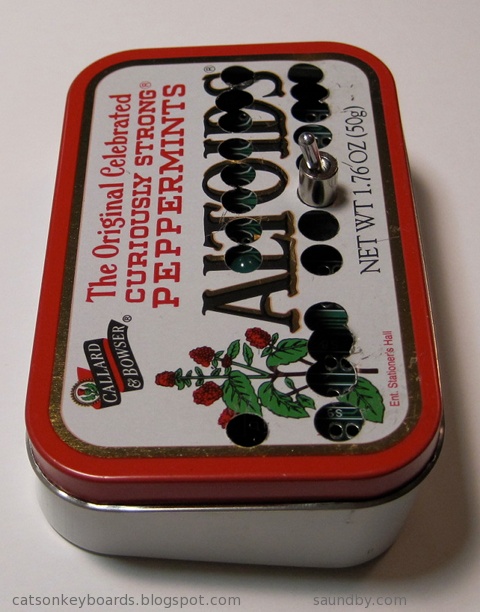
Aside from some astronomy, I've been spending a lot of my free time this summer on some retrocomputing projects. In particular, I've been working on my homebrew 8085 single board computer and my Ampro Little Board Plus Z-80 systems. Alongside that, I've been trying to fit a new computer that's similar to a COSMAC Elf into an Altoids tin.

Retrocomputing in Your Pocket.
Meanwhile, I'm trying to fit my Membership Card into its tin. I think my switches are too tall, so I'm going to have to make some other accomodations.

Each step of the project adds just one to three new pieces to the computer. The complete computer is only twelve integrated circuits, plus resistors, capacitors, and other small parts. It can be built with only eight ICs, if you want a simpler version that gives up a couple of extras. These can always be added in later, if desired. The real key to the project is that it provides a complete, functional 8085 system similar to the SDK-85 development system that can be built up from simple parts that are easy to understand and use in programs.
Most of my work lately, other than playing with software and deciding how I want the programmer's interface to work in its operating system, has been on the front panel of the computer and its enclosure. I want it to be something that someone with minimal tools, and even without power tools, can build from common materials available at an ordinary hardware store. I also want it to be attractive enough to show off after it's built, not something that looks like it belongs in a junkpile.

Since posting details on the 8085 construction project takes about 3 times as long as doing it, I've been holding off on doing an update of the project on its site until I have the enclosure complete. Now I'm almost done, so an update will probably occupy the later part of my summer.

I got a pair of system boards for these from Dave Baldwin when he was cleaning out some old computers prior to a move. One night, I really wanted to get one of the many systems up and running that Dave had given me, and since these seemed like they'd be the easiest to get running I grabbed one and got it going.


Then Vic Maris of StellarVue Telescopes offered me an old desk he didn't need at his offices any more. He said it was large. It is. I had to do some major work to get it into my office. But once there, I put my usual computers on it (an iMac 20" and a Beige G3 PowerPC Mac), and had enough room for one more computer!

I put the Ampro's current box (a PC's beige box) under the desk. I've got another enclosure for it that'll be much more attractive and interesting--but that's another project yet to come. On top, I had plenty of room for my ADDS 2020 terminal, which is the user interface for the Ampro. Unlike the original Big Board computer (the "Ferguson"), the Ampro uses a terminal, whereas the Big Board has a built in CRT and keyboard interface.
Once I got everything in place, I started working with my ADDS terminal to try to get the best image out of it. I originally used this terminal with the Ampro because it's the smallest full terminal I've got. I took a look at all the space on my new desk, and realized...I could use a better terminal. So I pulled out my VT-102, which has a very nice white on black character display and is very sharp.

The VT-102 wasn't perfect, though. So, thanks to some help from fellow retrocomputerists I was able to find the technical info I needed to adjust the character height on the display (it was a little taller in one part than another when it came out of the garage.) Now it's perfect.
Now I'm happily writing games in Turbo Pascal at my desk, and the space next to my easy chair is waiting for another project to move in while my wife's back is turned.

Since this picture was taken I've cleaned up. Really.
The breadboard version of my 8085 computer, the MAG-85 is still in use, by the way. That's where I've been doing my OS development while I finish the permanent version of the hardware. That way I don't have to worry if I've got the permanent one's keyboard and display off for work on the face panel if I want to sit down and code some 8080/8085 assembly.
Lee Hart's 1802-Based Mini-Microcomputer: The Membership Card.
Retrocomputing in Your Pocket.
Lee Hart's Membership Card computer. It's based on the RCA 1802 microprocessor, and it's a close cousin to the COSMAC Elf computer (Google it, if you don't know about it!)
Meanwhile, I'm trying to fit my Membership Card into its tin. I think my switches are too tall, so I'm going to have to make some other accomodations.
The tin doesn't quite close up. My interconnect between the PCBs may be too tall, or my switches aren't laying as low as Lee's did. It's only about 1.5mm, but it's enough. I'm working on Plan B now.
My 8085 Handheld Single Board Computer Project
My first shot at a front panel layout for my 8085 computer, laid out on acrylic sheet to make it easy to see what's where.
Each step of the project adds just one to three new pieces to the computer. The complete computer is only twelve integrated circuits, plus resistors, capacitors, and other small parts. It can be built with only eight ICs, if you want a simpler version that gives up a couple of extras. These can always be added in later, if desired. The real key to the project is that it provides a complete, functional 8085 system similar to the SDK-85 development system that can be built up from simple parts that are easy to understand and use in programs.
Most of my work lately, other than playing with software and deciding how I want the programmer's interface to work in its operating system, has been on the front panel of the computer and its enclosure. I want it to be something that someone with minimal tools, and even without power tools, can build from common materials available at an ordinary hardware store. I also want it to be attractive enough to show off after it's built, not something that looks like it belongs in a junkpile.
The partially-complete Masonite face panel of my 8085 computer.
Since posting details on the 8085 construction project takes about 3 times as long as doing it, I've been holding off on doing an update of the project on its site until I have the enclosure complete. Now I'm almost done, so an update will probably occupy the later part of my summer.
Ampro Little Board Plus Z-80
My Ampro Little Board Plus, in its original incarnation. A pile of parts on a kitchen table.
I got a pair of system boards for these from Dave Baldwin when he was cleaning out some old computers prior to a move. One night, I really wanted to get one of the many systems up and running that Dave had given me, and since these seemed like they'd be the easiest to get running I grabbed one and got it going.
A complete computer, with Z-80 CPU at 4MHz, Floppy Disk Drive Controller, Serial and Parallel I/O, and SCSI all on one small card--in 1984!
Honey, how about we eat dinner on the patio tonight?
Then Vic Maris of StellarVue Telescopes offered me an old desk he didn't need at his offices any more. He said it was large. It is. I had to do some major work to get it into my office. But once there, I put my usual computers on it (an iMac 20" and a Beige G3 PowerPC Mac), and had enough room for one more computer!
My new desk, with Three full size computers.
I put the Ampro's current box (a PC's beige box) under the desk. I've got another enclosure for it that'll be much more attractive and interesting--but that's another project yet to come. On top, I had plenty of room for my ADDS 2020 terminal, which is the user interface for the Ampro. Unlike the original Big Board computer (the "Ferguson"), the Ampro uses a terminal, whereas the Big Board has a built in CRT and keyboard interface.
Once I got everything in place, I started working with my ADDS terminal to try to get the best image out of it. I originally used this terminal with the Ampro because it's the smallest full terminal I've got. I took a look at all the space on my new desk, and realized...I could use a better terminal. So I pulled out my VT-102, which has a very nice white on black character display and is very sharp.
The Beige G3 runs Lemmings and Warcraft, the iMac is my interwebs machine, it's desktop background is an image of the Big Board computer PCB, and to the right is my Ampro's terminal, here showing the utilities menu.
The VT-102 wasn't perfect, though. So, thanks to some help from fellow retrocomputerists I was able to find the technical info I needed to adjust the character height on the display (it was a little taller in one part than another when it came out of the garage.) Now it's perfect.
Now I'm happily writing games in Turbo Pascal at my desk, and the space next to my easy chair is waiting for another project to move in while my wife's back is turned.
Getting the new desk in meant moving some stuff out.
Since this picture was taken I've cleaned up. Really.
The breadboard version of my 8085 computer, the MAG-85 is still in use, by the way. That's where I've been doing my OS development while I finish the permanent version of the hardware. That way I don't have to worry if I've got the permanent one's keyboard and display off for work on the face panel if I want to sit down and code some 8080/8085 assembly.

Wednesday, March 31, 2010
HFE: Sacramento Area Electronics Parts Source
There's a neat little place in Sacramento--next door to North Highlands--that sells lots of electronics supplies and surplus stuff, as well as some consignments. It's called HFE Electronics. It's at the prior location of HSC (Halted Specialties Corp., better known as HSC Electronic Supply.) HSC decided to consolidate, pulling out of the Sacramento location after over 25 years and focusing their attention on their Bay Area store and online sales.

HFE fills the gap that would have been left with the loss of HSC in this area. Not only that, but they've picked up for the Popkey Electronics store that recently closed here. They bought out Popkey's stock and are integrating it into their inventory now.
HFE is a fun place to poke around, ask questions of the staff (or, in my case, I more often get involved in helping the staff answer questions from other customers) and otherwise pick up all sorts of fun bits of electronics. They have everything from discrete components to ICs to equipment. There's new retail stuff as well as heaps of surplus and used stuff. There's lots of bits and bobs for those of us who like playing with microcontrollers, those of us who like building up analog circuits from scratch, amateur radio people, digital electronics types, tinkerers with pre-existing equipment, repairers of the $100 item with a broken ten cent part, and so on. Count me in all the above categories. I seldom get out the door without being about $100 lighter. :)
Among the things I noticed my last time in (no guarantees this will all be there when you walk in, especially if I beat you there) are:
HFE fills the gap that would have been left with the loss of HSC in this area. Not only that, but they've picked up for the Popkey Electronics store that recently closed here. They bought out Popkey's stock and are integrating it into their inventory now.
HFE is a fun place to poke around, ask questions of the staff (or, in my case, I more often get involved in helping the staff answer questions from other customers) and otherwise pick up all sorts of fun bits of electronics. They have everything from discrete components to ICs to equipment. There's new retail stuff as well as heaps of surplus and used stuff. There's lots of bits and bobs for those of us who like playing with microcontrollers, those of us who like building up analog circuits from scratch, amateur radio people, digital electronics types, tinkerers with pre-existing equipment, repairers of the $100 item with a broken ten cent part, and so on. Count me in all the above categories. I seldom get out the door without being about $100 lighter. :)
Among the things I noticed my last time in (no guarantees this will all be there when you walk in, especially if I beat you there) are:
- An Odyssey 2 game console from the 70s (based on the 8048 CPU, with lots of room inside the case for mods!
- Some Tek scopes and modules
- An old Mac SE/30 unit (sans keyboard and mouse.)
- Lots of interesting rocker switches
- A bunch of LCD displays with 44780 controllers and similar
- Oodles of LEDs and displays (I've picked up a bunch of dual digit 14 segment displays, among others.)
- Prototyping boards, tools, wire jumpers for solderless breadboards, and other proto stuff.
- Interconnects and sockets of all sorts of varieties.
Monday, February 16, 2009
Black Screen Saver for Mac OS X Leopard
Black Screen Saver for OS X Leopard. No Downloads Required.
My wife has a new computer, an Apple 24 inch Aluminum iMac. The screen on it is beautiful. It's brighter and has a much better range of viewing angles than my 20" Aluminum iMac (which display is pretty awful compared to the wonderful display in my old white 20" iMac that the Aluminum was supposed to replace.)
My wife's computer lives in the living room of our house. She likes to have it there so that she can be around her family while doing bills, working on video transfers, and so on.
This is the same room of our house that our TV resides in.
When we're watching a movie on the TV, that big, beautiful screen is serious competition for the TV. Annoyingly so. On her old computer, my wife had a standard screensaver for the system that would turn the screen black. That option was not provided on her new computer. On the old computer, the monitor was a separate piece of equipment from the computer itself. So the monitor could be switched off, if need be, while the computer was still running, perhaps encoding a video for writing to DVD. The iMac is all one thing. There's no separate power switch for the display.
Well, in fact there are ways of making the screen go black on the iMac. But they weren't obvious to us when we were preparing to sit down to a movie last night with the evening slipping away while we were fussing with a computer instead of starting the film.
What we expected to find was a screen saver in the Screen Saver section of System Preferences that would simply make the screen black. What we didn't find (mind you, we're not Mac novices around here) was the "Put the display to sleep" option under Energy Saver that would have done pretty much what we wanted--except that it can't simply be activated on demand, like a screen saver. (And exactly how one activates a screen saver on demand on a plain-jane Mac is yet another issue.)
An internet search turned up the Basic Black screen saver. It's donationware and I wish them all the luck in the world. It does exactly what's wanted. How much it's worth to someone should have nothing to do with the fact that we're talking five minutes with Quartz Composer, tops, to make the thing. It's like the old joke about the auto mechanic's bill presented after tapping on the car's engine to make a problem go away: $1.00 for the tap, $99 for knowing where to tap.
There are a couple of Quartz Compositions already on the Mac that can fill the bill.
They're in the Macintosh HD/System/Library/Compositions folder on a standard Leopard install.
Monochrome.qtz turns my screen black. I haven't looked at the QC script to see that it does it in all instances, but it seems to do so.
XRay.qtz turns the screen black with some very brief, and very subtle, flashes of dim, dim light every so often. The flashes are dim enough that they could easily pass unnoticed in normal lighting.
To make these available to Screen Saver in System Preferences, use Finder to copy these files from Macintosh HD/System/Library/Compositions to Macintosh HD/Library/Screen Savers. Then they will be available under the "Others" section at the bottom of the screen saver menu. They could also be placed in Macintosh HD/System/Library/Screen Savers but they might be lost through an OS update (though I would tend to doubt it.)
Another option:
You know that picture you've got in iPhoto of the inside of your camera's lens cap? The one labelled "Black Bats in Coalmine at Night During New Moon"? You can use it as a black screen saver, too. We didn't have ours available last night. So we ended up turning the iMac around so that the screen wasn't facing us during the movie.
Not what I expect to have to do with a Mac, I can tell you.
Edit:
I took a look at Monochrome.qtz. It'll show black for you. It wants an input image to convert to a monochrome image. No image, it stays black. It's overkill versus an even simpler Quartz Composer script to just show black, but hey, it does the job as-is and all you've got to do is copy it from one directory to another--no programming required.
Subscribe to:
Posts (Atom)


 Posts
Posts


 Webomator.com: Backward into the