Showing posts with label cell phone. Show all posts

Tuesday, May 7, 2013

New Android Devices 1:A Samsung Phone Clone


I decided to finally dip my toe into the Android world a few months ago with the purchase of a new Android phone. I should have done this over a year ago, at least, but I decided to give a Blackberry phone a try, first. Boy, what a disappointment and waste of time that was!

So I went looking at different phones and their prices. I was looking for something on the economy end of the scale at first, but as time went on and my BB convinced me I really needed to just pull the trigger as even a low-spec candy bar feature phone would be less frustrating, I upped my commitment to the point where I was looking at bigger displays.

To stay within the price range I was looking at (less than $200 at the end, though originally I had been thinking less that $100), I went looking at clone phones from China.

Not My First China Phone

Those of you who've been reading here a while may recall a series of articles about a prior phone I owned, a Sciphone G2. This was a Java-based feature phone that had been skinned to look like Android. It was an excellent phone, and it's use of Java was a big advantage for me, as there were plenty of good Java phone apps and I could write my own J2ME apps as well. Calling it a mere "feature phone" was an insult, in fact, as I'd rather have one of these than any of the contemporary iPhones that were out at the time.

In fact, after mine went to the eWaste recovery site in the sky, I wished I still had it every day that I was using my Blackberry 8900.

When I went to get another, new China phone, I returned to where I'd bought my G2, hoping to find something equally good. Unfortunately, when I returned to the BlueLans site, I found more clothing than electronics. Their phone selection was ridiculously out of date. Yes, at the time, with the BB 8900 on my belt, I really did consider buying another SciPhone G2.

So I went looking for another supplier. I tried getting a phone from PandaWill. But that turned into a fiasco. It never even got past customs. I ordered a phone from them with a version of Android on a 4" display for about $80. It would have been a good deal, if it had been for real. Unfortunately, they sent me some runaround about not being labelled properly to be shipped with the shipper I chose. They wanted to change shippers, and from what they were saying it didn't sound as if the phone was what it had been represented as on their web page, as well.

Round and round we went. After over a month past the promised delivery date, still no phone. Still some incomprehensible messages from them that made no sense. I tried to cancel the deal with them. They said the phone was in transit (though they also said it wasn't, and that they wanted to change shippers. How can they change shippers if it's in transit? I know there's a logical explanation, and I can think of several possibilities, but they refused to be clear in their communications.) Finally I demanded cancellation of the deal or I'd dispute with Paypal. That did the trick. Suddenly, all their excuses for why the deal couldn't be completed as they told me it could until I actually paid my money disappeared and they cancelled it.

Stay clear of them. If they're not entirely dishonest, they're at least shady enough you don't want to have to sort out a problem with them. If there's a problem of any sort, they'll make it your problem, and my experience they'll at least lie through omission to do so.

Attempt 2

For the second try, I decided to go through a supplier on Amazon with a good track record and Amazon fulfillment. That would at least give some shielding against what I'd just been through with the first place. Initially, I looked for the phone I'd tried to order before. But, it had been a bit longer, and I decided to go with something with a newer version of Android and a larger display (there had also been several more checks deposited to the bank since my first try. I guess that's one good thing about the delay.)

The phone I finally opted for was an SIII clone. It has a display just short of 5", and claimed to be running the Jelly Bean version of Android. Fortunately for me, I didn't care if the phone had Jelly Bean or Ice Cream Sandwich.

When the phone arrived, it was running 4.0, ICS. The About This Phone page had been programmed to lie and say 4.1 (Jelly Bean), but the interface was clearly not JB, the phone reported 4.0.x when I hooked it up to my PC with the Android development software, and the "Easter Egg" on the phone is the ICS easter egg, not the one for JB.

Nevertheless, it's a great phone. The display is really good, the responsiveness was good. It had the right amount of memory and the processor and all the other technical bits were as promised on the Amazon page.

In fact, it was good enough I bought two more. I got one for my daughter about a month after I bought mine. Hers came with a version of ICS with more of JB hacked into it. The interface was more JB, and it had the JB Easter Egg. I guess someone saw my post on Amazon and updated the things I specifically mentioned. It even reported that it was 4.1.x to my PC with the Android Development System. There were still some pieces of ICS in it, though. But it still ran great.

About two months later I bought another for my wife. This time the OS really was Jelly Bean. 100%. And it was a different phone, though the mold lines were about the same. My wife's phone has a much brighter an more vibrant display. That's the first thing I noticed. Inside, the layout of SIMs and memory card is different, as is the battery. And while I had to buy the back with the flip cover screen protector as an add-on for the phones for my wife and daughter, it came in the package with my wife's phone.

One thing to note--while I ordered the same model of phone for my wife, the original supplier I bought from for myself and my daughter had stopped listing that model of phone, so I went with another source. Another source, a different phone.

I'm not disappointed, though, on any count. Everything important about each of these phones was as I wanted it.


Review

Bottom line: This is a great phone. The actual phone interface in Android isn't everything I could want in the way of usability, but that's an Android problem (and each version varies.) Once you get used to the Android Phone application, they work well as a phone. The important functions for me, beside the usual calling and logging, are speaker phone ability and good reception in marginal areas. While my old, lamented Nokia 3650 was a better phone in both these respects, the SIII clone has been better than any phone I've owned since the 3650. It certainly beats out my "name brand" Blackberry, which was purchased in large part because it was lauded on these points.

Processor:
The MTK6577 processor is really what's in it, and it's a great processor for a phone. I would say my tablet blows it away, but my tablet needs to drive a whole lot more screen, so as far as my feeble human perception is concerned, they're both fast.

Memory:
It's a phone. There's never enough, especially when you're like me, loading oodles of memory hog techie apps like the Spartacus Rex Terminal Emulator. That said, it provides easy and immediate use of the MicroSD card memory when you put one in. Unlike, say, Samsung, which treats MicroSD as "something else". If an app allows itself to be loaded on the SD card, this phone will let you put it there and execute it from there. (For those not familiar with some other Android devices, they only use the SD card as data memory, and won't execute apps off of them, or move them to them.)

Programmers take note: making your app run off an SD card takes nothing more than a single line in your manifest file for the app, unless you're doing something on a very short list of things that require the app to be on the phone's main memory. (In which case, write a small helper app that does that in the phone's memory, then put the bulk of your app in another package on the SD card, dangit!)

Display:
It's great. My wife's phone is "wipe your chin, the drool is showing" beautiful, but the ones on my phone and my daughter's are very nice and sharp. Here's an oversized image. The colors are stronger and sharper than in this image, I did my best with the camera:


I/O:
USB works great for recharging as well as for mounting the phone as a file system to Linux, Windows 7 or XP, and Mac OS X. I haven't tried Win8, nor am I likely to unless I have a powerful incentive deposited to my account.

The Wifi is also excellent. I've had several devices with disappointing Wifi, some that cost many times what I paid for this phone. It hooks up easily, and gets good reception no matter what mishandling I'm engaged in with the phone while browsing or whatever. I depend on Wifi, as I'm way too darned cheap to pay for phone-based data services ever since T-Mobile screwed me out of my grandfathered plan after lying to me when I changed service plans.

Both SIM slots work fine, and like most clones, this phone functions fine without a SIM if you're not planning on using it with a phone service. It has two SIM slots, I use one, but plan to add a second SIM card since we have a county nearby where normal phone service from outside the county doesn't operate.

The phone does not include Near Field Communications or IR, but it does have Bluetooth. This works well with headsets and for data file transfers. It's easy to set up and connect to devices, and the antenna on this phone is good enough to get it a good range (I send photos to my computer when outside and around the house without a problem.)

Accessories:
I picked up the flip cover to keep the screen protector from being scratched. My phone came with the screen protector already on, as did my wife's phone, but my daughter had to put hers on. Since mine floats around in my pocket now, and I occasionally put metal things in there before I think to pull them out and move them to the other pocket, I decided to get the flip cover.

The flip cover comes as a new back for the phone. The new back has the cover attached.


At first I found the flip cover annoying whenever I had it open and in my hand. It can get in the way of your fingers, or press into them when you're gripping the phone. After a while, the area around the hinge of the flap gets softened, and this problem becomes pretty much unnoticeable. At first, however, it's a pain in the tookus.

Covers made for the Samsung SIII don't fit, there is enough difference in the forms of the two phones that even the soft "jelly" covers don't fit this phone. So don't plan to add anything specifically designed for the SIII if you get one of these.

Needless to say (I hope), you'll also want to add a MicroSD card to the phone. It's good for up to 32GB. I've got a 16GB in mine, loaded with books and apps, but with still about 9GB free. If I put much music on, that would probably fill it. Personally I recommend the smallest size you think you can live with, as larger cards tend to respond more slowly, especially if you have lots and lots of files in a single directory. This is aside from the concern about speed of the MicroSD. Get the fastest you can find, at least Class 6, if you don't want to hate your phone because you bought a slow MicroSD (I used mine with a Class 4 until I bought a Class 10 for it, and the difference when the new card went in was like someone opening the windows in a stuffy room.)

Wrap Up
Finally, if you don't have a phone with a recent Android OS (4.0 or newer), I highly recommend getting one. It's a solid OS with plenty of tools to let your smartphone be really smart rather than just a parasite living off your PC or a toy trapped inside other people's apps. Load up a real file manager (I recommend ES File Manager, for a start, but get several as each will have its own strengths), a terminal program (several will do the trick without "rooting" your phone), one of the Scripting Languages for Android (which work through SL4A) and a cool old system emulator or two. You'll have a phone that you can really compute on.

This phone is the best pocket-sized device I've had since my old HP 200LX. Believe me, I've blown over a couple of thousand trying to replace my old 200LX with other mobile devices, trying to get something that I could do with a mobile computer from 1994. Now I'm there.

In fact, things went so well for me with this phone, that I decided I'd pick up an Android tablet, too.

But that's another story.

Friday, December 18, 2009

Nokia Ovi: Epic Fail

I decided to download some new apps to my sorta-new Nokia E63 today. My normal approach for putting apps on my phones is to go out looking for open source apps on the web using one of my regular computers, then transfer it onto the phone via memory card or Bluetooth. Today, I made the mistake of deciding to try out Nokia's Ovi software service instead.

First I went out via Wifi on the phone itself. Initially, I had the "Download!" item on the phone as it came from the factory. Upon contacting Nokia I got a message telling me I needed to upgrade to the new Ovi software.

OK. I upgraded. Then I tried connecting to Ovi. I got a message telling me Ovi wasn't available. Wonderful. At that point I had no idea whether that meant I'd just happened to hit some time when site maintenance was going on, or if my new software was no good.

Later I was able to connect (two days later. I should have mentioned I didn't just start this process today...)

You can go along, looking at possible downloads at Ovi, but you can't download without an account. The advice I got was to create an account on my PC, then sync with the phone so that it could use that account to connect to Ovi. *sigh*

I went to the only PC I have that runs a current version of Windows as required by Nokia's sync software. I logged into Ovi and created my account. I downloaded the software (after fighting my way through Nokia's awful website--I'm sure the Flash crud works fine on Nokia's LAN, but on my broadband it takes forever and you can't even tell what it's doing then once it's downloaded you get an error more than half the time. And don't even try to connect to Nokia's website from one of their phones!)

I got the software downloaded while I left the house for errands, came back, installed it, and discovered that I had no data cable and that none of my present USB cables was the right one for this phone. My cheap, half-the-price Chinese phones came with data cables, Nokia! What's the matter, can't turn a profit without trying to milk your customers for an overpriced data cable? Not only that, my Windows system is the only one in the house without Bluetooth. I didn't feel like burning more time on a wasted effort by trying to find a driver for the dongle I've got, so after the website, download, and install I just gave up. I'll recover the hard disk space another day.

I went back to Ovi on the phone, and found that I could just log in directly. Then I selected that I wanted to see only free apps. Then I changed catagories. And it started showing me for-pay apps. When you change categories you then have to go back and choose to see just free apps again. And even if you do, if they've got a "featured" app that's for pay, it stays there at the top of your list.

Four pages of apps in, the stuff I was finding for free was garbage. Adware and crippleware, mostly. About what I expected, I'm afraid, and why I usually just go looking for free open source software right off the bat. I was hoping to find a few decent simple time-killer games, though. They may be there, but I can't find them among the cruft.

What a waste of time and effort.

Do yourself a favor, if you do end up with one of Nokia's phones, learn to install apps without going through Ovi if you don't already know how. It'll be time far better spent than doing what I did, and you'll still know how to do it when you get a different phone. Like a cool, inexpensive little Sciphone, maybe.

My Articles on cell phones:

Monday, December 14, 2009

Face Off: Nokia E63 vs. SciPhone G2

I picked up a Nokia E63 cheap some time ago as a possible replacement for my Sciphone G2. I like the keyboard on the E63, and that coupled with a discounted unit price at a local brick-and-mortar induced me to buy.

The phone my G2 replaced was an older Nokia, a Nokia 3650. This was a great phone, I still had such an old phone on my hip for such a long time because I couldn't find a newer phone that gave me all the features it had, plus some tech upgrades, at a price I was willing to pay. For the longest time the best I could find was phones costing over $700. Everything selling for less would have meant giving up something I already had on the 3650.

As a result, I had a good impression of Nokia. I know all their phones aren't winners (otherwise replacing the 3650 would have been a no-brainer, right?) But still, I liked Symbian far, far better than WinMobile or any of the other OSes I saw on other phones. Giving up Symbian when getting the G2 was one of my biggest concerns.

Overall, though, the G2 turned out to be a great phone. I gave up my old 3650 to one of my kids shortly after moving to the G2. I took a leisurely pace when "moving in" to the G2, and after about 3 weeks I had everything configured as I like it, and was using all the features I'd bought the phone for without any problems.

The phone ended up having a problem after that, and the fine support at scophone.com, from whom I'd bought the phone, had me return it for a replacement. When the replacement arrived, I was able to "move in" to the new phone easily enough (my only problems turned out to be with my service provider, T-Mobile, who turned off my internet service without my authorization then refused to reinstate it at my previous rate, only offering me the new rate of over double my grandfathered rate from before.)

Then last October I bought the E63.

Well.

I looked at the calendar and discovered that just three days short of two months in using this phone, I still don't feel comfortable with it. When I tried (and tried, and tried, but that's a long story) to do a firmware update, at one point it warned me it'd be clearing everything in the phone. Didn't bother me at all, I haven't personalized it at all past setting up the Wifi and pairing it with my workstation via Bluetooth. I don't stand to lose any data. It's not like it's my phone...

I'm starting to get used to some of the menus I use regularly. It's still not natural. Not even calling my wife.

The controls and menu layout stink. You're never sure what you should do, you're never sure exactly what you're going to get. Constant surprises keep you feeling this way.

This phone's keyboard is great. Otherwise, I call it a dog. I gave up my old phone about a week after I gave up my G2. I still have my G2, and I take a "vacation" from my E63 every so often by sticking my SIM back in it. My teenager is upset that she doesn't have my G2--she was really looking forward to it. With the Java apps on it, it pretty well kicks the butt of even the vaunted "Jesus Phone".

So, in spite of the G2's quirks, I still like it more than my twice-the-price first-line manufacturer Nokia E63:

Nokia E63 versus Sciphone G2

Keyboard:
E63: Very nice physical keyboard.
G2:Soft keyboard, with the annoying trait of having to flip through multiple international keyboards when entering data that requires shifts between upper and lower case, etc.
Win: E63

Blacklist:

E63: Either has none or it can't be found by mere mortals.
G2: Easily found and configured.
Win: G2

Java:
E63: Clearly documents which JSPs it supports, supports a wide variety of them.
G2: Less clear what it supports, but runs touchscreen capable Java apps well.
Win:E63 by a nose. Functionally the G2 is as good, but better docs of what standards it supports would be very nice.

General Phone Use:
E63: Awkward interface, usable but non-intuitive. Lousy menu structure, unclear about keyboard mode.
G2: Easy, intuitive.
Win:G2, hands down.

Signal Strength:
E63: Excellent in marginal areas (where I live and work is the definition of a marginal area.)
G2: Very good.
Win: E63, but not by much--the G2 outperforms every other phone I've tried but the Nokia E63 and 3650.

Call Clarity:
E63: Excellent sound and clarity, decent noise rejection.
G2: Excellent sound and clarity, good noise rejection.
Win: G2 by a nose.

Hands-free, wired:
E63: works well with an awful provided headset.
G2: works poorly with a nice basic headset.
Win: Nokia, at least it's usable though the headset is so bad you don't care.

Hands-free, Bluetooth:

E63: Mating with headset is a pain, works well after that.
G2: Mating with headset is a little challenging, works well after that.
Win:G2 by a nose.

Hands-free, Speaker phone:
E63: Easy to use, excellent volume level, poor volume controls.
G2: Easy to use, decent volume level, great volume controls.
Win: G2. Even though the Nokia achieves higher volume levels, the inability to control it easily during a call makes this point moot.

Apps:
E63: Hidden in crappy menu structure, no good customization options.
G2: Easy to install, good menu structure (but not as good as the i68+), easy to customize.
Win:G2.

Overall Ease of Use:
G2, hands down.

For all that, I haven't given up either phone...yet. I haven't checked for a firmware update for my G2 since I've gotten it. If the keyboard thing is fixed, I'll be ready to hand the Nokia to my teen. The keyboard is pretty much what's keeping me on the Nokia right now. But I'd swear less if I gave it up...

Edit, Dec. 18, 2009:
E63: No Data Cable Provided
G2: Data cable provided.
Win: G2

The more I try to get out of the Nokia, the worse it gets.

I can see why Nokia is having trouble...

My Articles on the Sciphone G2:

Monday, October 12, 2009

Sciphone G2 Tips


Some tips for users of the Sciphone G2:

  • Fastest way to move all those files you just transferred from the "Received" directory to the place they belong is not to use the Move function in File Manager. Instead, use file manager to go to the Recieved directory, select the file, then select "Open" from the menu. It will ask if you want to "open it from" . Answer yes, it'll move it then open it in the app. Back-arrow to drop out of the app, then do it for the other files as needed.

  • If you're looking for something to select, but it doesn't seem to have it there, use a tap to select the thing you want.

  • If you're selecting a directory, and tapping on it gives you "Empty" (meaning it has no subdirectories, by the way, not that it has no files. It about gave me a heart attack the first time I saw it), then press the OK button below the screen.

  • Be patient. There are many operations that seem to have an I/O delay associated with them.

  • If you've been patient, try again. Clicks and touches can get missed if you're going too fast at some points.

  • You can use the rocker switch on the side as well as the four-way switch on the face to scroll.

  • If you're sick of hearing beeps while using the ebook reader, put it in Meeting mode. You'll feel the shake while you're reading, anyway.

  • Usually you can briefly press the hang up button when you're at the top window to lock the screen. But sometimes it won't respond to a short press. Press again, and hold, then select "Lock Screen" from the resulting menu.

  • Expect everything to be slow if you're running a large video.

  • When answering, the screen may be slow to respond if you tap the "Answer" button. Use the pick-up/call button on the face of the phone--the one that looks like an old phone receiver turned upward on the left side.

  • Have I mentioned patience? Overall, the phone works nicely, but there are points where it seems to pause for a moment, and other times when the menus don't seem to give you the right choices.

  • If a menu doesn't seem to have the logical choice, check selections on the screen if you've been navigating through the physical keys. Vice versa if you've been navigating via the screen. At some points you can only make selections one way or the other, but not both, it seems.

  • Remember that the camera takes the picture after the camera shutter noise. To avoid smearing, keep holding the camera steady until it displays the completed image.


Good luck!


My Articles on the Sciphone G2:

Tuesday, July 7, 2009

Bluetooth Headset for the Sciphone G2: Round 2

I had a little trouble getting my new Bluetooth headset to charge up, but now it's charged and ready to go.

Samsung WEP200 Bluetooth Headset
Blue Light=Good
It paired up with the Sciphone G2 just fine, the only hiccup was getting the correct menu (I'll post a step-by-step on my website soon, but it's not difficult.) Once paired, the phone switches automatically between the Bluetooth profile and General profile automatically depending on whether the headset is powered up or not.

Note: You'll want to make sure that you've got a reasonable ring tone set up for the Bluetooth profile, it won't default to the same one as your General profile.

Once on Bluetooth, everything worked great. The sound is good, there is no noise in the background as there is with the included wired headset. I'm still working on that problem, but Bluetooth is certainly a reasonable work-around.

Upshot is, if you're a frequent headset user (while driving or whatever), expect to purchase a Bluetooth headset to use with this phone.

I looked at the headsets at retail outlets, and choked at the prices I saw. Fortunately, I found that online prices are far more reasonable. I've linked the unit I bought here:


It's a pretty basic unit, no stereo but inexpensive, comfortable to wear, and it has good sound. The buttons are large enough to use easily while you're wearing it. Some headsets I've seen have volume controls that are impossible to use without pulling the headset out.

I'm still new enough to wireless headsets that I feel like I ought to be quoting Lieutenant Uhura while I'm wearing one, but nonetheless I'm happy with the one I got.

Also, the charging problem is easy to overcome once you realize it's there. If the light is flickering when you set the headset in its charger, take an extra moment to seat it properly. It's obvious once you know.

My Articles on the Sciphone G2:

Bluetooth Headset for the Sciphone G2: 1st Lesson

I picked up a Samsung WEP 200 Bluetooth headset to use with my Sciphone G2. I got it online at a great price. There were other headsets, but I wanted something with usable buttons, not something miniturized to the point of uselessness. The WEP200 looks like it'll fill do what I want, from the reviews I've read.

It arrived yesterday. I haven't used it yet, though. Step 1 in the instructions is to charge the headset in its little carrying case charger module.

The instructions say it'll take 2 hours to charge. So I tucked it in, and got a red LED which it is supposed to display until it charges, at which point a blue LED lights up. Well, after waiting overnight the red LED is still on. Sort of.

It's actually flickering a bit. Just a little, barely noticeably. I opened the case just now and fiddled with the headset. Now the light is on solid red.

Lesson 1: If the little red LED on the Samsung WEP 200 headset is flickering, it's not going to charge in two hours. It's not even going to charge overnight. Fiddle with it until it doesn't flicker.

More later, as events transpire...

Once the LED turns blue.

My Articles on the Sciphone G2:

Thursday, July 2, 2009

Sciphone G2 Headset

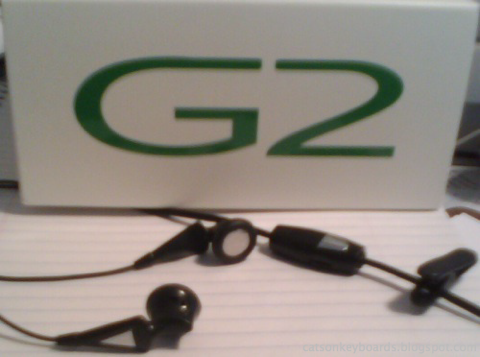
There's one problem I haven't managed to solve with my SciPhone G2. When I'm on a call, I get noise on the included headset.

Sciphone G2 Headset Ear Plugs and Control image

When I'm listening to music through the headset, it works great. When I pick up a call, the G2 pauses the music. Perfect. However, noise then appears while I'm on a call on the headset. It sounds like radio interference.

Handset Sound Quality: Excellent


The G2's sound quality from the handset is excellent. It's as good as my old Nokia 3650, which had excellent sound quality, even when compared against other top-notch mobiles. It does a great job of picking up my voice, rejecting ambient noise, and of playing the sound from the other end of the call. It also does a great job of picking up audio when in speakerphone mode, though the location of the microphone makes it more sensitive to direction than my old candy bar phone with its mike on its face panel.

Headset Sound: Not Good

When I'm using the included headset, however, I get noise. I've worked with SciPhone on this, but we haven't resolved it yet. I'm doing some more testing on my part to get back to them with more information at this point, because I strongly suspect it has to do with the fact that the headset cable doubles as an FM radio antenna for the G2. I was going to put a ferrite on the headset's cable to see if it cut the interference at all, but I've recently reorganized my electronics storage and I can't find my ferrites now (so much for being organized!)

The amplitude of the interference drops as I turn down the headset volume. But it doesn't go away until I turn it down to the point where I can't hear the call any more. Both sides of the call hear the interference.

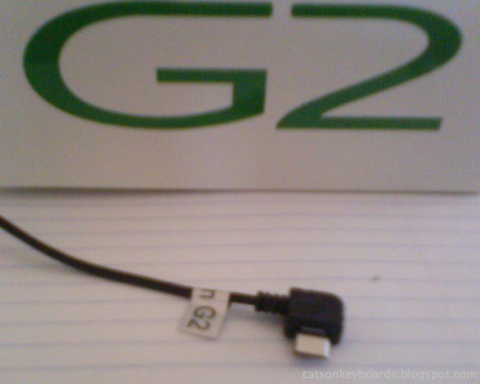
Headset Plug

The non-standard plug end of the G2 cell phone.

The plug on the headset is non-standard, so I can't just plug in another headset and see what happens. There is said to be an adapter available from mysciphoneshop.com, you'll want to make sure you let them know you want it for a G2 to get the correct pinout if you go there to get one. I'm going to be trying something else, though.

The Workaround

I'm continuing to work on the problem. Meanwhile, I've ordered a Bluetooth headset to use with my G2. This will let me use the phone hands-free conveniently for the time being.

I suspect the problem with the included headset came about as a result of differences between the RF environment between here in the U.S. and China. I'm going to keep doing some testing, but I'm planning on being pretty conservative in how I do it. Once I find some ferrites I'll have a chance to see whether it's really coming from RF interference or not.

So far, this is the only real problem I've had with the G2. Everything else has worked well for me.

My Articles on the Sciphone G2:

Friday, June 26, 2009

A New Sciphone G2

Well, I've got a new Sciphone G2 cellphone. My first one developed a problem with the touchscreen, so Scophone has replaced it for me. The replacement took some time because of postal transit time for my old phone going back. One the replacement was on its way, it got here in just a few days.


The original one, which looks just like the new one from the outside.

The problem the first phone developed was that the touchscreen sensed the touches on the screen reversed top-to-bottom. It made the phone pretty hard to use. A restore to factory settings didn't do the trick (typing in the password with an inverted touchscreen was a trick, though), so Scophone asked me to send it back for a replacement. I have no complaints about Scophone's service, that's for sure.

I haven't had a chance to fully "ring out" the new phone yet, but so far it's looking really good. For one thing, the battery cover comes off this one without too much trouble. The first one was more difficult than I felt it should be. This one is just right. It's not going to come open when I don't want it to, but I don't feel like I'm going to break the phone when I open it. Also, the stylus fits better. It was too hard to get out on the first phone, at least for the first few goes. After that it wasn't quite so bad, but it was still more trouble to get out than I felt it should be. This one is, again, just right. It hasn't loosened up any with use, either.

I've got the new phone on my home's WiFi network again, and soon I'll have everything configured just as I had it on the first phone. It looks like there have been some minor changes to the software. I'll be posting more on the phone soon.

My Articles on the Sciphone G2:

Thursday, May 14, 2009

Wireless on the SciPhone G2 Cellphone

One of the biggest draws of the Sciphone G2 is its wireless abilities. I have the Wifi model, which also includes Bluetooth. One of my biggest concerns when buying this phone was how well it would work as a phone as well. If it doesn't pick up a cell signal and get my calls in and out, all the other features don't mean a lot to me.

I've had a chance to use my new G2 under a fairly wide range of conditions since I first got it. I live out on the edge of the reception areas for the local cell providers. There's an Interstate highway going through our town, which helps, but we go to a lot of places locally that aren't right along the Interstate, too. Further, my carrier's coverage has gotten worse in this area over the past couple of years.

So I need a phone that can pick up a signal well. A marginal phone won't work out here.

My prior phone was a Nokia 3650, a phone which was recognized for its excellent reception. It's worked very well for me, even as the cell coverage has gotten worse. It manages to get calls through in places other phones get nothing, and it only drops off the network in places that it's flatly impossible to get a signal through.

My reception with my Sciphone G2 has been equal to that of my Nokia 3650 so far. The only caveat is that it's somewhat sensitive to angle and position. It gets the best signal when held up vertically. It gets a good enough signal to connect even in other positions, but I notice a greater change in signal strength with this phone based on its position than I ever did with my Nokia.

But I have no coverage complaints with this phone. If it'll work for me, out where I am, it'll work for you at least as well as anything else without an external antenna.

Bluetooth


The phone's Bluetooth works well, too. I had no problem going through and getting it set up for my devices. It paired with my computer easily as well. If you've used the Sciphone i68+, it works pretty much the same way, and it's pretty much the same as any other mobile's Bluetooth setup. You can search for devices, pair with them, set what you want to use them for, and so on.

One thing that's less than perfect about the G2's Bluetooth is that its antenna is very sensitive to the phone's position. Data transfer rates vary a lot based on the angle of the phone with respect to whatever it's talking to. I got changes of 10x while transferring photos by how I was holding the phone. It never dropped the connection, but it certainly made a really big difference in how fast the data was going.

I haven't had a chance to try out a Bluetooth headset yet. I expect the really small distance between a headset and the phone will make this not a problem, but when transferring files across the house it does. So if your photos or files are moving slowly across Bluetooth, try holding the phone in a different position.

Wifi


Here's the biggie. Wifi! I'm using Wifi for web browsing on my home's wireless network. The signal strength is excellent under all circumstances. The only hangup I've had with Wifi was the initial configuration, which wasn't obvious enough to do without instructions.

There are instructions at:
Wifi Setup Directions at MySciPhone.com

You can also get other information from the home directory for that file. Basically, you need to set up a wireless profile that uses Wifi, then select that from the available profiles when you start your browser.

The data transfer rates I get are reliably about 2Mb/sec across my 802.11n home network. I'm not sure what version of 802.11 the phone is actually speaking. But the data transfer rates outpace my internet connection to the outside world, and are plenty fast for the types of transfers I do otherwise.

Summary


One minor thing is that Bluetooth and Wifi can't both be on at the same time. You have to turn off one to use the other.

Battery life is not severely affected by the wireless being on. I left Wifi turned on over 6 hours while using the phone outside the house for calls, taking photos, and so on, and the battery level was still at 86% when I got home. Playing music is the hardest thing on the batteries that I've found so far.

I haven't configured my EDGE/GPRS networking for my provider yet. The configuration that worked for the Sciphone i68+ didn't work for me (the Nokia 2610 config.) So I'll need to log into the forums at MySciPhoneShop.com and see what folks are saying there. More on that once I get it going.

My Articles on the Sciphone G2:

Wednesday, May 13, 2009

The G2 Cellphone Camera

The G2 Cellphone's camera has a much higher resolution than that of the Sciphone i68+. I'm not going to play games with numbers in megapixels, the camera's native resolution is 1600 by 1200. The included camera software can do interpolation to achieve higher "apparent" resolutions, so the manufacturer claims 4 megapixels for the camera.

The resolution of the camera is fine. It's response to different lighting conditions is good, too. It doesn't have any built-in flash capability. It has the ability to set both exposure and white balance, as well as to use a number of effects in pictures (sepia tone, etc.)

A picture of my old Motorola 68000 poster. Somehow the greyscale image effect seemed appropriate.

Here's a section of the above photo at full resolution. Not too shabby, even for handheld.

The only problem I've had with the camera so far is it's shutter release. It uses to "OK" button on the front of the phone to take a picture. The problem is that the button is kind of stiff, so pressing it makes the phone move just as it takes the picture. This results in lots of "transporter accident" photos. There may be a trick to holding the phone still while pushing the button. I'm still working on the "best grip" for the phone while taking pictures, I need to keep my fingers out of the way of the lens, which is way up in one corner, and try to hold the phone still.

My first few images weren't bad. Then I took one bad picture and it's been a struggle to not get the images smeared ever since. The "touch the screen" shutter release on the Sciphone i68+ is much better.
The effects of a stiff shutter release, coupled with holding the camera out at arm's length over someone's shoulder.


Some of my class working away on their class projects. The camera wasn't perfectly still here, but I managed to hold it still enough for snapshot quality.

Pushing the camera's macro ability. This camera is far better than my Nokia's for close up images. The part near the top, in best focus, is only about 3 inches (75mm) from the lens of the camera.

My Articles on the Sciphone G2:

Tuesday, May 12, 2009

Web Browsing on the G2 Cellphone

I'm still learning my way around my new Sciphone Dream G2 cellphone.

One of the questions I hear about this phone concerns the lack of a keyboard. Well, it's got a virtual keyboard that comes up in the Opera Mini web browser, at least, when you need to enter text.
Click or tap on a text field in the browser, you get this screen. Tap on the screen to start entering text.

Here's the keyboard. As small as the keyboard looks, you can use it with fingertips. The stylus is easier, though.

Once you've pressed the "OK" button, you go back to this screen. Tap on "Options" in the bottom left hand side (hard to see in this pic, but that's what's there.)

Tap "OK" on this menu. That takes you back to the browser, with your text now entered into the field.


The included web browser is Opera Mini. It's a very nice browser. It does a good job of rendering even very complex pages to the small screen (I thought my Eee PC was challenging!) There was only one thing about the browser that was not obvious: scrolling.

The pages displayed in the browser appear to have a scroll bar at the edge. I drove myself crazy trying to scroll with it, first with my finger, then with the stylus. It turns out this isn't a scroll bar! In fact, it's just showing you where you are on the displayed page. To scroll, touch some part of the screen where there isn't an active link and drag the page in the direction you want it to go. You can actually touch the page on a link or some other live element, and it will detect that you're doing a drag rather than a click. But to be safe, I try to touch an inert part of the page.
That white bar with the strip on the right edge of the screen isn't a scroll bar. It's just showing you where you are on the page. You can't scroll by dragging the red bit. You drag the page itself to scroll.


Next, using the G2 cellphone's built in camera.

My Articles on the Sciphone G2:

SciPhone G2 Phone Use

Here are some updates since yesterday's post.

The ringer on the G2 is very loud! You don't need to worry about missing it. I haven't tried changing the ringtone yet, but the default will let you know you've got a call and no mistake.

The speakerphone output is somewhat quiet, however. Not too quiet, but not loud enough to use unless you're in a moderately quiet environment. A normal indoor room (conference room, office) will be fine. It would be usable in a car with moderate road noise. If you've got background conversation noise, or a loud stretch of road (like Interstate 80 right after winter where the truck chains have removed the road surface) then it may not be loud enough. If you depend on it under these conditions, you'll want a headset.

The transmitted sound is good, both in handset mode and in speakerphone use. I haven't tried the included headset yet.

The sound you receive is good, but it seems to amplify high frequency background noises more than my Nokia did. Clicks, mostly. This is just a first impression, I've only had a couple of brief conversations on it, so I'll be posting more on what it sounds like when I've made more calls with it.

Dialing is easy, and it plays the standard DTMF phone tones as you dial, which makes it nicer to dial without having real buttons. You can also select phone numbers off the SIM card directly. I haven't had a chance to play with speed dial or other such features, yet.

I also got the G2 to talk to my home Wifi once I followed the manufacturer's directions, as relayed on the Sciphone forums. There's a file that includes directions (multilingual, English comes second) on how to configure the phone so that you can select the Wifi as the network connection for the included applications to use.

I was able to browse easily with the included Opera Mini browser. I still have some things to learn about using Opera Mini (particularly with Delicious, since I don't have any bookmarks on the phone.)

The music plays good and loud. The music is a bit tinny through the internal speaker but I didn't expect anything else. Hopefully I'll have a chance to try it with headphones soon. One downside to the G2: It doesn't use standard headphones. It has special ones that use the phone's USB port. I'm not sure if it's compatible with SciPhone i68+ headphones or not, but it looks the same at first glance.

My Articles on the Sciphone G2:

Monday, May 11, 2009

SciPhone G2 First Impressions

My Dream G2B. Now I need to find a calculator program that will do justice to the ledger pad it's on. Anyone know where I can get an HP-41C emulator?

I ordered myself a new cell phone a little over a week ago, a SciPhone G2. I spent a lot of time researching different cell phones before I settled on this one, and considered everything from an iPhone or Nokia E90 at the top end down to anything that would give me at least the same features as my old Nokia 3650.

I spent a lot of time considering the SciPhone i68+, but there were two things that kept me from jumping at it right away: the camera and data networking are no better than my N3650, and I wanted to make sure I found a reliable seller, so that I could be sure I'd be getting the real SciPhone, not a knockoff.

I found a great forum full of information from a lot of users of the i68+ as well as its knockoffs. I got a SciPhone G2B, which has a different layout of keys than the SciPhone G2A. It's not as colorful, but just looking at the G2A's keys I would have to say that the G2B layout should be better to use.

The first challenge I ran into was opening the battery cover. It's not described or illustrated in the manual. Given that this is a phone with a large display, I wanted to make sure I didn't break it while trying to figure out how to get the battery in, before I even had a chance to use it.

The battery cover doesn't have any raised bumps or other clues on how to open it, either. On my G2, the cover runs across the entire back, and the lens cover for the camera is part of the battery cover. There are pictures of two G2s with the backs off in the G2's manual, neither looks exactly like mine.

I ended up using a small plastic tool to pop the back off while pulling with my thumb on the lower part of the battery cover. The cover is made to slide about 1/4 inch (6mm) toward the bottom of the phone, then lift off. It doesn't slide all the way off.

Once you've got the battery in the phone and you go to replace the back cover, you have to press the cover down a bit to get it fully engaged with the back of the phone. Then slide it back up. I usually don't get both the tabs at the top engaged on the first try, but once its in place it's secure. So secure you'll probably have to use a tool to start it loose again.

Getting the battery in isn't difficult. Looking at the battery and the phone will let you see where the contacts are, and therefore which way the battery goes in. You can put the battery in either left-side first (contacts first) or right-side first (contacts last). To get it out, there's a tab on the right side of the battery and a little relief cut underneath the tab on the phone. A small fingernail could probably get it popped out, I use my little plastic tool again.
Using the little red plastic tweaker tool to pop out the battery.
The phone has a solid feel to it, it doesn't feel cheap and nasty. The texture on the case is pleasant, and easy to grip. The case color is a lot nicer than the manufacturer's picture makes it look, it's a standard dark black, not some wishy-washy gray. The screen is good--nice contrast, good colors, and bright. I put the protective plastic cover back on it until I get a protective case for the phone.

When I put my T-Mobile (USA) SIM card in it, it put me on the cell phone network with no problem. I haven't had a chance to configure GPRS/EDGE and MMS/SMS yet. And I'm currently working on getting Wifi working on my home network.

More Articles on the Sciphone G2: