Showing posts with label free software. Show all posts

Thursday, August 25, 2016

What is a Linux Distro?

We've got a number of folks in a Facebook Linux group I moderate who are playing around with the guts of their Linux by swapping around pieces from different distros. Which is cool--experimentation and tinkering are always good things.

It has raised a point that I think may require some background. Specifically, "What's a distro?"

Back in Ye Olden Days

When Linux first came around, those of us who wanted to play with it got source code. And that's all. We'd compile the kernel under some other operating system (Windows, another Unix, or maybe even the Mac of the time if you were a masochist!)

Then we'd start compiling binaries for our Linux kernel--a shell and cc would be a common place to start so that you could start compiling stuff for Linux under Linux.

After a while, we realized that we were duplicating a lot of effort. Many of us had fairly generic systems that we could swap binaries between without having to recompile absolutely everything.

With time, the concept of having a set of precompiled binaries for the kernel and applications as a starting point for a Linux system became the basis for a distro. Usually you'd install from a set of floppies or a CD. If the kernel you chose from the distro was close enough for your purposes, you'd just use one of the ones they'd precompiled. If you wanted something more suited to your hardware, you'd recompile the kernel with a few configuration changes and usually get much better performance and a more stable system, without having to recompile the application binaries for user space.

We still regularly compiled applications. Anything that wasn't bog standard usually would have to be compiled. As time went on, the list of precompiled binaries for each major distribution grew, and then distros started to have their own package managers to ease the installation and management of precompiled binaries.

The ability to do this is a large part of what has turned Linux from a tech toy used by a select few who are comfortable with compiling their own operating systems and applications to being the generally popular operating system it is today.

Stepping Into Today

Now it's not uncommon for users to choose a distro according to the application set they want for their system.

Different Linux distros have sprung up with selected sets of software precompiled and ready to install and run, or as part of their base installation.

The specialization has reached back into the kernel, too, as maintainers of the distros have improved their distro by compiling a kernel that suits the base suite of applications they provide. Distros that are intended to be more general-purpose likewise make changes to the Linux core to make the installation and hardware detection process simpler and more robust to make installing and setting up Linux easier for users.

More software is more easily available to everyone because of this. All the major distros are tied to a system of package management that provides users with almost limitless choices of software to install on their system.

Going outside the distro's own software repositories (repos) is certainly possible, especially in the instance of distros that are upstream of one's own.

For example, if you're running Mint, it's a snap to include repos for Ubuntu and Debian in your package manager's list of repos. And chances are almost all the software there will run without problems. For all I know (I haven't installed Mint in a while) Mint includes the Ubuntu repos by default, I seem to recall that being the case in the past.

However, if you're crossing over between branches, like wanting access to software compiled for Fedora that's not in the Debian-family distros, then you're starting to put yourself in a position of having more errors. The filesystem layout is different between Fedora and the Debians. There may be differences in the kernel configurations that will cause you problems.

If you want to get software that isn't in your distro's repos, or in a closely related distro (preferably upstream), then the correct answer is really to compile it yourself on your system, rather than use software someone has compiled on a different system configuration.

If you want to save other people the trouble, see about contributing your effort to your distro's repos. They'll probably have standards of what you have to do to do that, but you can be part of the team that makes your distro that much cooler pretty easily.

Kernel Swaps

I've seen discussions of turning one distro into another on the Facebook group. Hopefully a better understanding of what a distro is, and how it is defined, helps to show why "Turning Ubuntu into Kali" or some such is a misnomer. If you're grabbing another kernel then starting your system off it, you're no longer running either distro. You've gone custom.

That's not a bad thing, experimentation is a good thing. But you also want to look at how effective the technique of playing mix-and-match with precompiled system files and applications is versus just doing your own compilation with the stuff you want.

If there's a specific distro that you want the advantages of, it's best to install it rather than to build a sort of chimera by grabbing pieces then lashing them on to your current distro. You're asking for trouble by using binaries that haven't been compiled using the same assumptions at compile time.

If you want something truly custom, then rolling your own Linux is very probably the way to go. It's not hard, and that used to be the standard installation method. There are a number of systems out there to make it even easier than we had it in the old days (Linux From Scratch, Gentoo, etc.)

I hope this helps clear up some of the confusion about distros and their parts. :)

Tuesday, May 7, 2013

New Android Devices 1:A Samsung Phone Clone


I decided to finally dip my toe into the Android world a few months ago with the purchase of a new Android phone. I should have done this over a year ago, at least, but I decided to give a Blackberry phone a try, first. Boy, what a disappointment and waste of time that was!

So I went looking at different phones and their prices. I was looking for something on the economy end of the scale at first, but as time went on and my BB convinced me I really needed to just pull the trigger as even a low-spec candy bar feature phone would be less frustrating, I upped my commitment to the point where I was looking at bigger displays.

To stay within the price range I was looking at (less than $200 at the end, though originally I had been thinking less that $100), I went looking at clone phones from China.

Not My First China Phone

Those of you who've been reading here a while may recall a series of articles about a prior phone I owned, a Sciphone G2. This was a Java-based feature phone that had been skinned to look like Android. It was an excellent phone, and it's use of Java was a big advantage for me, as there were plenty of good Java phone apps and I could write my own J2ME apps as well. Calling it a mere "feature phone" was an insult, in fact, as I'd rather have one of these than any of the contemporary iPhones that were out at the time.

In fact, after mine went to the eWaste recovery site in the sky, I wished I still had it every day that I was using my Blackberry 8900.

When I went to get another, new China phone, I returned to where I'd bought my G2, hoping to find something equally good. Unfortunately, when I returned to the BlueLans site, I found more clothing than electronics. Their phone selection was ridiculously out of date. Yes, at the time, with the BB 8900 on my belt, I really did consider buying another SciPhone G2.

So I went looking for another supplier. I tried getting a phone from PandaWill. But that turned into a fiasco. It never even got past customs. I ordered a phone from them with a version of Android on a 4" display for about $80. It would have been a good deal, if it had been for real. Unfortunately, they sent me some runaround about not being labelled properly to be shipped with the shipper I chose. They wanted to change shippers, and from what they were saying it didn't sound as if the phone was what it had been represented as on their web page, as well.

Round and round we went. After over a month past the promised delivery date, still no phone. Still some incomprehensible messages from them that made no sense. I tried to cancel the deal with them. They said the phone was in transit (though they also said it wasn't, and that they wanted to change shippers. How can they change shippers if it's in transit? I know there's a logical explanation, and I can think of several possibilities, but they refused to be clear in their communications.) Finally I demanded cancellation of the deal or I'd dispute with Paypal. That did the trick. Suddenly, all their excuses for why the deal couldn't be completed as they told me it could until I actually paid my money disappeared and they cancelled it.

Stay clear of them. If they're not entirely dishonest, they're at least shady enough you don't want to have to sort out a problem with them. If there's a problem of any sort, they'll make it your problem, and my experience they'll at least lie through omission to do so.

Attempt 2

For the second try, I decided to go through a supplier on Amazon with a good track record and Amazon fulfillment. That would at least give some shielding against what I'd just been through with the first place. Initially, I looked for the phone I'd tried to order before. But, it had been a bit longer, and I decided to go with something with a newer version of Android and a larger display (there had also been several more checks deposited to the bank since my first try. I guess that's one good thing about the delay.)

The phone I finally opted for was an SIII clone. It has a display just short of 5", and claimed to be running the Jelly Bean version of Android. Fortunately for me, I didn't care if the phone had Jelly Bean or Ice Cream Sandwich.

When the phone arrived, it was running 4.0, ICS. The About This Phone page had been programmed to lie and say 4.1 (Jelly Bean), but the interface was clearly not JB, the phone reported 4.0.x when I hooked it up to my PC with the Android development software, and the "Easter Egg" on the phone is the ICS easter egg, not the one for JB.

Nevertheless, it's a great phone. The display is really good, the responsiveness was good. It had the right amount of memory and the processor and all the other technical bits were as promised on the Amazon page.

In fact, it was good enough I bought two more. I got one for my daughter about a month after I bought mine. Hers came with a version of ICS with more of JB hacked into it. The interface was more JB, and it had the JB Easter Egg. I guess someone saw my post on Amazon and updated the things I specifically mentioned. It even reported that it was 4.1.x to my PC with the Android Development System. There were still some pieces of ICS in it, though. But it still ran great.

About two months later I bought another for my wife. This time the OS really was Jelly Bean. 100%. And it was a different phone, though the mold lines were about the same. My wife's phone has a much brighter an more vibrant display. That's the first thing I noticed. Inside, the layout of SIMs and memory card is different, as is the battery. And while I had to buy the back with the flip cover screen protector as an add-on for the phones for my wife and daughter, it came in the package with my wife's phone.

One thing to note--while I ordered the same model of phone for my wife, the original supplier I bought from for myself and my daughter had stopped listing that model of phone, so I went with another source. Another source, a different phone.

I'm not disappointed, though, on any count. Everything important about each of these phones was as I wanted it.


Review

Bottom line: This is a great phone. The actual phone interface in Android isn't everything I could want in the way of usability, but that's an Android problem (and each version varies.) Once you get used to the Android Phone application, they work well as a phone. The important functions for me, beside the usual calling and logging, are speaker phone ability and good reception in marginal areas. While my old, lamented Nokia 3650 was a better phone in both these respects, the SIII clone has been better than any phone I've owned since the 3650. It certainly beats out my "name brand" Blackberry, which was purchased in large part because it was lauded on these points.

Processor:
The MTK6577 processor is really what's in it, and it's a great processor for a phone. I would say my tablet blows it away, but my tablet needs to drive a whole lot more screen, so as far as my feeble human perception is concerned, they're both fast.

Memory:
It's a phone. There's never enough, especially when you're like me, loading oodles of memory hog techie apps like the Spartacus Rex Terminal Emulator. That said, it provides easy and immediate use of the MicroSD card memory when you put one in. Unlike, say, Samsung, which treats MicroSD as "something else". If an app allows itself to be loaded on the SD card, this phone will let you put it there and execute it from there. (For those not familiar with some other Android devices, they only use the SD card as data memory, and won't execute apps off of them, or move them to them.)

Programmers take note: making your app run off an SD card takes nothing more than a single line in your manifest file for the app, unless you're doing something on a very short list of things that require the app to be on the phone's main memory. (In which case, write a small helper app that does that in the phone's memory, then put the bulk of your app in another package on the SD card, dangit!)

Display:
It's great. My wife's phone is "wipe your chin, the drool is showing" beautiful, but the ones on my phone and my daughter's are very nice and sharp. Here's an oversized image. The colors are stronger and sharper than in this image, I did my best with the camera:


I/O:
USB works great for recharging as well as for mounting the phone as a file system to Linux, Windows 7 or XP, and Mac OS X. I haven't tried Win8, nor am I likely to unless I have a powerful incentive deposited to my account.

The Wifi is also excellent. I've had several devices with disappointing Wifi, some that cost many times what I paid for this phone. It hooks up easily, and gets good reception no matter what mishandling I'm engaged in with the phone while browsing or whatever. I depend on Wifi, as I'm way too darned cheap to pay for phone-based data services ever since T-Mobile screwed me out of my grandfathered plan after lying to me when I changed service plans.

Both SIM slots work fine, and like most clones, this phone functions fine without a SIM if you're not planning on using it with a phone service. It has two SIM slots, I use one, but plan to add a second SIM card since we have a county nearby where normal phone service from outside the county doesn't operate.

The phone does not include Near Field Communications or IR, but it does have Bluetooth. This works well with headsets and for data file transfers. It's easy to set up and connect to devices, and the antenna on this phone is good enough to get it a good range (I send photos to my computer when outside and around the house without a problem.)

Accessories:
I picked up the flip cover to keep the screen protector from being scratched. My phone came with the screen protector already on, as did my wife's phone, but my daughter had to put hers on. Since mine floats around in my pocket now, and I occasionally put metal things in there before I think to pull them out and move them to the other pocket, I decided to get the flip cover.

The flip cover comes as a new back for the phone. The new back has the cover attached.


At first I found the flip cover annoying whenever I had it open and in my hand. It can get in the way of your fingers, or press into them when you're gripping the phone. After a while, the area around the hinge of the flap gets softened, and this problem becomes pretty much unnoticeable. At first, however, it's a pain in the tookus.

Covers made for the Samsung SIII don't fit, there is enough difference in the forms of the two phones that even the soft "jelly" covers don't fit this phone. So don't plan to add anything specifically designed for the SIII if you get one of these.

Needless to say (I hope), you'll also want to add a MicroSD card to the phone. It's good for up to 32GB. I've got a 16GB in mine, loaded with books and apps, but with still about 9GB free. If I put much music on, that would probably fill it. Personally I recommend the smallest size you think you can live with, as larger cards tend to respond more slowly, especially if you have lots and lots of files in a single directory. This is aside from the concern about speed of the MicroSD. Get the fastest you can find, at least Class 6, if you don't want to hate your phone because you bought a slow MicroSD (I used mine with a Class 4 until I bought a Class 10 for it, and the difference when the new card went in was like someone opening the windows in a stuffy room.)

Wrap Up
Finally, if you don't have a phone with a recent Android OS (4.0 or newer), I highly recommend getting one. It's a solid OS with plenty of tools to let your smartphone be really smart rather than just a parasite living off your PC or a toy trapped inside other people's apps. Load up a real file manager (I recommend ES File Manager, for a start, but get several as each will have its own strengths), a terminal program (several will do the trick without "rooting" your phone), one of the Scripting Languages for Android (which work through SL4A) and a cool old system emulator or two. You'll have a phone that you can really compute on.

This phone is the best pocket-sized device I've had since my old HP 200LX. Believe me, I've blown over a couple of thousand trying to replace my old 200LX with other mobile devices, trying to get something that I could do with a mobile computer from 1994. Now I'm there.

In fact, things went so well for me with this phone, that I decided I'd pick up an Android tablet, too.

But that's another story.

Monday, June 4, 2012

Parallax Propellor Quickstart Board

When I was at the Parallax Robotics Expo back in April, I picked up a P8X32A Quickstart Board. I've had my eye on the Propeller chip for a long time, I first heard of it before release. But to date, time spent on other things kept me from getting started with it.

Parallax P8X32A Quickstart Board, shown inside an Altoids Tin for scale.
The P8X32A Quickstart Board, in the obligatory Altoids tin for scale.
At the robotics expo Parallax was cutting some great deals on their products, however. And I figured that if I had something on hand it might make it a bit easier to take a first look at the Propeller. With the discounts they were giving at the show, I seriously considered the Propeller Starter Kit, which includes the Propeller Demo Board. But, since I had no idea how long it would be before I actually got a chance to use it, I decided that a smaller investment would be wiser. So I got a Quickstart board.

The Time Window Opens

Finally, last Friday afternoon, I had a chunk of time open up as a result of being too ill to make a prior commitment. (I can't help but think of how many important things in my life have happened because of time made available through being too sick to do what I was supposed to do, or because I was stranded somewhere without transportation.) The tiny box for the Quickstart board had been living next to one of my computer keyboards for over a month, so I didn't even have to go looking for it. There was a USB cable of the correct type sitting in the drawer next to me. So I started in.

To keep it simple I decided to start out with the Parallax programming environment, Propeller Tool on my Windows 7 machine. I expect to try out Brad's Spin Tool, the other major development tool for Propeller, on my Mac and Linux machines a bit later.

I was pleased to see that it installed everything, the driver for the USB interface chip on the Quickstart board, the IDE, and the serial terminal tool for the Propellor. It says it does that before you download and install, but I was a bit unsure of whether the Terminal program would actually be in there before I actually installed the program.

Once the software was installed, I started it up then plugged in the Quickstart board. I got a ding-dong from Windows telling me it saw the hardware. I was able to find a menu item to report what chip version the software saw, and it saw my chip. I didn't get the message I expected from the documentation at first, a dialog pop-up. That appeared later, the first time I tried to send a program to the board.

About that...

Parallax has a tutorial that runs you through the initial steps of programming the Quickstart board. Aside from the fact that to get to each of the several pages you follow a link from the product page (the pages aren't linked together--that is, when you get to the bottom of one page there's no link to the next one) there's another oversight on these pages as well.

The page gives a short, simple program, describes what it does, then goes on to a slightly more sophisticated program. It tells you about how the editor behaves. But it doesn't tell you how to actually get the code on the chip.

Now, I'm not exactly a first timer here. I looked at the menu and saw "Run" at the top of the screen. But when I chose that I got a list of items, none of which were clearly "compile and run". So I started selecting things at random. I also didn't know whether to expect a simulation environment to start, or how to select between a simulator and the real hardware. I scanned the tutorial web page up to the third program in it, and found no specific instructions.

This is one of those things of which Sherlock Holmes remarked, "the answer is perfectly obvious, once you know it." There is no simulation environment in the free tool, that costs extra (I wish Parallax could follow Atmel's example in providing it with the free tool, the first job I applied an AVR to happened because I was able to use the simulation tool to verify the software timings I needed). And the Run=>Compile Current=>Load EEPROM or Run=>Compile Current=>Load RAM would either have done enough to let me get what I wanted--the sample code running on the target hardware.

But that wasn't clear. I was doing a quick try it and see, so I hadn't spent time with the chip's datasheet yet to learn about how it loads and runs software, what facilities it has for storage, what the implications are of loading EEPROM vs. loading RAM (I didn't even know if they were both program storage, for all I knew one was program storage and the other was for loading an initial state for testing.)

So I was a bit stymied until I just decided to try things at random and see what happened.

At the bottom of the tutorial page is a short table describing the shortcut keys and what they do. Below the actual step-by-step examples that omit instructions for how to compile and run the code. There they describe F10 and F11, for example, and the implications of each choice (RAM or EEPROM).

I managed to get the short initial program (which lights an LED) loaded and running. The LED lit up. There was much rejoicing.

Demo, Demo, Who's Got the Demo?

The next thing I started to wonder about was the demo that showed off the touchpads by lighting up the LEDs when the pads are touched. This hadn't appeared to be pre-loaded like demos often are on other processors. Nor did there appear to be anything obvious among the Propeller code that came with the IDE (another thing I fouond by spelunking, rather than as a result of documentation.) There were no projects with names like "Quickstart Board Demo" or "Touchpad Demo" or whatever. Nearly all the demos appeared to be for hardware I didn't have.

At first I went back to the Quickstart tutorials on the web. I did searches for the demo on the Parallax website and through Google, but the closest I came up with was modified versions of the demo listed in a forum thread. I did find the demo later, but it was only by going back and looking for it time after time that I finally located it today, my fourth day trying, here, on the Parallax Semiconductor Quickstart product page, not on the Propeller downloads page or the Parallax store product page, where there are lots of other downloads but not this one. The location is so subtle, that even after I found it earlier today it just took me five minutes of backtracking to find the right page over again. It's on the linked page, at the end of the list of downloads at the bottom. Direct Link to P8X32A Quickstart LED-Touchpad Demo Software Download

Well, back to last Friday. The demo was interesting to me, but while I was looking for it I came across information about the video capabilities of the Propeller. Frankly, while I'd heard the Propeller did video I just figured it was something along the lines of bit-bashed video like what I've done with several other microcontrollers. I've even generated video from a little Atmel AVR ATTiny12 with nothing more than a software loop and a resistor divider-no fancy shift registers or anything.

Needless to say, it was pretty simple video. No colorburst, no color. But it got some data out of the chip on a two-pin interface nicely (three levels are needed for even black and white video to get the sync signals for timing in addition to the black and white pixel data.)

The Propeller goes way, way beyond this. It's got both NTSC and VGA signal generation hardware on board. And it's not just single bit video, either. It can generate full color at a number of resolutions. This I had to try. But my little Quickstart board doesn't have a video output on it. I looked at the Propeller Demo Board and saw that it had a video interface. It was just a 3-resistor DAC and an RCA jack, so I decided to make one.
Three resistors on an IDC header to an RCA jack, a fourth square pin on a wire provides a ground. Simple quick and dirty video interface for the P8X32A Quickstart board.
It doesn't get much quicker and dirtier. It took longer to pull the parts than to assemble.
Five minutes later, I had my own video interface. (Note: the accepted way to do this if you're not buying your Quickstart board at a Parallax event is to go to Gadget Gangster and buy your Quickstart board with a free QuickProto board, which includes the video interface along with lots of other cool bits that make the Quickstart board so much more ready-to-go.)

At first, the video was pretty wonky. Then I realized I had the resistor that's supposed to go to P13 going to P15. Once I fixed that, it was better, but still not good. The graphics demo ran OK, but one of the text demos wouldn't even sync properly, the other had poor contrast. The thought crossed my mind that either the timing in the Propeller wasn't much better than my old Atari Pong or that the provided 5MHz crystal meant that the timing wasn't right on. But I've learned the hard way, time and time again, to suspect user error first.

I took another look at my too-quick and too-dirty video interface and found that the resistors that were supposed to go between P12 and P13 were swapped. A moment later I had pulled the pins from the plastic IDC header and moved them to the correct positions. This is why doing electronics when you're under the weather is not always a good idea. Fortunately this wasn't a mistake that'd let the smoke out.

Once that was done, the video looked great on all the demos. I then had to make a batter adapter so that I could try it out on the big screen TV in my living room. A quad-AA battery pack came to hand quickly enough, one of the ones with the 9V snap connector on the end. Then I soldered a 9V snap connector pigtail to another IDC header and spliced in an IDC socket pigtail. That way I'd still have a place to put my ground pin from the Q&D video interface without soldering it to the battery connector. As a final refinement, I put a slider switch in line on the positive battery wire to act as a power switch.

Once that and the video adapter were plugged into the Quickstart board, I took it out to the living room and hooked up to a free composite video input. It looked great.

I spent the rest of my time mucking around with the code of the various NTSC video demos. Spin is a really easy language to learn, if you've got any programming experience it'll come easily. It's even simple enough I could easily see teaching it as a first language to new programmers (with a Propellor board on hand, of course, to get the full hardware + software experience!)

Cleaning Up Shop
As mentioned, I have now been playing with my new board for four days. In spite of a couple of minor snags (figuring out what to choose to compile and run my programs, finding the demo for the Quickstart board itself) it's been a very rewarding use of my time. I can see now why people who've been raving about this controller for five or six years are excited about it.

After my first night playing with the board, I learned while reading the Parallax forums that the Propeller could also do RF-modulated video. That's what I spent mid-day Saturday playing with. I put rabbit ears on my big screen (talk about incongruity!) and a pair of jumpers on the RCA jack and managed to receive video from the Propeller from about 25 feet away. What worked even better was an LCD handheld television left over from the analog TV transmission days. I was able to get as far as 10 feet from my back door, a total distance of about 50 feet, and still get good reception. I don't think it's making it as far as the neighbor's house, though (fortunately.)

Yesterday I buckled down to some more structured learning of the Spin language, reading the Propeller Manual and Datasheet, and so on. Today I'm continuing that, working my way through tutorials and such. I also took a look in the goodie bag I filled at the Free tables at the Robotics Expo--there are a couple of Propeller boards in there that I can't wait to find a use for now.

Friday, October 21, 2011

MeshCAM: An Inexpensive Commercial CAM Program

I was recently contacted by Robert Grzesek, developer of MeshCAM, a 3D CAM program. He'd seen my earlier article where I express some frustration with "free" software, particularly for CAM. The free software I tried usually did simple rasterized cuts of the object loaded, with the result that a lot of the design's detail was lost.

Robert offered me a free copy of MeshCAM if I'd blog about it. I took a look at the product information online and took him up on his offer.

MeshCAM is in the same price range as the other commercial CAM program I've been using--it's a hobbyist-affordable program. This is very nice, as so much of the available software is well beyond the budget of an amateur, or a small business where CAM work is a sideline without a large budget.

It's documentation and the tutorials are very good. Having recently gone through some tutorial-based training with some other programs that are from much larger companies in the past few days, I'm pretty well up to speed with what can go wrong with a tutorial. The MeshCAM tutorials are up to date and in sync with the current version of MeshCAM. They describe the process well from the basis of someone trying to get a specific task accomplished, they're not just a description of what appears in the menus.

At first, I wasn't sure that double-sided machining for full 3D objects was going to be covered, but it was, I just needed to stop anticipating possible problems quite so much.

Working with MeshCAM itself, I've opened up the provided files and a couple of files of my own. For the file types it accepts (STLs and DXFs, in addition to its own MCF format, plus a number of 2D image formats for image-based height maps), it opens the files without a problem and displays them properly. Wavefront OBJ files would be a nice addition, but then that's why I've got the open source program MeshLAB (which has no relation to the MeshCAM line of products) which is frustrating at times, but mostly does the job of object type conversion and it's free.

object display for MeshCAM
Above is an example of MeshCAM's display of an object. The way MeshCAM displays its axes is a bit cartoonish, but at least you won't have to worry about missing them. They can get in the way of small objects in the display screen. There may be a way to deal with that by changing the way they're displayed, but so far I've just moved or rotated my objects away to view detail then moved them back.

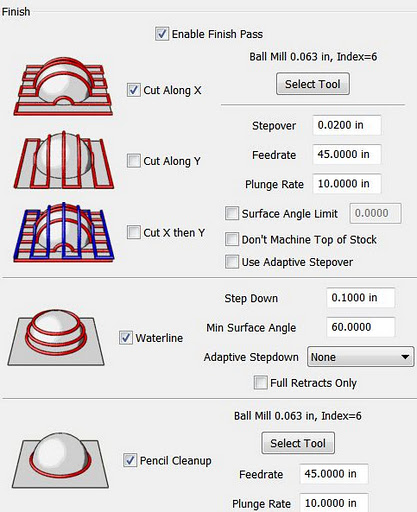
The thing that makes MeshCAM stand out for me at this point is its finishing abilities:
MeshCAM's many flexible finishing options.
It has built-in multi-pass finishing. I've managed to get the same results from Cut3D through a work-around. There, I create a finishing toolpath for one tool, save those toolpaths, then go back and define a different finishing pass, then save those toolpaths, and run them on the CNC one after the other.

MeshCAM doesn't require this. It gives a great set of finishing options for multiple tool passes right out of the box. I'm presently working on a model specifically to take advantage of these capabilities. Since much of what I'm doing is intended to have a high level of detail, I'm looking forward to seeing what comes off the CNC when I use MeshCAM to build the toolpaths.

MeshCAM displays the toolpaths it generates in the 3D view once they've been calculated, which gives a good first-look check to make sure that things came out right. There's no preview of the cutting operation built in to MeshCAM, however, as in Cut3D. Instead, a separate program, CutViewer is offered. Or you can do a "dry run" in most CNC control programs like EMC2 or Mach3 to see what the cutting will look like, at least as far as tool head movement is concerned.

The previews of the cutting operations have been one of my favorite features of Cut3D, so it's a feature I miss in a CAM program. I've gotten a higher degree of confidence from using this to see how the cutting operation will proceed ahead of time--the order of cuts is not always what you'd expect. The ability to check this during the CAM operation is very nice.

So I'd recommend planning to add CutViewer to your purchase if you buy MeshCAM, or make sure you're comfortable with your CNC control program's preview abilities. I'm using the preview abilities of EMC2's Axis view, myself.

Once I've finished the models I'll be trying out with MeshCAM, I'll be reporting on the final results. I'm planning both a flat relief object and a full 3D, 2-sided object.

Stay tuned...

Wednesday, May 4, 2011

Learning GCode with EMC2

I'm spending a lot of time with my new microCarve A4 CNC router this week. My first couple of items were made using a handy image to gcode converter that's built into the EMC2 control software I'm using.

But the image converter simply treats the image as a depth map which is cut by raster-scanning with the cutting head. For the designs I used, this was slow, and produced rougher results than would be produced using vector cuts.

So I looked at a couple of approaches to improve things. One is using CAD software that works well with a CAM package to covert the CAD design into machine control instructions to cut out the CAD shapes. The other is to go straight to writing my own machine control programs by hand. I know that I'll want to have both methods in my toolkit, but which to use first?

After a bit of back and forth yesterday morning, I decided to start with programming by hand first. So I dove into the EMC2 documentation for gcode, the programming language more properly called RS-274-NGC. What a catchy name, eh? You can bet that the folks who picked programming language names like "python" and "Java" are kicking themselves after seeing how "RS-274-NGC" rolls off the tongue.

Results of my first gcode program on my microCarve A4 CNC.
Results of My First GCode Program.

Well, the EMC2 site has a link for a gcode tutorial, but what's there is...not much. Maybe I'll pitch in, since that's what wikis are for, right? The I went an read the EMC2 documentation, which has the standard cart-before-horse format of discussing details before generalities. Then I found the excellent LumenLabs GCode Tutorial. Much better!

I read some bits, scanned others, then hit the keyboard on my CNC control system. It's an old Athlon 800 with 768MB of RAM loaded up with the EMC2 LiveCD install for Ubuntu Hardy Heron, with EMC2 upgraded to the current version after install.

I fired up EMC2 with the SIM-Axis configuration for developing the gcode. I've got three different configurations of EMC2 on my desktop. I've got the SIM-Axis setup, and two different configurations for my microCarve A4, each with different origins for the axes.

I used gedit to create an initial gcode file, then opened it in EMC2. The gcode preview window is great. Whenever I edited the gcode file and saved, I'd click the reload button in EMC2 and immediately see the changes. Likewise, the error messages were good enough to let me find my problems, though the problems were usually typos rather than what was reported.

I used iterative development, of course. No sense writing too much code before finding out that I didn't understand some element of syntax. I started with initializing the mode settings, lifting the head to a safe traversal height, traversing to a point in space, then returning to machine zero. After fixing a couple of problems, I got what I wanted. Then I added a few additional move commands, and got the simulated CNC to follow them. At that point I could see that things would get out of hand pretty quick if I didn't learn some basic flow control.

So I read up on subroutines in gcode. I laid out a simple key pattern on graph paper, and wrote the necessary routines. That's the border you see in the picture above. That was the easy part. It's all straight lines.

Next was curves. I read up on G2 and G3. I hadn't thought about the ability to shift the depth of cut across the curve when I started reading, but by the time I was done I was thinking, "Hmmm, if I vary the depth of the cut with a V groove bit, I can vary the width of the cut just as I would vary the width of a line with a calligraphy pen."

So I broke out a fresh sheet of graph paper, and started drawing some letters. Well, it took me about three times as long to lay out the letters as it took me to lay out the key pattern, but I managed that. Not only that, but I set things up with scaling factors and variable settings that allow me to easily scale and move the letters.

Results
The results you see above are what I got from the first "live" run of my first gcode program. The cuts are a bit deeper than I'd like, and the 90 degree bit I'm using right now doesn't help. Also, the cutting was a bit fast for the plywood, causing the wood to be frayed on the cross-grain cuts. Still, the varying of "line weight" on the letters turned out well. Overall I'm happy with it, and the defects should be easy to fix when I run it again. I'm planning on building a complete alphabet for this font and throwing it into a file for later use.

Friday, December 18, 2009

Nokia Ovi: Epic Fail

I decided to download some new apps to my sorta-new Nokia E63 today. My normal approach for putting apps on my phones is to go out looking for open source apps on the web using one of my regular computers, then transfer it onto the phone via memory card or Bluetooth. Today, I made the mistake of deciding to try out Nokia's Ovi software service instead.

First I went out via Wifi on the phone itself. Initially, I had the "Download!" item on the phone as it came from the factory. Upon contacting Nokia I got a message telling me I needed to upgrade to the new Ovi software.

OK. I upgraded. Then I tried connecting to Ovi. I got a message telling me Ovi wasn't available. Wonderful. At that point I had no idea whether that meant I'd just happened to hit some time when site maintenance was going on, or if my new software was no good.

Later I was able to connect (two days later. I should have mentioned I didn't just start this process today...)

You can go along, looking at possible downloads at Ovi, but you can't download without an account. The advice I got was to create an account on my PC, then sync with the phone so that it could use that account to connect to Ovi. *sigh*

I went to the only PC I have that runs a current version of Windows as required by Nokia's sync software. I logged into Ovi and created my account. I downloaded the software (after fighting my way through Nokia's awful website--I'm sure the Flash crud works fine on Nokia's LAN, but on my broadband it takes forever and you can't even tell what it's doing then once it's downloaded you get an error more than half the time. And don't even try to connect to Nokia's website from one of their phones!)

I got the software downloaded while I left the house for errands, came back, installed it, and discovered that I had no data cable and that none of my present USB cables was the right one for this phone. My cheap, half-the-price Chinese phones came with data cables, Nokia! What's the matter, can't turn a profit without trying to milk your customers for an overpriced data cable? Not only that, my Windows system is the only one in the house without Bluetooth. I didn't feel like burning more time on a wasted effort by trying to find a driver for the dongle I've got, so after the website, download, and install I just gave up. I'll recover the hard disk space another day.

I went back to Ovi on the phone, and found that I could just log in directly. Then I selected that I wanted to see only free apps. Then I changed catagories. And it started showing me for-pay apps. When you change categories you then have to go back and choose to see just free apps again. And even if you do, if they've got a "featured" app that's for pay, it stays there at the top of your list.

Four pages of apps in, the stuff I was finding for free was garbage. Adware and crippleware, mostly. About what I expected, I'm afraid, and why I usually just go looking for free open source software right off the bat. I was hoping to find a few decent simple time-killer games, though. They may be there, but I can't find them among the cruft.

What a waste of time and effort.

Do yourself a favor, if you do end up with one of Nokia's phones, learn to install apps without going through Ovi if you don't already know how. It'll be time far better spent than doing what I did, and you'll still know how to do it when you get a different phone. Like a cool, inexpensive little Sciphone, maybe.

My Articles on cell phones:

Thursday, June 18, 2009

A Semester with Greenfoot

This last semester I used the Greenfoot framework as an integral part of my high school computer class. It was an experiment to see what it could do for the students compared to the way that I've taught my class in the past. Based on the results that the students achieved, I'd have to say that Greenfoot was a very good addition to our class, with only a few reservations.

In my high school computer class, I spend the fall semester on basic computer skills, background knowledge, horizontal applications, and basic networking and communications knowledge. The highlights of the semester are class-produced websites (last year's are visible here), and a document including text, graphics, and tables which is a proposal for a video game concept. For the websites, I have each student produce a basic set of linked web pages individually while we learn rudimentary HTML and CSS, then the students are grouped into teams for the main website project. The game proposals are produced individually, and I have each student give a presentation to the class of their proposal.


The Problem: Getting Graphics

The second semester of the class moves on to computer programming. For this we use the Java programming language. It's not perfect for our needs in class, but it works well enough, as I've discussed before. One problem I've had with using Java as a teaching language is that while it has graphical abilities, they are so generalized that the learning curve for using them is difficult to manage in the limited class time we have. I want to provide at least a basic sense of what's happening in the computer when programming--all that stuff about data types, data structures, algorithms and so on--but still have sound and graphics available for the students since they provide a lot of motivation, as well as giving a source of feedback to students on what their program is doing that is more visceral than text. Likewise, different students respond to different stimuli. Some can perceive patterns in text, but more often they're more prepared for perceiving them in images or sounds. So this sort of program output can be critical in whether a student "gets" what a program is doing when it runs. I've discussed this in more detail before.

With the simple, constrained systems of the past, e.g. Apple II, Commodore 64, Atari 800, etc., accessing basic sound and graphics was easy compared to present day systems. There are still BASICs available today that provide the same sort of access, but they're also more divorced from mainstream programming than was the case 20 years ago. Java, while a relatively simple language in many respects, takes a very generalized approach toward graphics and requires a substantial amount of program infrastructure for graphics which is a distraction and source of confusion to new programmers.

Greenfoot: The Answer?

Enter Greenfoot, a framework for Java with design goals directly in line with my needs, it would seem. I admit to having some concerns and misgivings as I was preparing to use Greenfoot in class. Prior to the start of the year, I had two students try out Greenfoot over the summer. At the end of the first semester, the class members gave their video game proposal presentations and the class selected four games for development.

Now the semester is over and I've got time to reflect on the results of the year.

The games have been completed and posted to the Greenfoot Gallery. You can see what the students themselves had to say in their development blogs, linked below.


Army of One: Stoner Wombats

One of my students was having trouble meshing with a working group. After trying a few different arrangements, I ended up putting him on his own to work on an individual project. Since he was working alone, and had less time on his project than the other students, his project is far less developed than the others. Still, once on his own he was able to apply himself and showed the initiative to solve some programming problems he ran into in attempting to implement his ideas in his game. Here's his game:

Stoner Wombats


Never Say Die: Offroad Xtravagaanza Becomes The Art of Clay Pigeons

One of the groups started with an ambitious idea for a motorcycle simulation. They wanted something like the popular side-scrollers that simulate a motorcycle's balance and suspension while traveling over an obstacle course. I allowed the group to go ahead with the idea, and we worked hard on trying to divide the problems in implementing the simulation down to a scope that they could implement. However, the problems with learning the details of programming and debugging coupled with the difficulty they had in developing mathematical models for the simulation stymied them. They made significant progress along some paths, only to be stopped on others.

They then changed their objectives, changing the game to a top-view track racing game. Again they made substantial progress, only to run into problems with movement control and collision detection in their code that they weren't able to beat within a reasonable time.

So they stepped back once more, started with a working codebase (the ballon-popping demo scenario), and began modifying it and adding features. Even though they were weeks behind the other teams at this point, and shorthanded, they made good progress and turned out a good game.

The Art of Clay Pigeons

Art of Clay Pigeons Development Blog

Overall, I'd say this group had the most "educational" experience. As I mentioned, they did solve a lot of problems toward each of their prior goals. Though the process was very frustrating for them, they managed to maintain a good attitude and positively move forward from each failure.

Modularity is Our Friend: Day 3


Another group started out with a very basic idea for a shooter that needed a lot of fleshing out. They also ran into development problems, with collision detection and with hitting a mental limit on data structures. They managed to maintain a central base of working code, however, so their game didn't change as much through the course of development as the Art of Clay Pigeons/Offroad Xtravagaanza team. They began development of several different sets of possible features in parallel, then used the advantages of OO programming to add each to the central codebase, experiment with it, test interactions with other features, and then decide where to go.

They followed a very iterative process and learned to be fairly conservative about connecting ideas with their ability to implement them. They managed to apply some basic data structures to their game, notably Lists. They had other ideas for which I suggested more sophisticated data structures, but they decided they'd rather "limit their risks". Some of the students who worked on this game, "Day 3", have stayed in contact, and I know at least one update has been worked on since school ended, so this game may continue to develop. I know one thing they'd like to do is put one of the lines of work they had near completion that didn't quite make it in by the end of class into the game. So Day 3 may continue to develop:

Day 3

Day 3 Development Blog

Success by Design: Farm Frenzy

The remaining project ended up looking almost exactly like its original design. It was consciously designed as a modification of a classic video game (Pac-Man), and it avoided some of the problems the other teams ran into by sticking with large cells in the playfield. The team did a great job with this, with one of the team working out many of the little details outside of class, then coming in with sheets of layout information on graph paper and pseudocode ready for implementation.

Farm Frenzy, a.k.a. The Purple Piggy Game

Farm Frenzy Development Blog

Results: Positive

I have to say that I'm really pleased with how things turned out. All class members were able to contribute constructively to their team projects, and all teams were able to complete a game that actually runs and get it posted on the Greenfoot Gallery. I had my doubts, especially when one team was halfway through the last class without having yet even gone through the process of exporting their game from Greenfoot, much less posting it online. They rallied, however, and managed to get in under the wire.

Greenfoot worked well for giving students visual feedback on their program work, and it made the class fun and interesting for them. Overall I'd say motivation levels were higher than in my prior classes, in that a higher proportion of students were engaged with developing new ideas and seeking to implement them in code.

Greenfoot didn't prevent me from teaching more sophisticated programming concepts in class, but it did somewhat limit the scope with which I could approach them. Students were willing to follow discussions of the use of data structure objects, but they also wanted to "get back to work", so we weren't able to dig in as deeply in these area as I have with prior classes. We did manage to cover the basics, however, and I didn't see any reluctance to open up the Java API reference, or the API reference for Greenfoot, either. Overall, I'd say that the class moved into using data Objects faster than before, but didn't go as deep or into as broad a range of data structures as in previous classes. They did show that they understood what they were doing when they used Objects and Interfaces like List, though. They were able to deal with types, iterators, and selection of elements. So I'm satisfied that the important lessons were learned.


Problems Encountered

Our problems with implementing ideas in Greenfoot were a mix of things. In part, it was through our collective inexperience with Greenfoot that we didn't always conceive of things in a way congruent with how Greenfoot handles them. In other cases, we ran into problems when trying to implement things in ways that I've used in the past, particularly collision detection, that for whatever reason didn't appear to work in Greenfoot. Greenfoot is well suited for cell-based game models, it is more difficult to implement what might be called "small cell" models with pixel-level movement and control, or something close to it. Small cell models without "terrain" effects, such as space simulations don't seem to be as much of a problem. Other than that, for new programmers it seems best to stick with large cell games, where each player or game object occupies one cell on the playfield, and all interactions are based on occupation of the same cell or adjacent cells.

I had to write a fair bit of code myself outside of class to assist students with solving problems or developing implementations. I'll be writing more code before we start again next year, so that I've got a better handle on what it takes to solve some of the problems that we ran into last year. Especially dealing with collision detection. With this I'll be better able to guide the students in understanding how much work it'll take to implement their ideas, and help them make better decisions on how they design their games.

I expect to write more on my experiences using Greenfoot in class as time goes on, and provide some of the example scenarios I've developed. For now however, I have to say that I've quite happy with how Greenfoot worked in my class and I'm looking forward to using it again next year.

You Can't Argue with the Price (or License)

On top of that, thanks to the fact that Greenfoot is free, it allows me to have students create video games without using one of the commercial instructional development systems that have license fees that come out of our school's limited budget. And in this case the lower cost does not result in a reduction in the value of the product, much the opposite. The commercial systems that have been used by other instructors at our school in the past have no connection to real world programming languages, and the games require the system's runtime package to operate. My student's Greenfoot games, on the other hand, are written with their logic in Java, and are easily packaged for independent distribution as Java executables as well as web distribution.

Thumbs Up

Final word: Greenfoot's good stuff. If you're teaching introductory level computer programming, it's worth giving a try.

Saturday, February 14, 2009

WOPR was Right--The Only Way to Win is Not to Play the (Copy-Protection) Game

The only way to win is not to play the game.

I was looking at picking up a copy of Spore. I've enjoyed a fair few simulations in the past. I still play a fair few old ones on my older computers. I set up a new old G3 Macintosh over the holidays so that I could keep playing Civilization and several other games. The Aluminum iMac that I got as a replacement for the iMac G5 that Apple failed to repair properly doesn't do Classic, so I lost immediate access to a bunch of old games with the "upgrade."

Aside from that, I'd seen Spore in various stores, and read a couple of blogs about folks stretching the capabilities of the game. Today I took a look at some reviews and such, and found out what the box and the initial articles I read didn't tell me about. The copy protection.

Those of you who already know the story are probably telling your computer screen that I should know that the copy protection has been scaled back from the original draconian copy protection system. Yeah, I saw those articles. They were all from last September. And I've seen plenty of unhappy buyers listing copy protection problems in the months since then. I've also read the terms of the "looser" anti-copying scheme. I'm not buying it. I'm still enjoying playing games I bought many years ago. I'd like to buy new games and get years of enjoyment from them, no matter how old and tired someone else thinks they are.

I decided to forego Half-Life 2 because of Steam. I loved Half-Life and its spin-offs. But I wasn't going to deal with paying full price for what is in essence software rental. I've not bought many games since. I used to buy about ten games a year, and get three or four more as gifts. Back when the companies felt the CD format was protection enough. Then the companies decided they needed to protect themselves from CD writers with tricky internet-based copy protection. And I left the marketplace.

Enter Spore. I was tempted. It looks like fun. Will I be able to play it on my vintage Aluminum iMac ten years from now? (I'm assuming my aluminum iMac lives longer than all the other bum Macs I've gone through since I got my wife's old PowerMac G4 tower. But that's material for a future blog entry.) The answer appears to be no, at least not without loading up on crackware now while it's available (and risking a plenitude of security problems while getting it.)

So, as WOPR said, I'm not going to play the game.

What's my alternative?

Well, there aren't many A-titles out in the free world, but there's plenty of B and C level stuff to stay occupied. And the free titles keep getting better. Free as in freedom, not just price. Though it's a lot easier to risk my time on something that didn't cost me cash out of pocket.

I've turned up some possibilities with the following Google search string:
freeware site:http://www.apple.com/downloads/macosx/

I'm also poking around here on Java Game Tome.

There's also Free Mac OS X Games.

Gog.com and Stardock are worth a look. I'd recommend g4g if it weren't for the fact that all the garbage on the site crashes my browser whenever I try to look. I don't know what all they've got there and whether it's legit stuff they've got in the ad spaces or bot-herder crap, so I recommend staying away.

And if you want a slightly dated A-title first person shooter, I recommend Nexuiz. I'm not sure of the correct pronunciation, but I say "necks-wiz." It plays a lot like the old Unreal Tournament. I like it a lot more than Sauerbraten and World of Padman, though those are worth checking out, too, if you're looking for an FPS.

The free/open software copies of popular commercial games haven't been so hot, in my opinion. There are open clones of Civilization and WarCraft II out there. They don't fill the bill well enough to keep me from restoring an old beige G3 Mac to service and installing the originals.

Maybe somebody will do an open copy of Spore that I'll be able to play someday. Or maybe they'll make a half-a-loaf version that starts a package dependency spiral on install, like some other things I've tried. Really, the open games I've liked the best have been those that aren't so much trying to copy a game as give a fresh take on it.

Many years ago, when the world was younger than it is today, I picked up a couple of really great games. The first was F-15 Strike Eagle. Its copy protection beat my disk drive heads out of alignment. It cost me half again as much as the game to get the repair. Just Microprose's way of thanking me for my business.

Another was Psi-5 Trading Company. My wife loved that game. She doesn't like a lot of computer games, so when she likes one, I try to make sure she gets to enjoy it. We got about three plays out of the first copy before it refused to play any more because its sensors detected that my store-bought disk had transformed into an evil pirated copy. A call to the publishers reassured me that they'd be happy to swap out my disk, for a price. Not including shipping and handling charges. All together about the price of the game. And in only two or three weeks, so long as holidays, employee vacations, and snow days didn't interfere. Or whatever. For the game my wife wanted to play tonight.

So I went out and bought copy number 2 at our local retail outlet. (Yes, I guess they "saw me coming.") It ran about twice before cosmic rays from the planet Skyron in the galaxy Andromeda turned my store-bought disk into a "pirate copy." If it weren't for a cracked copy a friend gave me, we would never have played the game again.

I'd like to say I learned my lesson at that point, but no, hope (and foolishness) springs eternal.

Or nearly so.

I quit.

I'm not going to play the copy protection game.

So there you are. Make it free of copy protection, then I'll play the game.