Showing posts with label hacking. Show all posts

Thursday, August 25, 2016

What is a Linux Distro?

We've got a number of folks in a Facebook Linux group I moderate who are playing around with the guts of their Linux by swapping around pieces from different distros. Which is cool--experimentation and tinkering are always good things.

It has raised a point that I think may require some background. Specifically, "What's a distro?"

Back in Ye Olden Days

When Linux first came around, those of us who wanted to play with it got source code. And that's all. We'd compile the kernel under some other operating system (Windows, another Unix, or maybe even the Mac of the time if you were a masochist!)

Then we'd start compiling binaries for our Linux kernel--a shell and cc would be a common place to start so that you could start compiling stuff for Linux under Linux.

After a while, we realized that we were duplicating a lot of effort. Many of us had fairly generic systems that we could swap binaries between without having to recompile absolutely everything.

With time, the concept of having a set of precompiled binaries for the kernel and applications as a starting point for a Linux system became the basis for a distro. Usually you'd install from a set of floppies or a CD. If the kernel you chose from the distro was close enough for your purposes, you'd just use one of the ones they'd precompiled. If you wanted something more suited to your hardware, you'd recompile the kernel with a few configuration changes and usually get much better performance and a more stable system, without having to recompile the application binaries for user space.

We still regularly compiled applications. Anything that wasn't bog standard usually would have to be compiled. As time went on, the list of precompiled binaries for each major distribution grew, and then distros started to have their own package managers to ease the installation and management of precompiled binaries.

The ability to do this is a large part of what has turned Linux from a tech toy used by a select few who are comfortable with compiling their own operating systems and applications to being the generally popular operating system it is today.

Stepping Into Today

Now it's not uncommon for users to choose a distro according to the application set they want for their system.

Different Linux distros have sprung up with selected sets of software precompiled and ready to install and run, or as part of their base installation.

The specialization has reached back into the kernel, too, as maintainers of the distros have improved their distro by compiling a kernel that suits the base suite of applications they provide. Distros that are intended to be more general-purpose likewise make changes to the Linux core to make the installation and hardware detection process simpler and more robust to make installing and setting up Linux easier for users.

More software is more easily available to everyone because of this. All the major distros are tied to a system of package management that provides users with almost limitless choices of software to install on their system.

Going outside the distro's own software repositories (repos) is certainly possible, especially in the instance of distros that are upstream of one's own.

For example, if you're running Mint, it's a snap to include repos for Ubuntu and Debian in your package manager's list of repos. And chances are almost all the software there will run without problems. For all I know (I haven't installed Mint in a while) Mint includes the Ubuntu repos by default, I seem to recall that being the case in the past.

However, if you're crossing over between branches, like wanting access to software compiled for Fedora that's not in the Debian-family distros, then you're starting to put yourself in a position of having more errors. The filesystem layout is different between Fedora and the Debians. There may be differences in the kernel configurations that will cause you problems.

If you want to get software that isn't in your distro's repos, or in a closely related distro (preferably upstream), then the correct answer is really to compile it yourself on your system, rather than use software someone has compiled on a different system configuration.

If you want to save other people the trouble, see about contributing your effort to your distro's repos. They'll probably have standards of what you have to do to do that, but you can be part of the team that makes your distro that much cooler pretty easily.

Kernel Swaps

I've seen discussions of turning one distro into another on the Facebook group. Hopefully a better understanding of what a distro is, and how it is defined, helps to show why "Turning Ubuntu into Kali" or some such is a misnomer. If you're grabbing another kernel then starting your system off it, you're no longer running either distro. You've gone custom.

That's not a bad thing, experimentation is a good thing. But you also want to look at how effective the technique of playing mix-and-match with precompiled system files and applications is versus just doing your own compilation with the stuff you want.

If there's a specific distro that you want the advantages of, it's best to install it rather than to build a sort of chimera by grabbing pieces then lashing them on to your current distro. You're asking for trouble by using binaries that haven't been compiled using the same assumptions at compile time.

If you want something truly custom, then rolling your own Linux is very probably the way to go. It's not hard, and that used to be the standard installation method. There are a number of systems out there to make it even easier than we had it in the old days (Linux From Scratch, Gentoo, etc.)

I hope this helps clear up some of the confusion about distros and their parts. :)

Wednesday, February 24, 2016

Yaesu FT-2900R PTT Switch Fix

One thing that's bothered me about my otherwise excellent Yaesu FT-2900R radio is how touchy the push-to-talk (PTT) switch is on the included microphone. It's got a very light "touch" to it, which means the least bump or press puts you on the air whether you want to be or not.

It's hard to get it out of the microphone bracket or to hand it to someone else without hitting the switch and doubling over someone while you make unhappy noises about the surprise of the switch getting pressed AGAIN. My wife and daughters often share my station with me when we're checking in to local 2m nets, so being able to hand off the mike is pretty important around here.

Today I finally decided to take matters in hand. Fortunately, Yaesu makes it easy to get into the mike. There are just three screws, two near the bottom of the mike, and one going through the button for the mike bracket (that will be the long screw when you go to put it back together.) Once inside you can see why there's a problem. All the keeps the PTT from getting pressed is a little piece of springy foam that's down near the pivot point for the switch. When you push on the normal part of the switch (or bump into it), you get a lot of mechanical advantage on this little bit of foam, it goes squish, and you're on the air as the plastic tab up top presses into the little microswitch on the microphone's PCB. Not good!

Adding Some Crunch

I took some measurements with a caliper, then headed to the hardware store. In the little drawers of specialty items there are springs (at least in my local hardware stores.) Among them are some small compression springs. The one I chose was a #9 Compression Spring. The specifications are: 0.312 inches OD, 0.047 thick wire, 2 inches long (as sold.) That's 5/16 inches diameter, aka 7.94mm. And 3/64 inches wire, aka 1.19mm. And 2" is about 51mm.

I took this home and clipped a bit off, as you can see in the images. The part I used was about 7/8 inches long, or 22mm. The cut end went over the plastic tab that presses the PTT switch inside the mike, with the flat end resting against the switch body.


If I were the paranoid sort, I'd put a bit of protective tape over the printed circuit board to protect it from the spring. However, there's nothing for the spring to short to even if it does wear through the solder mask on the trace it lays over. So I just left it alone.

After reassembly, my microphone has a nice crunchy feel to it, and it takes just the right amount of force to close the PTT switch now. The force resisting closure is up at the top of the switch where it belongs, now, so even this little spring does the job.

I hope this helps some of you out there, because I've heard a lot of other FT-2900R owners with the same complaint about the PTT switch that I've had.

Monday, November 17, 2014

Microsoft's Cross-Platform Play

Microsoft has recently announced that they are moving .Net to open source and supporting Mac and Linux in addition to their Windows OS with Visual Studio Community 2013. Also, Visual Studio 2015 will support iOS and Android development.

Frankly, it's a little confusing because in some places MS mentions Mac and Linux, but very few, and they mention iOS and Android in lots of places, but not everywhere. So the support may be different than what I said.

Nevertheless, MS is opening up. Or at least seeming to.

Their timing couldn't be better, in my opinion.

Oracle is working hard to poison Java. I'm not entirely sure why, unless they think that ticking off any Java programmers and users outside those developing middleware for Oracle's products is a really great strategy. Their support for Java as a general programming language, as Sun did, has been piss-poor since day 1. Every so often they make a grand gesture to try to present themselves as interested, but the product they offer now is not something I could send someone out to install with a good conscience. What kind of an honest, large-scale company thinks that half-sneaking some crap software in under the cover of installing their own is a really great idea? Not one that really treasures the individual customers, I can tell you (and yes, Adobe is on this particular excrement list, too.)

Couple that with their poor responsiveness to security concerns, to the point where the Java language is treated as a sort of worm or virus by most software, and you've got a company that's decided to leave a hole in the cross-platform development market simply because their interests are elsewhere.

Cross Platform Alternatives

C# is Microsoft's outgrowth from their own attempt at embrace, extend, exterminate targeting Java. It's a very good language, including the good parts of Java while having a set of libraries (.Net) that don't have the Java API's less than useless historical cruft but do have everything good about the API, which made Microsoft look really cool to programmers when it came out as most were not familiar with the Java API itself.

Switching to C# from Java is an afternoon's exercise. But it and the .Net library started out wed to the Microsoft platform.

Enter Mono, a cross-platform implementation of .Net supporting the C# language based on Microsoft's ECMA standard for its products. It has been growing, at least in part on the back of the decline of Java, as well as bringing the good things about C# and .Net to Mac and Linux development. It doesn't hurt that it is the core that drives products like the Unity cross-platform game-development system, too.

Now Microsoft is combining their products with Mono, and extending their reach to Android and iOS.

There are a Couple of Ways This Could Go (and Possibly More)
In Future A, Microsoft does the excellent work they do in producing development tools, but now with a return to platform-agnosticism. This encourages programmers to develop for Windows and Windows Phone as well, since programmers who might otherwise have been targetting only iOS or Android will be selecting these tools for their intrinsic value as development tools to write programs for their favored OS, then decide to toss a Windows/WinPho version out there, too, since it's not costing them any significant extra effort and might end up fattening the coffers a bit.

Microsoft gains developers for its platforms, draws "thought leader" and technical leaders into their ecosystem, and the developers get the advantage of having good development tools for any major platform they choose.

In Future B, Microsoft uses this as a ploy to draw programmers in, but cross-platform support is sloppy, or delivered slowly, or lags behind the native capabilities of the non-MS platforms. Perhaps it doesn't play well with the various different versions of Android, or maybe the Mac and Linux native code suffers by comparison with code developed with native tools for those platforms.

It turns out to just be hype. Maybe there are forces within MS that fight the release of solid tools that are truly cross-platform, so they ensure that foreign platform support is sub-par, thinking that they're helping their own products by making it "harder" to develop for other platforms. The only point of cross-platform, to them, is to allow Windows patriots to proclaim themselves cross-platform developers without knowing anything about the competition.

In this future, Windows does not become the programmer's platform of choice, Windows has extra costs of development that make it less attractive as a development target when another platform is the one that's going to pay the bills (probably iOS), and life goes on as it does today with possibly the Microsoft touch putting some poison into Mono.

I can only hope that the upper management at MS is committed to Future A. because that's what it's going to take to keep Future B from stepping in any time it pleases.

Microsoft, Doing You Know What in Their Own Messkit for the Past Decade
Windows 7 was a boon for programmers when it came out. I and many other programmers I know had been feeling somewhat kicked about by Apple, didn't see tools with the same level of sophistication on Linux (and generally more system maintenance than the commercial OSes, and system maintenance doesn't pay bills), and Windows 7 was a viable place to go, or to at least have as a second OS on our desk for conducting development and testing.

Windows 8 added some nice stuff behind the scenes, but not without wrecking the usability of the platform, as well as making it a far less attractive target for development. In my case, I abandoned Windows as a target for native development about a decade ago, and was waiting on Windows 8 to see if I might add it to my repertoire again. The answer became "no". Windows 10 will determine whether I ever consider it a serious platform for anything at all in the future, as the professional applications that I currently use on Windows have all become multi-platform over the past several years, so I can move my licenses over to Mac OS or Linux for all of them.

If Microsoft gets it right with their development tools, and Windows 10 restores the power to the desktop that earlier versions provided--not just a false appearance of it as in Windows 8.1--then they stand to become the defacto professional desktop again.

Whither Mobile?

And given that the consumer desktop is the market that is dying in the face of mobile platforms, one would hope that they are bright enough to strategically commit to a powerful professional computer OS again. While the mass market computer is probably going away, there was a profitable professional/hobbyist market before the internet boom put a computer in practically every household. That professional market stands to be even larger than the historical one, as many professions that had nothing to do with computers now rely on them, and many new professions have arisen over the past 25 years that rely on the computer.

Also, there's a possibility that the mobile device as a computer replacement is just a flash in the pan. Most people bought their mobile devices in place of a routine upgrade to their home computer for one cycle. Now that they have tablets, the tablet market is going flat while computers are seeing a modest rise in sales. I think just about everyone has had a chance to discover that the touch interface is very limited in what it can do with current technology. It's severely error-prone and it's not well suited to complex activities. It's too soon to read now, but there's a chance the tablet may be relegated to specialty use status, with the keyboard-equipped computer regaining its status as the "real" computer behind the smartphone's limited purposes as a personal communication and light entertainment device. We'll see.

The phone isn't going to go away, though. It's going to be the most personal of personal computers, at least until it's replaced by a small tablet and a complete phone the size of an earpiece, or some other revolutionary turn that gets people to give up a screen for convenience. So supporting the mobile platforms is, for Microsoft, probably a must to their survival. At least until they can get real market share for Winpho.

Either way, if Microsoft plays their cards right, going to platform-agnosticism in their development tools could be a really good thing for everybody--including and especially Microsoft.

Wednesday, January 15, 2014

Commercial Spaceflight Isn't About Sending Fatcats to Space

I've seen a fair bit of "hate the rich" sentiment toward various "space tourism" ventures out there, such as Virgin Galactic's White Knight 2, XCOR's Lynx, and other development efforts toward reusable suborbital spaceflight. I feel this is driven by the usual specious reports by the media about space tourism and seat costs in the range of hundreds of thousands of dollars to drive the class warfare point home. Naturally, the first image that will come to someone's mind when seeing these reports is some overstuffed fat cat buying themselves a $200,000 joy ride at the expense of others.

The fact is, a point has been missed here. Space tourism is the economic model that's being used to draw investment for this work, but it's not the reality of where this work is going. In order to get money to do something new, without a proven business model, you have to build a business model from scratch. This means finding something that will presumably pay the bills and earn enough to pay investors a return at least as good as an investment in another proven economic activity, such as investing in a restaurant or manufacturing. In fact, the return needs to be better, at least on paper, to induce investors to take the risk of not putting their money into something proven.

For reusable suborbital launches, the case was made using space tourism. That's because none of the other potential uses is really well known, but a unique luxury offering could be pretty well characterized, and counted on to deliver a return.

But the real value in these quick trips to space lies elsewhere than in joy rides for someone with $200,000 burning a hole in their pocket.

It's Like a Reusable Mercury-Redstone for Suborbital Research

The Next Generation Suborbital Researchers' Conference is one group that's excited about the prospect of cheap suborbital flights. Currently, the overall cost of a sub-orbital flight on a sounding rocket is about $3.5M. The costs to the users are less, because much of that costs is subsidized by NASA, and by sharing of launches between institutions. It costs each institution about $50,000 to $500,000 per launch with somewhere from half a dozen to a dozen institutions sharing the costs between themselves. This gives them the chance to launch about a half a cubic foot to a cubic foot of payload on a short flight on a rocket. It will experience at least 25Gs of acceleration, with shocks of double that or more. Nobody can ride along, so the success of the flight will depend on the researchers' ability to automate their payload (adding considerably to the costs of building and testing the payload before flight.)

Flight on one of the new commercial launchers will cost the institutions about $50,000 to $400,000 per launch. They get to send a person to operate the experiment, and likewise to experience the ride, if they choose. They may also buy a package where they send their equipment, which will then be operated by a space tourist paying their own way who has been trained to operate the experiment, or the package may be activated by the spacecraft's crew.

The commercial space operators are already putting together special deals for the space researchers. They can buy into multiple flights at discounted rates.

Plus, their payloads can experience flight at human comfort levels, 3Gs or less, with controlled temperature, air, etc. This results in far less cost. The same instrument package used on the desktop at the university's lab can be the same one sent on the flight. It doesn't have to go through vacuum testing, extensive testing of the automation under different conditions, hardened against high shock loads, etc. Standard safety design and testing for not bursting into flames and filling the cabin with smoke will still be necessary, but that's a big step down in cost and effort from what's required for a sounding rocket flight. That drops research costs even more.

Another important point is that these flights will be far more available than sounding rocket flights. NASA launches somewhere around a dozen sounding rocket flights each year. The commercial flights will be more frequent, and easier for an institution to get a payload on board, deal with schedule changes, and so on.

Teachers in Space
Another purpose of the new commercial "tourism" flights is to send the sort of tourists I think most of us would want to send. Teachers in Space is a program that can't wait to use commercial spaceflight to send teachers into space with student research at all levels of education. Speaking as a part-time teacher myself, I can say that it helps the students a lot to hear about science and spaceflight from someone who's actually been involved in it. If we have a growing cadre of science teachers who can start a statement to students with, "When I flew in space...", work alongside them on projects they're building that will actually go into space, it will bring a sense of reality and engagement to their education that's so hard to get otherwise.

Other Desirable Space Tourists

There are plenty of other people we, as a society, would like to see get a chance to experience space travel. Make A Wish Foundation flights? Rewards for science fairs? Small companies doing their own research to compete against larger ones? There are many, many uses for these vehicles that have nothing to do with the ultra-rich burning off spare dollars.

Opening Up Space

That just happens to be the easiest way to show that there's a potential profit at the end of the long development process for those who invest in the companies making this happen. So don't be fooled by reports making the commercial space industry out to be nothing more than a new form of luxury for plutocrats. This is about giving little people the access to space that's so far been limited to governments and richer institutions. This is the same sort of revolution that we got with the microprocessor, which brought computers into our homes then into our pockets. Once upon a time, the computer was known to the average person as a tool of oppression. When your bank or government told you that their computer said you owed them so much money, you were stuck fighting a battle against the authority of a tool you didn't have. When we got our own computers, we got the power to tell them back, "Well, my computer says..."

Now, we're on the verge of having space access be democratized in the same fashion. Virgin Galactic, XCOR, and Blue Origin are not the end of this particular road, any more than the first heavy, balky, difficult to build and use microcomputers from before 1977 were the end of the process of democratizing the computer. But if early public sentiment had risen to kill off the early small computers as nothing more than toys for the rich, where would your tablet and cell phone come from today?

Be glad the rich are there, willing to buy tickets for a space adventure. Because they're there, the way is being opened for your kids and their teachers, their work and research.

In the words of Alan Stern, "The access revolution is about to happen. When these guys are flying all the time, and you can fly an experiment over and over and over and get different data sets all the time, close the loop and fly an experiment the next week and the week after, I think we're going to see the best applications be things we haven't thought of yet, because we're kind of looking at it through old eyes." (Aviation Week, June 17, 2013, "Suborbital, But Reusable" reporting on the 2013 NGSRC.)

Tuesday, November 19, 2013

ZBrush for CNC Got Better

Yesterday, I learned that ZBrush (my 3D design program) now has an extension that lets it directly export files I can use with my Computer Aided Manufacturing (CAM) programs. I spent most of my work time today testing the output of various designs to see how they looked.

ZBrush has this 'built-in' since version 4R6 came out, it was available as a plug-in before, but since it calls itself a 3D printing plug-in, I ignored it, assuming it was software to sent object data to one or more of the commercial 3D printing services, like Shapeways. Turns out it's an exporter for standard 3D object file formats like .stl.

This is a huge improvement for my workflow of going from design to a finished part prototype in the real world. Before I had to use a very complex conversion program. Its control panel makes the flight deck of a 747 look simple. And if I didn't get the settings just right, I could get some really nasty effects in the final machining. Using the same settlings over again doesn't work, I had to adjust things based on the size of the object, the scale of features on it, the size of the material it would be cut out of, the relative size of the tool, etc., etc.

Now that difficult & frightening step is gone. I do a couple of passes to simplify the 3D object design as much as possible without losing detail (which I was doing anyway, it speeds up everything later), set a couple of simple settings in the exporter, like the real-world size the final object will be, then export.

The resulting files load just fine into the two different programs I use that create the list of instructions for my CNC machine to cut the 3D object out of a solid block of some material (usually a polyurethane plastic). I did a dry run to set up two test files tonight--doing everything short of actually making the parts. Tomorrow I plan to make an actual part from a new file as a final test. Probably something fun.

For those interested in trying this at home, I use both MeshCAM and Vectric's Cut3D for CAM. Cut3D is my usual preference, though I'm using an older version of MeshCAM (4). I prefer Cut3D's interface for setting tabs, and its included machining preview.

Both produce excellent GCode for my CNC (a MicroCarve A4 driven by EMC2 and a Gecko G540 controller.)

For doing image depth maps, I use EMC2's built in facility, though if you want to bypass the copious experimentation & two pages of notes I use to get it looking good, you might want to look into one of the dedicated commercial programs for this.

Thursday, November 14, 2013

Ted Nelson's Computer Lib 40th Anniversary to be Honored at Chapman University

I forgot to mention an additional item in my post on meeting Ted Nelson. Chapman University will be honoring the 40th anniversary of the publication of Computer Lib on April 24th-26th, 2014, presumably at Chapman's campus in Orange, California.

Here are images of the flyer (once again, apologies for the fold. I put it in my hip pocket since I wasn't toting anything else to carry things at the time.)


Wednesday, November 13, 2013

Lee Felsenstein at Homebrew Computer Club Reunion

Lee was the MC at the main part of the club meetings back in the day, and he reprised that role on the night of the HCC reunion. He was also the designer of the computer in that day that I most desired, the Sol 20 Computer. I loved that system--the look, the keyboard, its operation.

Image by cellanr
There were just two things you wanted to know about the Sol to make life happier: Build the fully expanded system right at the outset. Opening up the heart of the system to expand it later was a major PITA. The other? Use someone else's disk subsystem. Though with the information available today a Helios disk subsystem could probably be made to work.

I still have the sales brochures for the Sol 20. I pull them out every now and then to drool over them again. Part of it is nostalgia, but part of it is the great design itself. Actual Sol 20s sell for more than I can afford, but perhaps I'll build myself a look-alike system from sheet metal and walnut wood sometime, anyway, and print up a nice black name badge.

I still have an Osborne 1 computer. This one is one I got only relatively recently. It is pretty well maxed out on upgrades (disk upgrades, video upgrades, etc.) and is a pleasure to use. It's not as pretty as a Sol, but I enjoy showing it off in current day computer classes. The kids love it--especially the floppy disk drives and the tiny screen. But...they get hooked on Zork.

Lee Felsenstein Today

In our conversation last Monday, Lee showed me a project he's working on today as an educational tool. It's a programmable logic simulator, targeted at middle school students. What Lee showed me was a pair of printed circuit boards that have captive fasteners to clamp them together around a plastic matrix. The matrix holds surface mount diodes, which the students can place into the matrix to program it. In essence, it's a 16 by 8 programmable logic array that is programmed through physically locating the diodes.

OK, I know that sounds totally abstruse to many of you, so let me tell you what makes this a great idea, and why your middle schooler ought to know about this stuff even if you've gotten through life without having to so far (assuming you don't know already).

The core of computers are built out of logic circuits. The memories feed the logic circuits with data (in current designs--it doesn't have to be that way though it's presently the assumption), in essence, the programmable logic is the complement to the memory. This analogy of the logic and memories being complementary components of a computer holds on many levels. It's possible to build logic out of memories--I've done it--but it's not efficient.

Initial education in logic circuits can be accomplished with a simple breadboard and some logic chips. A few AND chips, OR chips, NAND chips, inverters, and so on. Add some resistors and LEDs and the kids are off and running. For a little while. Once they master this, and understand what's going on, they immediately start expanding their ideas.

Then a problem hits. More chips and more wiring between them mean more complexity, and more difficulty in realizing their ideas.

At this point, it's possible to introduce them to programmable logic devices. Teach them that the logic functions they had in the ICs live inside the PLDs, and that they can program the devices rather than run wires. The problem is that this is a big, big jump up in abstraction level, especially for a kid in the middle school age bracket (which is the perfect age to introduce this stuff, which I'll go into later.)

Whereas Lee's invention maintains a physical element. The programming is accomplished by manually placing diodes into a matrix, rather than typing characters on a screen then punching the 'program' button to dump it to a Flash PLD. This keeps it from getting too abstract, encourages experimentation, and maintains the hand-on element that's necessary for students in the 9-13 years age range.

Building Blocks of Electronics

Electronic logic is building blocks. Your kids play with building blocks, right? They start with simple structures to learn how to build more complex structures. Before long, they can use every single piece they've got building large, complex structures. Once the individual blocks and a few simple ways of interconnecting them are understood, they can take off and make great big projects that reach to the ceiling.

It's the same with electronic logic. It's a collection of simple building blocks. The problem is, the complexity of assembly is a little greater. Enough that once you get past a certain level (I'd say 20-30 ICs), it gets progressively more difficult to implement your ideas. The ideas out-race the ability to construct.

This shouldn't be an obstacle. The ideas should be allowed to continue to grow, without removing the physical aspects that make the activity interesting.

The Lee Felsenstein Magic

Lee has hit a sweet spot here. With all the excitement about the Raspberry Pi (which I will save my criticisms of as an educational tool for a future article), Lee's project should have that sort of excitement going for it. This is about students building their own processor. This knowledge is important. This is what the people who caused the microprocessor revolution used to cause the revolution in our lives. This is the knowledge that put a CPU in your telephone, your oven, and your iron. This is what tunes your radio.

Assembling a processor from random logic is a huge project. Yes, people still do that (I've even build a very, very simple one from racks of relays, myself, under cover of testing those relay racks and their support wiring after installation.) Building your own processor with a PLD is a lot easier, once you understand the building blocks.

Lee explains himself well on his project page. Have a look. I will be following the progress of the project.

And I'm really glad I got a chance to meet up with Lee again after all these years. He was one of my mentors and inspirations in my youth, just as he describes those who mentored him. It seems to be a common thread that those of us getting older want to assist the younger generation just as we were assisted when getting started in technical pursuits (as hobbies--the jobs came later.)

And if you're raising a kid--don't just foist off software on them as something to play and "learn" with. Software isn't reality. I've designed any number of computers on paper and in software, and then go on to build far fewer of them. Because software and paper aren't the real thing. The real thing has all sorts of little niggles and oddities that you'll never learn about in any way other than doing the real thing. Teach your kids to solder, use solderless breadboards, and use real components at all levels of complexity. Don't try to do too much at once, start with kits then move your way toward recreating circuits on breadboards then to soldering them on prototyping boards.

But do the real thing. Right alongside your other crafts projects. Because electronics is just as much a craft with some useful products as is crochet or embroidery (both of which I do) or quilt-making or sewing (which some of those close to me do). And most of all, have fun!

Tuesday, May 7, 2013

New Android Devices 1:A Samsung Phone Clone


I decided to finally dip my toe into the Android world a few months ago with the purchase of a new Android phone. I should have done this over a year ago, at least, but I decided to give a Blackberry phone a try, first. Boy, what a disappointment and waste of time that was!

So I went looking at different phones and their prices. I was looking for something on the economy end of the scale at first, but as time went on and my BB convinced me I really needed to just pull the trigger as even a low-spec candy bar feature phone would be less frustrating, I upped my commitment to the point where I was looking at bigger displays.

To stay within the price range I was looking at (less than $200 at the end, though originally I had been thinking less that $100), I went looking at clone phones from China.

Not My First China Phone

Those of you who've been reading here a while may recall a series of articles about a prior phone I owned, a Sciphone G2. This was a Java-based feature phone that had been skinned to look like Android. It was an excellent phone, and it's use of Java was a big advantage for me, as there were plenty of good Java phone apps and I could write my own J2ME apps as well. Calling it a mere "feature phone" was an insult, in fact, as I'd rather have one of these than any of the contemporary iPhones that were out at the time.

In fact, after mine went to the eWaste recovery site in the sky, I wished I still had it every day that I was using my Blackberry 8900.

When I went to get another, new China phone, I returned to where I'd bought my G2, hoping to find something equally good. Unfortunately, when I returned to the BlueLans site, I found more clothing than electronics. Their phone selection was ridiculously out of date. Yes, at the time, with the BB 8900 on my belt, I really did consider buying another SciPhone G2.

So I went looking for another supplier. I tried getting a phone from PandaWill. But that turned into a fiasco. It never even got past customs. I ordered a phone from them with a version of Android on a 4" display for about $80. It would have been a good deal, if it had been for real. Unfortunately, they sent me some runaround about not being labelled properly to be shipped with the shipper I chose. They wanted to change shippers, and from what they were saying it didn't sound as if the phone was what it had been represented as on their web page, as well.

Round and round we went. After over a month past the promised delivery date, still no phone. Still some incomprehensible messages from them that made no sense. I tried to cancel the deal with them. They said the phone was in transit (though they also said it wasn't, and that they wanted to change shippers. How can they change shippers if it's in transit? I know there's a logical explanation, and I can think of several possibilities, but they refused to be clear in their communications.) Finally I demanded cancellation of the deal or I'd dispute with Paypal. That did the trick. Suddenly, all their excuses for why the deal couldn't be completed as they told me it could until I actually paid my money disappeared and they cancelled it.

Stay clear of them. If they're not entirely dishonest, they're at least shady enough you don't want to have to sort out a problem with them. If there's a problem of any sort, they'll make it your problem, and my experience they'll at least lie through omission to do so.

Attempt 2

For the second try, I decided to go through a supplier on Amazon with a good track record and Amazon fulfillment. That would at least give some shielding against what I'd just been through with the first place. Initially, I looked for the phone I'd tried to order before. But, it had been a bit longer, and I decided to go with something with a newer version of Android and a larger display (there had also been several more checks deposited to the bank since my first try. I guess that's one good thing about the delay.)

The phone I finally opted for was an SIII clone. It has a display just short of 5", and claimed to be running the Jelly Bean version of Android. Fortunately for me, I didn't care if the phone had Jelly Bean or Ice Cream Sandwich.

When the phone arrived, it was running 4.0, ICS. The About This Phone page had been programmed to lie and say 4.1 (Jelly Bean), but the interface was clearly not JB, the phone reported 4.0.x when I hooked it up to my PC with the Android development software, and the "Easter Egg" on the phone is the ICS easter egg, not the one for JB.

Nevertheless, it's a great phone. The display is really good, the responsiveness was good. It had the right amount of memory and the processor and all the other technical bits were as promised on the Amazon page.

In fact, it was good enough I bought two more. I got one for my daughter about a month after I bought mine. Hers came with a version of ICS with more of JB hacked into it. The interface was more JB, and it had the JB Easter Egg. I guess someone saw my post on Amazon and updated the things I specifically mentioned. It even reported that it was 4.1.x to my PC with the Android Development System. There were still some pieces of ICS in it, though. But it still ran great.

About two months later I bought another for my wife. This time the OS really was Jelly Bean. 100%. And it was a different phone, though the mold lines were about the same. My wife's phone has a much brighter an more vibrant display. That's the first thing I noticed. Inside, the layout of SIMs and memory card is different, as is the battery. And while I had to buy the back with the flip cover screen protector as an add-on for the phones for my wife and daughter, it came in the package with my wife's phone.

One thing to note--while I ordered the same model of phone for my wife, the original supplier I bought from for myself and my daughter had stopped listing that model of phone, so I went with another source. Another source, a different phone.

I'm not disappointed, though, on any count. Everything important about each of these phones was as I wanted it.


Review

Bottom line: This is a great phone. The actual phone interface in Android isn't everything I could want in the way of usability, but that's an Android problem (and each version varies.) Once you get used to the Android Phone application, they work well as a phone. The important functions for me, beside the usual calling and logging, are speaker phone ability and good reception in marginal areas. While my old, lamented Nokia 3650 was a better phone in both these respects, the SIII clone has been better than any phone I've owned since the 3650. It certainly beats out my "name brand" Blackberry, which was purchased in large part because it was lauded on these points.

Processor:
The MTK6577 processor is really what's in it, and it's a great processor for a phone. I would say my tablet blows it away, but my tablet needs to drive a whole lot more screen, so as far as my feeble human perception is concerned, they're both fast.

Memory:
It's a phone. There's never enough, especially when you're like me, loading oodles of memory hog techie apps like the Spartacus Rex Terminal Emulator. That said, it provides easy and immediate use of the MicroSD card memory when you put one in. Unlike, say, Samsung, which treats MicroSD as "something else". If an app allows itself to be loaded on the SD card, this phone will let you put it there and execute it from there. (For those not familiar with some other Android devices, they only use the SD card as data memory, and won't execute apps off of them, or move them to them.)

Programmers take note: making your app run off an SD card takes nothing more than a single line in your manifest file for the app, unless you're doing something on a very short list of things that require the app to be on the phone's main memory. (In which case, write a small helper app that does that in the phone's memory, then put the bulk of your app in another package on the SD card, dangit!)

Display:
It's great. My wife's phone is "wipe your chin, the drool is showing" beautiful, but the ones on my phone and my daughter's are very nice and sharp. Here's an oversized image. The colors are stronger and sharper than in this image, I did my best with the camera:


I/O:
USB works great for recharging as well as for mounting the phone as a file system to Linux, Windows 7 or XP, and Mac OS X. I haven't tried Win8, nor am I likely to unless I have a powerful incentive deposited to my account.

The Wifi is also excellent. I've had several devices with disappointing Wifi, some that cost many times what I paid for this phone. It hooks up easily, and gets good reception no matter what mishandling I'm engaged in with the phone while browsing or whatever. I depend on Wifi, as I'm way too darned cheap to pay for phone-based data services ever since T-Mobile screwed me out of my grandfathered plan after lying to me when I changed service plans.

Both SIM slots work fine, and like most clones, this phone functions fine without a SIM if you're not planning on using it with a phone service. It has two SIM slots, I use one, but plan to add a second SIM card since we have a county nearby where normal phone service from outside the county doesn't operate.

The phone does not include Near Field Communications or IR, but it does have Bluetooth. This works well with headsets and for data file transfers. It's easy to set up and connect to devices, and the antenna on this phone is good enough to get it a good range (I send photos to my computer when outside and around the house without a problem.)

Accessories:
I picked up the flip cover to keep the screen protector from being scratched. My phone came with the screen protector already on, as did my wife's phone, but my daughter had to put hers on. Since mine floats around in my pocket now, and I occasionally put metal things in there before I think to pull them out and move them to the other pocket, I decided to get the flip cover.

The flip cover comes as a new back for the phone. The new back has the cover attached.


At first I found the flip cover annoying whenever I had it open and in my hand. It can get in the way of your fingers, or press into them when you're gripping the phone. After a while, the area around the hinge of the flap gets softened, and this problem becomes pretty much unnoticeable. At first, however, it's a pain in the tookus.

Covers made for the Samsung SIII don't fit, there is enough difference in the forms of the two phones that even the soft "jelly" covers don't fit this phone. So don't plan to add anything specifically designed for the SIII if you get one of these.

Needless to say (I hope), you'll also want to add a MicroSD card to the phone. It's good for up to 32GB. I've got a 16GB in mine, loaded with books and apps, but with still about 9GB free. If I put much music on, that would probably fill it. Personally I recommend the smallest size you think you can live with, as larger cards tend to respond more slowly, especially if you have lots and lots of files in a single directory. This is aside from the concern about speed of the MicroSD. Get the fastest you can find, at least Class 6, if you don't want to hate your phone because you bought a slow MicroSD (I used mine with a Class 4 until I bought a Class 10 for it, and the difference when the new card went in was like someone opening the windows in a stuffy room.)

Wrap Up
Finally, if you don't have a phone with a recent Android OS (4.0 or newer), I highly recommend getting one. It's a solid OS with plenty of tools to let your smartphone be really smart rather than just a parasite living off your PC or a toy trapped inside other people's apps. Load up a real file manager (I recommend ES File Manager, for a start, but get several as each will have its own strengths), a terminal program (several will do the trick without "rooting" your phone), one of the Scripting Languages for Android (which work through SL4A) and a cool old system emulator or two. You'll have a phone that you can really compute on.

This phone is the best pocket-sized device I've had since my old HP 200LX. Believe me, I've blown over a couple of thousand trying to replace my old 200LX with other mobile devices, trying to get something that I could do with a mobile computer from 1994. Now I'm there.

In fact, things went so well for me with this phone, that I decided I'd pick up an Android tablet, too.

But that's another story.

Wednesday, April 3, 2013

Amateur Radio Desk Complete!

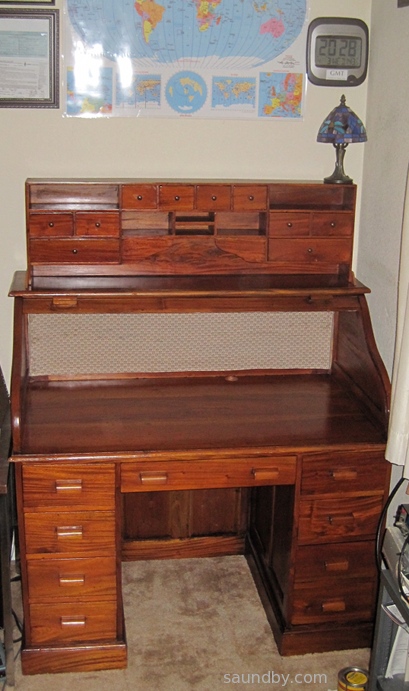
I've finished the rolltop desk that I started restoration work on this weekend.

Long story short, I needed a real place to put my amateur radio equipment. It's been perched on a short bookshelf behind my desk for months now. Before that it was in the living room on an end table beside my easy chair. Neither were great set-ups, of course. Now I've got a proper place for my radio station to stay, and I can protect it from dancing cats with the roll-down top. Here's the desk in its place:

Newly refinished roll top desk for amateur radio.

As you can see, I've already got some amateur radio paraphernalia on the walls around the desk. A world map formerly owned by KA6C (sk) passed on to me by George, KG6LSB along with a really cool collection of KA6C's QSL cards (which will be taking up residence in this desk.) The clock is not atomic, but it's set to within a minute of GMT so that I can keep track of world time properly. I have my old completion certificates, including one of my code completion certificates from the 70s, and my three licenses on the wall as well (KD6KGV, AG6HU, and my present call, W8BIT.)

Today the oil should be dry enough for me to start fitting out the desk with power strip and a mass of equipment, so it'll never look this nice again. Until I put the top down. That's the nice thing about a roll top desk.

I will probably have to wait until next week to route my antenna cables into the house through the crawlspace and up through the floor under the desk. I won't be able to get to it today, and we've got weather blowing in tomorrow and through the weekend. Fortunately the desk is next to the window where my temporary feedthrough brings the cables in, so I'll be able to operate until I get the cables re-routed through the new feedthrough.

Monday, April 1, 2013

Rolltop Desk Restoration for Amateur Radio

I needed a place to put my amateur radio stuff. Power supplies, radios, microphones, QSL cards, and so on. Through great effort, I was able to clear a four foot space in our "computer room", a spare room given over to computers and my electronics desk. But I needed a new desk to fill that space. The two I have available in the garage are both too large.

This Saturday was our amateur radio club's monthly breakfast. Afterward would be a perfect time to see what the local thrift stores have to offer. The closest thrift store to the restaurant where we hold the breakfast is also our family's favorite. But when my daughter and I stopped by, they weren't open yet. So we crossed town to fill the car's tank with gas, then swung by another thrift store. The door was open.

The New Desk's Base and Cubbyholes, So Far:

Use "View Image" to see full size original.

We walked in and had a look around. Then one of the workers told us they weren't open yet. We made our way to the door, then he told us it'd be OK. We were about 20 minutes early. There was a beautiful, if a bit well-used, rolltop desk there. I borrowed a tape measure, and sure enough, it's four feet long. The question was whether I could get it home. After a bit I discovered that the whole desktop would lift off. A few measurements, and it looked like it would fit in the car. So we bought it.

It was a tight fit in the car. The fellow at the Salvation Army Thrift Store was a great help. We got it in, and home.

My daughter helped me clean it up. I had her take some oil to it. The beauty of the wood started to show. After a bit, I realized that this desk would really look good with a bit of work. As much as I wanted to just get it in place and start loading it up with amateur radio stuff (and get the walkways in the computer room clear enough to get through), I decided to do some refinishing on the desk.

And what results! The desk is made of real hardwood. The color is natural. All it takes is some linseed oil to bring it out. I used a mild stain as well, but it only enhances the wood's natural color, it doesn't change it.

The Top, So Far:

Use "View Image" to see full size original.

I also put some new fabric on the rolltop. The old fabric was pretty awful looking. It's been hidden behind the cubbyhole insert, but I'm pulling that out and putting it on top of the desk to make room for the radios on the desktop. I picked out a fabric with a look to match the period appearance of the desk itself. It was a struggle to install the new cloth, but I managed, and the rolltop goes up and down well, still, though I'm planning on a little more tuning before all is done, there.

Now I'm looking at my power supplies and thinking I need to put some sort of veneer face panel on to keep them from looking too ugly for the desk. Next thing you know, I'm going to have to get another desk for my ordinary ham radio gear, and fill this one with beautiful vintage equipment!

It's going to be a couple more days, I'm guessing, before I can actually put this desk into service. But the work is well along, and having such a beautiful new desk is going to be reward enough for the sacrifice of walking around boxes for a few extra days.

Friday, November 2, 2012

Ham Radio-Continued Incremental Improvements

It's been a while since I've posted an amateur radio update.

I had my rigs set up temporarily in my living room when I last posted. They got ousted over the summer, for the sake of letting visitors feel that they're not in imminent danger of electrocution when they come over. ;)

That was fine, my intention was always to move them out into a dedicated space in the garage. My plan for the summer was to clear out a section of the garage, put in some flooring and walls and build a little sound studio in a corner. Then reality struck.

Robbers Fire
First, we had a wildfire. That had me putting my effort into outdoor work. I'd already taken care of the normal maintenance for the property, but when a wildfire is within a mile of your home, suddenly you start seeing a lot more that can be done. So the work in the garage was deferred for the duration.

A number of our friends came over one day to help out, by the time we'd finished the property was in good shape. The hardest part there was, once the chainsaws got fired up, getting them to stop while there are still some trees standing on the property. ;)

Home Repairs
Next was some planned home repairs. Which turned out to be more extensive than planned. I started expecting to replace the sill plate on our patio. That work grew significantly once I got started, and it ate up all the time and money I expected to put into both the original repair and building up my ham shack in the garage.

Meanwhile, my radios were stacked in a location where I couldn't use them, and the antenna cables were run to a part of the house where there weren't any radios.

After the home repairs were complete, I tried to continue with the original ham shack plan, but it just wasn't going to happen. The money for lumber and all was spent, and I just wanted to get back on the air. Also, there's a good likelyhood we're going to be moving out of this house within the next year or two, so the more elaborate set up I'd planned is looking less reasonable.

Fallback Plan
Instead, I decided to come up with another idea. But first, I moved over the cable for my 2m antenna to where I could hook it up to the radio in its current location on the other side of the house. I started to plan a new HF antenna (I still have zero contacts with the original 40m dipole I put up, mostly because I've been off the air all summer because of the points listed above.) The new antenna idea oscillated between an 80m dipole, a 40m loop, and an 80m loop. My daughter (KJ6TFT) and I went out and measured tree locations on our property. It was a low-energy activity that let me start getting my ham mindset going again.

Among the things I was looking for was an antenna that would tune up on more bands. My coax-fed 40m dipole would do 40m and 15m, but after a couple of near-but-not-quite contacts on 10m I wanted something that could radiate more efficiently on other bands. There are a number of ways to manage that, and I've gotten halfway there on more than one. :)

And there was still the issue of having a place to put my radios.

Well, the further along I got, the clearer it became that if I was going to get anywhere, I would have to divide my work into two lots: stuff that had to happen before the winter weather set in, and stuff that could be done regardless of weather.

The end result was that after playing around with fishing line and a bow and arrow for some hours, while seeing the first storm coming in on the weather reports, that I dropped the new antenna project for the time being and focused on making improvements in my present antennas to change them from the "get on the air, quick" configuration from last spring into a "likely to stay operational all winter" configuration.

As it happens, that turned out to be the right decision.

Upshot
I'm running long, so I'll save details for later. But last night I was able to check into a 2m net for the first time in months. I'm using a set-up that can keep me on the air all winter, at least. There are a couple of tweaks I still want to make before there's snow on the ground, but none of them are critical, just things to make the setup nicer.

Also, I've made some changes to the 40m antenna and I should be able to get on the HF bands again with a temporary set-up this weekend, and I should have things settled into something I can run with all winter within the next week. The antenna looks better than ever to my antenna analyzer, and I'm hoping it gets some signal out. I expect to be putting a call out to some locals over 2m to see if I can arrange my first HF contact within the next few days. At worst, I'll fall back to making some 2m simplex contacts and start collecting grid squares. I may only have a J-Pole, but so far I've only got one square (CM99mb), so anything is a step up.

Thursday, November 1, 2012

Raising Money and Beautifying Public Libraries

Public Library Promotional Posters by Bradley W. Schenck

Brad Schenck is an old friend of mine, and a great artist. He and I are both lovers of literature, and of places that bring literature to people, like public libraries. I spent my childhood ransacking any nearby library's collections of science fiction, fantasy, and science books. I would never have been able to read and learn so much if I'd had to track down and buy those books.

At one point, everything I had to read came from a Public Library Bookmobile that stopped in my neighborhood every week. That's how I first read George Orwell's 1984 and Animal Farm, as well as Richard Adam's Watership Down.

Even in the age of the internet, books hold a unique place. Libraries provide resources both for getting information to people, and for helping people learn what information they need to acquire knowledge they seek. And libraries mean a lot more than books these days. They are also an entrance to the information that is on the internet, helping people get information past the confusion of advertisements, unreliable web sites, and social media noise.

Brad's started an IndieGoGo campaign to produce promotional posters for public libraries--his own as well as those of contributors. And to raise funds for libraries. Plus, you can get copies of the magnificent posters for yourself.

Brad's Own Words
Have a look at what Brad says, then consider throwing in a few bucks. Or a few more.

A Larger View of the Posters

Wednesday, August 15, 2012

Parallax Propeller + COSMAC 1802: the Saga Continues...

Monday morning I posted about hooking up a Parallax Propeller QuickStart Board to an 1802 Microprocessor. My hopes are to make the Propeller behave as a RAM for the 1802, primarily to be able to display a bitmap of that segment of memory as video. The idea is to make it compatible software-wise with the 1861 Pixie chip (the 1802's native video adapter), which is presently unavailable.

Since then I've spent more time on this project. A lot of that time got tied up in side issues related to tying a Propeller to an 1802, as well as some time spent dealing with the test equipment I want to use to keep an eye on the circuit and see what it's up to.

First, here's how it looks tonight:

Propeller QuickStart hooked up to an old CDP1802 microprocessor.
The second stage of the Propeller/1802 mashup circuit. Click for full size.
I've got a closer relationship between the two processors now. The Propeller is actually doing something. Before, the 1802 was getting power and a fixed clock signal off the QuickStart board, but the Propeller was not itself involved.

Clocking the 1802
One thing I put a fair bit of time into (too much, that is) is using the Propeller to control the clock of the 1802. There are a few reasons I think this would be nice:

The clock can be varied in software depending on the user's desire and the individual 1802's capabilities.
At some later point, the Prop can have a greater degree of control over the 1802's operation in general. With the ability to stop it, start it, and even single-step it.

On my first stab at this a couple of days ago, I just threw a repeat loop into the Prop's code to pulse an output line. I didn't have very good control of the rate, I didn't have the constants set right, and it didn't work right off the bat so I decided to drop it and just use another clock.

Let's Try a Timer, Because...That's What They're For
This time I took time to read up on using the counter/timers on the Prop. Each cog has one, and I played around with it for a while before feeding its output to the 1802's clock input. After a while I was able to get the results I wanted, and was able to fine-tune that bit of the code.

Then I hooked it up to the 1802 with a frequency of 1.25MHz...well, I should say I hooked it up to a 4049, passed it through a pair of inverters to square it up a bit and buffer it. Then I passed the signal to the 1802. Which ran just fine.

At this point I still had the data bus of the 1802 hard wired to a $C4, which is a NOP instruction for the 1802. That way I can watch LEDs on the address bus and see that the chip is running through its address space. The pulse rate of the high order LED gives me an immediate idea of how fast the 1802 is getting clocked, too.

Then I started playing with the constant for the counter's frequency to see what speeds this 1802 chip would be good at with a 5V Vdd and 3.3V Vcc (the 1802 can use split supply voltages for its core and I/O. Not bad for 1976, eh?)

Overclocking! 4.8MHz Baby! Yeah, uh, Megahertz.
This one ran up to 3.6MHz without a problem. I didn't run it up until it stopped, the other day I think I had it running at about 4MHz when I was playing with the repeat loop. Above 3.6MHz it seemed to start running hot, so I stepped it back down again.

Above 3.6MHz it was noticeably warm after a while, and seemed to be getting warmer. Between 3.2 and 3.6MHz it was warm, but maintaining its temperature just fine. At 3.2MHz it was solid as a rock and the heat was barely detectable to a calibrated fingertip. If I can get it to run at this speed reliably with the Propeller providing video then popular Elf software like Tiny Basic, Forth, CHIP-8, and the programs written in them are going to rock on this system.

Edit: I've run it up to 4.807MHz now, and it didn't seem all that hot this time. It really shouldn't have any problem with heat at these voltages, it normally runs at 5MHz at higher voltages. And now it doesn't seem to have a problem. When I tried to take it over 4.8MHz it ran sometimes but not others, or hung occasionally. So this is the limit for stable operation at this voltage for this chip (an RCA CDP1802CE.)

Getting Data to the 1802

OK, so back to the problem of making the Propeller look like a RAM. Frankly, when I did my first look at the timing involved, I figured this would be completely trivial to implement. Push in data and address bus wires, connect up /MRD (memory read signal) from the 1802 to the Prop, crank a little Spin code, and I'd have the Prop acting like a ROM.

Put in /MWR and a little more code, BAM, the Prop is a RAM.

Hook up TPA to catch the high order address byte, tweak the code, and the Prop is ready to map more than 256 bytes. All I'd have to do is add the video code then figure out how much Prop RAM was available then expand to fit.

Well, it wasn't that easy. If it had been, I'd be playing with the video now.

I tried to leap forward at first. I plugged in the address and data bus wires, plugged in /MRD, and added some code to my clock driver program. It had a 256 byte array that it set up and initialized to $C4 in every position (NOP again, but this time it would be a soft NOP rather than a hard-wired one.) Then I wrote the program to wait for the Propeller I/O line I'd selected for /MRD to go low. Once that happened, it would get the address off the address bus, look up the appropriate element in the RAM array in memory, and put it out on the data bus until /MRD came back up again.

Easy-peasy, right?

Well, it didn't work.

Oscilloscope signal trace of one of the data lines and /MRD on the Propeller/1802 mashup.
Top: Data from Propellor pretending to be a memory. Bottom: Memory Read Request. Result: Memory Too Slow! (Click for full size.)

When I was doing my timing calcs and looking at the 1802's leisurely timing--it doesn't mind waiting just under a millisecond for its memory to come back when it's running at its normal speed (about 1.78MHz.) Hey, an 80MHz processor could be running a version of interpreted BASIC written in LISP and keep up with that, right?

I guess not. At least not the way I did it.

I clocked the 1802 at 1.25MHz for the test. This is an easy, slow speed that the Propeller can generate easily. I figured it'd work, I'd push up the frequency to 2.5MHz, check timings on the scope, and discover that I couldn't make the 1802 go too fast for the Prop.

Unfortunately the trace above shows different.

I Can Do Lots of Things Wrong, All at Once
I'm sure this is the result of something I'm doing improperly. I can think of several possibilities already:

I'm using WAITPNE and WAITPEQ to respond to the pin change. Perhaps, because they do some power-saving activity on the cog on which they're invoked, they just aren't meant to respond this quickly. Maybe if I just go to an active polling loop I'll be OK?

I'm using SPIN, an interpreted language. Perhaps I need to just insert a bit of Propeller assembly to tighten up the timing?

Perhaps there's some option or configuration thing I've not done?

Maybe this cog has to do something active with the timer/counter (I'm using the same cog as the one that's running the 1802's clock.) Perhaps if I move the RAM functions to another cog I'll be fine?

Those are just what comes off the top of my head. I'm far from being an expert on the Propeller, and I haven't picked up the books on it yet, just the free manual and datasheet downloads. But things like this create an opportunity to learn.

I also had a few other things I needed to figure out on the way, minor little things like the order you mention the output pins in when writing your code statements (I was getting $23 out instead of $C4 initially. Yeah, oops.) That and the whole thing is a rather fragile lash-up right now. I'm going to go to solder as soon as I get the RAM moving data to and from the 1802. But not before, because I hate rework, and if I don't test it on a breadboard first, there'll be rework. And this lets me do a few things like change which lines I'm using for address and data easily. I moved the data lines to P16..23 so that I can watch the data on the QuickStart board's LEDs, like a little front panel. Before, I had the address lines here, but I've already got LEDs on the breadboard showing me the address line states. So a quick change of a few constants in software, and I get a data display with no re-soldering.

Slightly Off-Task Tasks
I also took some time out to search out a line cord for the new frequency counter I got at the Ham Radio Club night before last that didn't have one (found one, after searching high and low. It's an oddball, not an HP cord.) And I checked out the two portable NonLinear Systems oscilloscopes I bought, too (one works, one doesn't, as expected.) The frequency counter was very nice to have while I was figuring out how to use the Prop's counter/timer as a numerically controlled oscillator, so the time was well spent even if it did eat into my Propeller-as-RAM time.

Looking Forward to Round 3
I'll be back at this before the end of the week (I'd like to tomorrow, but it'll be a busy day so I may not be able to.) If you have any suggestions or salient experience, your comments or emails would be much appreciated!

Edit:

I've had a look at the Propeller docs. It looks like the timing of hub instructions is my problem. I may just insert WAIT states for the 1802 and see what that does.

Thursday, July 19, 2012

8085 Monitor Code and Other Distractions

I've been working on an 8085 microprocessor project for about 3 years now. It started with a simple circuit on a breadboard, moved to my HP Logic Lab, where it became a real computer, then got built into a permanent version on a prototyping PC board.

I've been documenting the thing since it moved to the Logic Lab on my web site, posting how-to articles on building both versions (the hardware is identical, only the construction method is different), as well as software to control the hardware.

Where I've come up short is putting together a sort of unified OS for the system online that allows software to be developed right on the system itself, as well as any high level languages. I've been writing lots of software for my own use with the system, mostly hand-coded using my assembly coding forms and my 8085 Pocket Reference Card. But I keep either getting distracted from or otherwise dodging the job of integrating all the software bits I've already got into a simple "monitor" program (sort of a mini-OS for machine language) for the system.

Part of it is the usual life distractions. I've been sitting next to a wild fire this past week, for example. And then I've got lots of other electronic toys I like to spend some time with. Each one has its own appeal.

Before the fire, and a bit during (when I was taking a break from cutting ever more brush around my property) I've gotten back to work on putting it together. The biggest part is the part that reads the keyboard, determines the current system state, and dispatches keystrokes and execution to the right place. All the hardware interfaces are already in place, most of the basic system routines are in place (timing/delays/string handling), etc. So the "glue" is pretty much all that's needed. And I got it about halfway done before the fire started, I'm writing the code that actually takes actions for each mode, or simply hands over the necessary info to user apps running on the system.

So, if I can get time away from deck repairs on my house this weekend (now that it looks like it's unlikely to burn down or that I get evacuated), I'll be trying to wrap up and test that code.

Small Thing, Big Obstacle

The other thing I'm looking forward to is replacing some of the switches I put on the MAG-85. I put in switches for various interrupts about two years ago, and the switches themselves turned out to bounce and make so much noise that I've given up on them. No amount of debouncing, hardware or software, within reason has made them reliable. I'd hate to have someone else construct a MAG-85 and have to deal with this. It's been a thorn in my side ever since I added them, and took a lot of the fun out of the permanent hardware project for me (on the breadboard version, I used some old keyswitches out of a knackered Mac Plus keyboard, they worked great with only the most minimal hardware debounce. But I figured I could hardly specify 25 year old keyswitches in a project that others might want to build.

I'm expecting a shipment of a bunch of different switches tomorrow that I can test and select from to replace the awful switches I have now. So I can put that behind me (and probably re-simplify the circuit to take out a bunch of the extra parts I put in to try to deal with the noise on these switches.)

Frankly, the old switches are something I'd about hesitate to use in a doorbell circuit, never mind real electronics.

Tuesday, July 10, 2012

Gadget Gangster QuickVGA+ for Parallax Propellor

Gadget Gangster QuickVGA+ board for the Parallax Propeller Quickstart Board
Propeller Quickstart Add-Ons Galore

I mentioned that I picked up a Parallax Propeller Quickstart Board a while ago, and finally got around to playing with it.

Well, I've played with it a lot more now, in part thanks to a cool add-on board from an outfit called Gadget Gangster. I bought a Quickstart VGA+ board from them. It adds a nice VGA port (duh) as well a a PS/2 keyboard port (that's PS/2 as in the old IBM "Personal System/2", not Playstation 2), a stereo audio output, and a Wii Nunchuck port (or the classic controller can go here.) All on one little business card sized board, that fits right on top of the Parallax Quickstart board.

It's a nice combination of features. It's also got places for adding an SD card connector (which I've done), an IR port, and a composite video port.

There's a Pocket Mini Computer project built around this board, that's sort of a C-64 retro-clone kind of system. I look forward to trying that out some time when I get tired of playing with the Wii nunchuck as a raw sensor in software.

One note about that...

The nunchuck software that Gadget Gangster recommended didn't work right out of the box. I've posted na updated version of the nunchuck demo software at the Parallax Propeller Object Exchange, the place where Propeller users post their software for others to modify and use. I modified the demo to use the correct I/O lines for the QuickVGA+ board, and I added a bit of code to make it more clear what's going on with the accelerometers in the nunchuck.

Next, I'll be building up my Gadget Gangster QuickProto board, which came in a bundle deal with a QuickStart board (so, yes, I now have two Quickstart boards. And I ordered one for my daughter, too.

Pennies from Heaven
That's not all the Propellers running around the house, as it happens. While we were at the Parallax Robot Expo, my daughter and I picked up some stuff off the Free table. Among those items were a pair of slightly used Propeller Proto USB boards and one one-off PCB Propeller board that appears to mainly for servos. My daughter has one of the Proto boards and I have the other, as well as the one-off PCB.

I've already added PS/2 mouse and keyboard ports to my Prop Proto board, as well as a composite audio/video adapter. I have plans for this board...

I also found an early rev of the Parallax QuickStart Proto board in my bag of goodies, which I'm planning to use to put a sort of Elf II I/O interface on a Quickstart board. A hex keyboard, a pair of hex displays, some control switches, and hey-ho it's 1977 all over again. :)

Bottom line on the Propeller: It's heaps of fun to play with. Quick and easy. I keep thinking I ought to stop and read the documentation, but it hasn't been necessary, yet.

Monday, June 4, 2012

Parallax Propellor Quickstart Board

When I was at the Parallax Robotics Expo back in April, I picked up a P8X32A Quickstart Board. I've had my eye on the Propeller chip for a long time, I first heard of it before release. But to date, time spent on other things kept me from getting started with it.

Parallax P8X32A Quickstart Board, shown inside an Altoids Tin for scale.
The P8X32A Quickstart Board, in the obligatory Altoids tin for scale.
At the robotics expo Parallax was cutting some great deals on their products, however. And I figured that if I had something on hand it might make it a bit easier to take a first look at the Propeller. With the discounts they were giving at the show, I seriously considered the Propeller Starter Kit, which includes the Propeller Demo Board. But, since I had no idea how long it would be before I actually got a chance to use it, I decided that a smaller investment would be wiser. So I got a Quickstart board.

The Time Window Opens

Finally, last Friday afternoon, I had a chunk of time open up as a result of being too ill to make a prior commitment. (I can't help but think of how many important things in my life have happened because of time made available through being too sick to do what I was supposed to do, or because I was stranded somewhere without transportation.) The tiny box for the Quickstart board had been living next to one of my computer keyboards for over a month, so I didn't even have to go looking for it. There was a USB cable of the correct type sitting in the drawer next to me. So I started in.

To keep it simple I decided to start out with the Parallax programming environment, Propeller Tool on my Windows 7 machine. I expect to try out Brad's Spin Tool, the other major development tool for Propeller, on my Mac and Linux machines a bit later.

I was pleased to see that it installed everything, the driver for the USB interface chip on the Quickstart board, the IDE, and the serial terminal tool for the Propellor. It says it does that before you download and install, but I was a bit unsure of whether the Terminal program would actually be in there before I actually installed the program.

Once the software was installed, I started it up then plugged in the Quickstart board. I got a ding-dong from Windows telling me it saw the hardware. I was able to find a menu item to report what chip version the software saw, and it saw my chip. I didn't get the message I expected from the documentation at first, a dialog pop-up. That appeared later, the first time I tried to send a program to the board.

About that...

Parallax has a tutorial that runs you through the initial steps of programming the Quickstart board. Aside from the fact that to get to each of the several pages you follow a link from the product page (the pages aren't linked together--that is, when you get to the bottom of one page there's no link to the next one) there's another oversight on these pages as well.

The page gives a short, simple program, describes what it does, then goes on to a slightly more sophisticated program. It tells you about how the editor behaves. But it doesn't tell you how to actually get the code on the chip.

Now, I'm not exactly a first timer here. I looked at the menu and saw "Run" at the top of the screen. But when I chose that I got a list of items, none of which were clearly "compile and run". So I started selecting things at random. I also didn't know whether to expect a simulation environment to start, or how to select between a simulator and the real hardware. I scanned the tutorial web page up to the third program in it, and found no specific instructions.

This is one of those things of which Sherlock Holmes remarked, "the answer is perfectly obvious, once you know it." There is no simulation environment in the free tool, that costs extra (I wish Parallax could follow Atmel's example in providing it with the free tool, the first job I applied an AVR to happened because I was able to use the simulation tool to verify the software timings I needed). And the Run=>Compile Current=>Load EEPROM or Run=>Compile Current=>Load RAM would either have done enough to let me get what I wanted--the sample code running on the target hardware.

But that wasn't clear. I was doing a quick try it and see, so I hadn't spent time with the chip's datasheet yet to learn about how it loads and runs software, what facilities it has for storage, what the implications are of loading EEPROM vs. loading RAM (I didn't even know if they were both program storage, for all I knew one was program storage and the other was for loading an initial state for testing.)

So I was a bit stymied until I just decided to try things at random and see what happened.

At the bottom of the tutorial page is a short table describing the shortcut keys and what they do. Below the actual step-by-step examples that omit instructions for how to compile and run the code. There they describe F10 and F11, for example, and the implications of each choice (RAM or EEPROM).

I managed to get the short initial program (which lights an LED) loaded and running. The LED lit up. There was much rejoicing.

Demo, Demo, Who's Got the Demo?

The next thing I started to wonder about was the demo that showed off the touchpads by lighting up the LEDs when the pads are touched. This hadn't appeared to be pre-loaded like demos often are on other processors. Nor did there appear to be anything obvious among the Propeller code that came with the IDE (another thing I fouond by spelunking, rather than as a result of documentation.) There were no projects with names like "Quickstart Board Demo" or "Touchpad Demo" or whatever. Nearly all the demos appeared to be for hardware I didn't have.

At first I went back to the Quickstart tutorials on the web. I did searches for the demo on the Parallax website and through Google, but the closest I came up with was modified versions of the demo listed in a forum thread. I did find the demo later, but it was only by going back and looking for it time after time that I finally located it today, my fourth day trying, here, on the Parallax Semiconductor Quickstart product page, not on the Propeller downloads page or the Parallax store product page, where there are lots of other downloads but not this one. The location is so subtle, that even after I found it earlier today it just took me five minutes of backtracking to find the right page over again. It's on the linked page, at the end of the list of downloads at the bottom. Direct Link to P8X32A Quickstart LED-Touchpad Demo Software Download

Well, back to last Friday. The demo was interesting to me, but while I was looking for it I came across information about the video capabilities of the Propeller. Frankly, while I'd heard the Propeller did video I just figured it was something along the lines of bit-bashed video like what I've done with several other microcontrollers. I've even generated video from a little Atmel AVR ATTiny12 with nothing more than a software loop and a resistor divider-no fancy shift registers or anything.

Needless to say, it was pretty simple video. No colorburst, no color. But it got some data out of the chip on a two-pin interface nicely (three levels are needed for even black and white video to get the sync signals for timing in addition to the black and white pixel data.)

The Propeller goes way, way beyond this. It's got both NTSC and VGA signal generation hardware on board. And it's not just single bit video, either. It can generate full color at a number of resolutions. This I had to try. But my little Quickstart board doesn't have a video output on it. I looked at the Propeller Demo Board and saw that it had a video interface. It was just a 3-resistor DAC and an RCA jack, so I decided to make one.
Three resistors on an IDC header to an RCA jack, a fourth square pin on a wire provides a ground. Simple quick and dirty video interface for the P8X32A Quickstart board.
It doesn't get much quicker and dirtier. It took longer to pull the parts than to assemble.
Five minutes later, I had my own video interface. (Note: the accepted way to do this if you're not buying your Quickstart board at a Parallax event is to go to Gadget Gangster and buy your Quickstart board with a free QuickProto board, which includes the video interface along with lots of other cool bits that make the Quickstart board so much more ready-to-go.)

At first, the video was pretty wonky. Then I realized I had the resistor that's supposed to go to P13 going to P15. Once I fixed that, it was better, but still not good. The graphics demo ran OK, but one of the text demos wouldn't even sync properly, the other had poor contrast. The thought crossed my mind that either the timing in the Propeller wasn't much better than my old Atari Pong or that the provided 5MHz crystal meant that the timing wasn't right on. But I've learned the hard way, time and time again, to suspect user error first.

I took another look at my too-quick and too-dirty video interface and found that the resistors that were supposed to go between P12 and P13 were swapped. A moment later I had pulled the pins from the plastic IDC header and moved them to the correct positions. This is why doing electronics when you're under the weather is not always a good idea. Fortunately this wasn't a mistake that'd let the smoke out.

Once that was done, the video looked great on all the demos. I then had to make a batter adapter so that I could try it out on the big screen TV in my living room. A quad-AA battery pack came to hand quickly enough, one of the ones with the 9V snap connector on the end. Then I soldered a 9V snap connector pigtail to another IDC header and spliced in an IDC socket pigtail. That way I'd still have a place to put my ground pin from the Q&D video interface without soldering it to the battery connector. As a final refinement, I put a slider switch in line on the positive battery wire to act as a power switch.

Once that and the video adapter were plugged into the Quickstart board, I took it out to the living room and hooked up to a free composite video input. It looked great.

I spent the rest of my time mucking around with the code of the various NTSC video demos. Spin is a really easy language to learn, if you've got any programming experience it'll come easily. It's even simple enough I could easily see teaching it as a first language to new programmers (with a Propellor board on hand, of course, to get the full hardware + software experience!)

Cleaning Up Shop
As mentioned, I have now been playing with my new board for four days. In spite of a couple of minor snags (figuring out what to choose to compile and run my programs, finding the demo for the Quickstart board itself) it's been a very rewarding use of my time. I can see now why people who've been raving about this controller for five or six years are excited about it.

After my first night playing with the board, I learned while reading the Parallax forums that the Propeller could also do RF-modulated video. That's what I spent mid-day Saturday playing with. I put rabbit ears on my big screen (talk about incongruity!) and a pair of jumpers on the RCA jack and managed to receive video from the Propeller from about 25 feet away. What worked even better was an LCD handheld television left over from the analog TV transmission days. I was able to get as far as 10 feet from my back door, a total distance of about 50 feet, and still get good reception. I don't think it's making it as far as the neighbor's house, though (fortunately.)

Yesterday I buckled down to some more structured learning of the Spin language, reading the Propeller Manual and Datasheet, and so on. Today I'm continuing that, working my way through tutorials and such. I also took a look in the goodie bag I filled at the Free tables at the Robotics Expo--there are a couple of Propeller boards in there that I can't wait to find a use for now.