Sunday, November 22, 2020

"Old Fashioned" Software Sales from Corel

A while back Humble Bundle had an amazing software bundle. It was a bunch of the Corel art software, plus a bunch of extras, for about $30 donation.
Given that I had been seriously considering a purchase of Corel Painter 2020 earlier in the year, but couldn't quite justify the price in my budget, it was perfect for me. Corel Painter 2020 with a whole bunch of brush packs, plus a collection of others like Paintshop Pro, their CAD software, and so on.

What was especially appealing is Corel's sales model. These are sold with a lifetime license. Unlike Adobe's "Open Up a Vein" licensing, once they're bought, they're bought. Which means the software and access to my own work isn't going to go "poof" someday if I change credit cards, stop a subscription, or whatever.

In fact, even though I am only getting started with Corel Painter 2020, I have to say that the sales model makes their come ons for Corel Painter 2021 appealing. They are offering some great prices (compared to what I was looking at dropping last January), and again, knowing that when it's bought I keep it makes me more willing to give up my lucre. I do know that once I've made some money off my use of Corel Painter 2020, I'm going to be favorably disposed toward putting some more of it into updates, upgrades, and extras.

But it goes further than that. I've not been happy with the online office software lately--I've been using the Google stuff for a long time, mostly as a light user but occasionally more deeply--and I don't think much of Office 365 in the use I've made of it. And hey, Corel sells office software, too, the legendary WordPerfect in its current form among them. And this deal with Corel 2020 is definitely making me go "Hmmmm..."

WordPerfect Office Suite
Wordperfect Guy Going Hmmm.
(This plug is completely unsolicited. I like their stuff, I'm amazed at the deal I got on the art software, and I don't mind paying for good software so long as I don't have to keep paying and keep paying whether I use it or not like it's an MMO.")

Friday, September 11, 2020

MAG-85 Update

MAG-85 Isn't Dead
MAG-85 circuit schematic

While I haven't posted much about my MAG-85 project or blogged about it lately, I have continued to work with it until late 2018, when all my activity shifted toward making a cross-country move from the Sierra Foothills of northern California to Florida. Electronics got roughly pushed aside for activities like packing boxes, painting, minor home repairs, and so on. As it happens, a lot has happened with the MAG-85 that never got posted simply because posting what I do multiplies the time involved in doing it by about 4x, so I wanted to get to a stable point, collect all the information, then post it in one big update.

That was probably a bad choice, versus the do a little, post a little approach I started with.

Presently, I am in my new home and still getting my electronics stuff set up again. I have found the boxes with my MAG-85 stuff and organized them, and my soldering iron is out and in use, though I will not really have an electronics desk till next week or so while I reorganize some things in my "laboratory". I broke down my breadboard MAG-85 that was assembled on my HP Logic Lab--it wouldn't have survived the move as-is, and most of my work has been on my vectorboard assembly lately anyway. I will be reassembling a solderless breadboard version of the MAG-85 again, though, and I'll document that as I do it. I have the breadboard ready to go, in fact.

The major item of work hanging over me is the software--the monitor program. I have all the necessary pieces--the keyboard routines, the I/O routines for the display, the various functions such as reading memory, writing to memory, displaying blocks of memory to the display. It needs to be assembled into a complete program, though, along with the current software to perform setup of the system at power-on. I hope to assemble this into a cohesive "operating system" as I am building up the breadboard. I will do this initially with the NOVRAM as the sole memory, but will expect to adapt that circuit to the use of both EPROM and RAM, so that users can have a system with a secure section of memory. Since I also want to accommodate a variety of memory devices, and later memory expansion beyond the 8K of the original MAG-85, this gets complex enough that I don't want to hold up the development of a monitor for the current design.

Beyond the desktop versions of the system--breadboard or vectorboard--I hope to create a battery-powered handheld version of the design. I have always wanted to have a small 8080-compatible handheld system that I can plink away at while sitting in my easy chair. My current vectorboard version was a step in this direction. It's bulky, but can be used handheld. I can make it smaller, though. The provisions I made for expansion, along with being overly conservative about its thermal design, made it larger and more unweildy than it had to be. So beyond getting a working monitor, I intend to refine the design for handheld use.

Once I'm at the point of having a PCB, I expect to release it as an open design, so that anyone can get a board made without relying on me to produce them. I will release the software under an open license as well, so that a community can run with it.

Among the design changes I am considering (after reaching the point of getting a full monitor and stable basic system) are a display with 4 lines rather than two, to allow a more sophisticated interface for both the machine language monitor, and for a possible Tiny BASIC or Forth addition to the base software.

Wednesday, January 8, 2020

Wider Window Borders in Windows 10

Windows 10 by default uses a 1 pixel border on the active window. Not only that, but it doesn't use a contrasting color to make it stand out. When you combine that with a high resolution display, it becomes impossible to control window sizes with the mouse--just try to get your pointer right on the window border at 4k, especially with a touch screen!

There used to be settings to control this that were easily accessible. No more! Microsoft took those controls away.

Fortunately, you can still use the Registry Editor to control your border widths (as of January 2020). The setting names have changed since Windows 8, though, so older guides to solve this problem don't work any more.

Set a Color
Before setting the width, let's make sure we can see the border. Fortunately, this is still a user-accessible setting, though it's buried in a spot you wouldn't expect.

From your Windows Start menu, select Settings (the Gear-shaped icon).


From Settings, choose Personalization.


In the Personalization Settings, choose Colors.


We need to do two things here. One is to turn on accent colors for title bars and window borders (the bottom red box in my image), and choose a good color for those accents. Mine was set to the light blue by default, I changed it to dark blue on the palette inside the upper red box:


Change the Margin Width
In your windows search bar, type 'regedit'. You'll usually get the Regedit app listed in results by the time you've typed in 'reg'. Click that to start the app. Then, once in Regedit you want to select HKEY_CURRENT_USER to get its drop-down, then "Control Panel" in that drop-down, then "Desktop". In succinct form:
HKEY_CURRENT_USER->Control Panel->Desktop.

In the right pane, you will see two settings that start with FocusBorder. These are the width and height settings for the window you're currently focused on on the desktop. By default, Windows 10 has these set to 1. Which is pretty much invisible, especially on a 4K or other high resolution display. Fortunately, you can watch the changes directly on your regedit window to see how your chosen settings work. Double click on the value name to change it--a dialog will come up with a box that lets you set the value. By default, it is looking for a hexadecimal (base 16) value. If you don't want to deal with that, click the button on the right to have it read a decimal value. Click OK to set the value.

Once you have a size set that you like, you can quit Regedit and your settings will remain. You don't have to relogin or reboot to make the change. Now whatever window is your current window will have a wider border that you can see.

[Click for Full Size Image]

On my 4K display, I found the border became reasonably visible with a value of 16 (10 in hexadecimal). It wasn't too hard to grab with touchpad or touchscreen, but I widened it up to 32 (20 hexadecimal), and it was much easier to see and to manipulate. I could easily see setting it to 50 or 60 (in decimal) if I wanted it to be more easily visible.

I hope that helps you solve your problem. If you have any problem with these instrusctions, leave a comment or drop me a note at saundby at gmail.

Wednesday, March 1, 2017

3D Text from an Image in ZBrush


(Skip to the brief step-by-step directions)

Here's a simple process I use to create raised 3D text for my CNC in ZBrush. It has many other uses, too, of course, and can also be used to create any
sort of embossed or raised pattern you wish.

The raised object can also be used with ZBrush's solid geometry tools as a subtraction mesh to create indented text or patterns.

Create the Image

Create an image file of the text or pattern. ZBrush accepts .jpg and .psd and probably other common formats as well. I usually use .psd files, as they can also be used in other ways with ZBrush, but .jpgs work just as well.

Set a high resolution for good detail. I use from about 1400x1400 to about 2500x1500

The letters should be black on white. You can also do white on black, but I find that it's easier to see what's happening in ZBrush using black on white, since the black area will be transparent in Spotlight in ZBrush. Leave a margin around your text or design, about 2 or 3 letters wide works well. Save the image and go to ZBrush.

Set Up an Object in ZBrush

Append a 3D plane to your project to put the text on initially. You want enough resolution in the object to take the details of what you're projecting on it. Dividing it 6 or 7 times should do the trick. I usually have smoothing off when doing this, but since a plane doesn't get smoothed except around the edges, it doesn't matter much. Delete the lower subdivisions.

We will get a consistent height on the projected text by using the Layer brush. Layer brush always builds to a set height for a single stroke. So we will be doing the whole projection as a single stroke of the brush across the mask we'll be making from our image. If you mess up--don't cover all the text in a single stroke, or accidentally do multiple strokes leaving the projection of unequal height, then use Ctrl-Z to undo and try again. On large projections it often take me a few tries to make sure I cover it all and don't bobble the stroke (I usually use the mouse for this rather than my tablet, in fact.)

Select the Layer Brush, set your brush size well larger than a single character in the center ring. Set Zadd on. Make sure Material (M), MRGB and RGB are off.


Import the Image

Import the image into ZBrush's available textures in the texture menu. Clicking on the Texture Off thumbnail will bring up a menu with an Import button on the lower left side. Use that to select your image in the filesystem. You should now have a thumbnail of your image in the Texture menu.

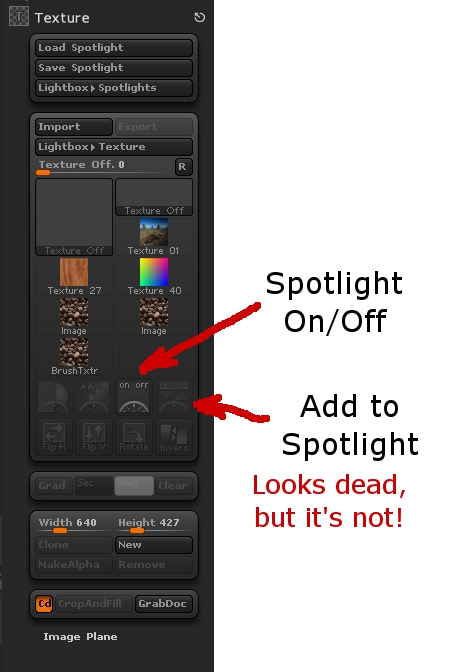
Now you need to get it into Spotlight. This requires using the unlabeled "Add to Spotlight" button (See ZBrush: Finding the Hidden Spotlight for information beyond the image below.)

Image showing Spotlight Buttons

Then, if Spotlight doesn't turn itself on, do so, and use its tools to position your text (or design) over the 3D plane. It should have some extra plane on all sides of the text, but not a lot. In fact, the blank area at the edges of the image in Spotlight should lap over the edges of the 3D plane a bit if possible.


Embossing the Text

As stated earlier, we use the Layer brush to emboss the 3D Plane with the "cutout" in Spotlight. In one stroke, with Alt (or Option) pressed to raise the text, sweep repeatedly back and forth across the image over the plane to emboss it all to the same level. The actual level it ends up at doesn't matter, we just want it raised compared to the background of the plane to an even level overall. Once that's done, the scaling and deformation tools in ZBrush can raise it to the actual level you want it at.


To crop away the unwanted areas, put a mask over the text you want to keep, then go to Tools->Subtools->Visibility->Hide Pt to hide the unmasked points. Then go to Tools->Subtools->Geometry->Modify Topology and click "Del Hidden" to remove the hidden points.


Finally, simply grow or shrink the text along the axis that the embossing is raised in to set its height.


Quick Reference, Step by Step
  1. Create a black-on-white high res image of your text or design.
  2. Append a 3D Plane object to your ZBrush project. (Tool->Subtool->Append, choose 3D Plane) Make it the active object.
  3. Turn off smoothing on Divide (Tool->Subtool->Geometry->Smt is not highlighted.)
  4. Divide the plane 6 or 7 times (Tool->Subtool->Geometry->Divide)*
  5. Delete Lower Subdivisions (Tool->Subtool->Geometry->Del Lower)
  6. Position the plane square facing you in the display, zoomed so that it just fits in the display area.
  7. Select the Layer Brush (Hotkeys: B, L, A)

  8. Set Z Intensity to 100% (at top of screen).

  9. Zadd is ON. MRGB, RGB, and M are Off.

  10. Set a large draw size. (Top of screen slider, or Hotkey S)

  11. Load your image into the Texture menu (Texture->Click on Texture Off, click Import on lower left of drop-down, select your image from the filesystem.

  12. Load your image into Spotlight (Click your image's thumbnail in the Texture menu, then click on the Add to Spotlight button--it's top right below the thumbnails.)

  13. Turn on Spotlight (button to left of Add to Spotlight) if it doesn't do it itself.

  14. Position and scale the image over the plane.

  15. Press Alt, hold the left mouse button, wipe brush repeatedly across the letters or design all as one stroke (don't let up the mouse button).

  16. Crop the plane to the outline you want.(Ctrl-Boxmask area you want. Visibility: Hide Pt. Modify Topology: Del Hidden)

  17. Use deformations to stretch the plane the letters are projected in to set the height of the letters.

* Alternately, Divide a couple of times, then turn it into a Dynamesh with a resolution of about 240 or so.

Thursday, August 25, 2016

What is a Linux Distro?

We've got a number of folks in a Facebook Linux group I moderate who are playing around with the guts of their Linux by swapping around pieces from different distros. Which is cool--experimentation and tinkering are always good things.

It has raised a point that I think may require some background. Specifically, "What's a distro?"

Back in Ye Olden Days

When Linux first came around, those of us who wanted to play with it got source code. And that's all. We'd compile the kernel under some other operating system (Windows, another Unix, or maybe even the Mac of the time if you were a masochist!)

Then we'd start compiling binaries for our Linux kernel--a shell and cc would be a common place to start so that you could start compiling stuff for Linux under Linux.

After a while, we realized that we were duplicating a lot of effort. Many of us had fairly generic systems that we could swap binaries between without having to recompile absolutely everything.

With time, the concept of having a set of precompiled binaries for the kernel and applications as a starting point for a Linux system became the basis for a distro. Usually you'd install from a set of floppies or a CD. If the kernel you chose from the distro was close enough for your purposes, you'd just use one of the ones they'd precompiled. If you wanted something more suited to your hardware, you'd recompile the kernel with a few configuration changes and usually get much better performance and a more stable system, without having to recompile the application binaries for user space.

We still regularly compiled applications. Anything that wasn't bog standard usually would have to be compiled. As time went on, the list of precompiled binaries for each major distribution grew, and then distros started to have their own package managers to ease the installation and management of precompiled binaries.

The ability to do this is a large part of what has turned Linux from a tech toy used by a select few who are comfortable with compiling their own operating systems and applications to being the generally popular operating system it is today.

Stepping Into Today

Now it's not uncommon for users to choose a distro according to the application set they want for their system.

Different Linux distros have sprung up with selected sets of software precompiled and ready to install and run, or as part of their base installation.

The specialization has reached back into the kernel, too, as maintainers of the distros have improved their distro by compiling a kernel that suits the base suite of applications they provide. Distros that are intended to be more general-purpose likewise make changes to the Linux core to make the installation and hardware detection process simpler and more robust to make installing and setting up Linux easier for users.

More software is more easily available to everyone because of this. All the major distros are tied to a system of package management that provides users with almost limitless choices of software to install on their system.

Going outside the distro's own software repositories (repos) is certainly possible, especially in the instance of distros that are upstream of one's own.

For example, if you're running Mint, it's a snap to include repos for Ubuntu and Debian in your package manager's list of repos. And chances are almost all the software there will run without problems. For all I know (I haven't installed Mint in a while) Mint includes the Ubuntu repos by default, I seem to recall that being the case in the past.

However, if you're crossing over between branches, like wanting access to software compiled for Fedora that's not in the Debian-family distros, then you're starting to put yourself in a position of having more errors. The filesystem layout is different between Fedora and the Debians. There may be differences in the kernel configurations that will cause you problems.

If you want to get software that isn't in your distro's repos, or in a closely related distro (preferably upstream), then the correct answer is really to compile it yourself on your system, rather than use software someone has compiled on a different system configuration.

If you want to save other people the trouble, see about contributing your effort to your distro's repos. They'll probably have standards of what you have to do to do that, but you can be part of the team that makes your distro that much cooler pretty easily.

Kernel Swaps

I've seen discussions of turning one distro into another on the Facebook group. Hopefully a better understanding of what a distro is, and how it is defined, helps to show why "Turning Ubuntu into Kali" or some such is a misnomer. If you're grabbing another kernel then starting your system off it, you're no longer running either distro. You've gone custom.

That's not a bad thing, experimentation is a good thing. But you also want to look at how effective the technique of playing mix-and-match with precompiled system files and applications is versus just doing your own compilation with the stuff you want.

If there's a specific distro that you want the advantages of, it's best to install it rather than to build a sort of chimera by grabbing pieces then lashing them on to your current distro. You're asking for trouble by using binaries that haven't been compiled using the same assumptions at compile time.

If you want something truly custom, then rolling your own Linux is very probably the way to go. It's not hard, and that used to be the standard installation method. There are a number of systems out there to make it even easier than we had it in the old days (Linux From Scratch, Gentoo, etc.)

I hope this helps clear up some of the confusion about distros and their parts. :)

Wednesday, February 24, 2016

Yaesu FT-2900R PTT Switch Fix

One thing that's bothered me about my otherwise excellent Yaesu FT-2900R radio is how touchy the push-to-talk (PTT) switch is on the included microphone. It's got a very light "touch" to it, which means the least bump or press puts you on the air whether you want to be or not.

It's hard to get it out of the microphone bracket or to hand it to someone else without hitting the switch and doubling over someone while you make unhappy noises about the surprise of the switch getting pressed AGAIN. My wife and daughters often share my station with me when we're checking in to local 2m nets, so being able to hand off the mike is pretty important around here.

Today I finally decided to take matters in hand. Fortunately, Yaesu makes it easy to get into the mike. There are just three screws, two near the bottom of the mike, and one going through the button for the mike bracket (that will be the long screw when you go to put it back together.) Once inside you can see why there's a problem. All the keeps the PTT from getting pressed is a little piece of springy foam that's down near the pivot point for the switch. When you push on the normal part of the switch (or bump into it), you get a lot of mechanical advantage on this little bit of foam, it goes squish, and you're on the air as the plastic tab up top presses into the little microswitch on the microphone's PCB. Not good!

Adding Some Crunch

I took some measurements with a caliper, then headed to the hardware store. In the little drawers of specialty items there are springs (at least in my local hardware stores.) Among them are some small compression springs. The one I chose was a #9 Compression Spring. The specifications are: 0.312 inches OD, 0.047 thick wire, 2 inches long (as sold.) That's 5/16 inches diameter, aka 7.94mm. And 3/64 inches wire, aka 1.19mm. And 2" is about 51mm.

I took this home and clipped a bit off, as you can see in the images. The part I used was about 7/8 inches long, or 22mm. The cut end went over the plastic tab that presses the PTT switch inside the mike, with the flat end resting against the switch body.


If I were the paranoid sort, I'd put a bit of protective tape over the printed circuit board to protect it from the spring. However, there's nothing for the spring to short to even if it does wear through the solder mask on the trace it lays over. So I just left it alone.

After reassembly, my microphone has a nice crunchy feel to it, and it takes just the right amount of force to close the PTT switch now. The force resisting closure is up at the top of the switch where it belongs, now, so even this little spring does the job.

I hope this helps some of you out there, because I've heard a lot of other FT-2900R owners with the same complaint about the PTT switch that I've had.

Monday, November 17, 2014

Microsoft's Cross-Platform Play

Microsoft has recently announced that they are moving .Net to open source and supporting Mac and Linux in addition to their Windows OS with Visual Studio Community 2013. Also, Visual Studio 2015 will support iOS and Android development.

Frankly, it's a little confusing because in some places MS mentions Mac and Linux, but very few, and they mention iOS and Android in lots of places, but not everywhere. So the support may be different than what I said.

Nevertheless, MS is opening up. Or at least seeming to.

Their timing couldn't be better, in my opinion.

Oracle is working hard to poison Java. I'm not entirely sure why, unless they think that ticking off any Java programmers and users outside those developing middleware for Oracle's products is a really great strategy. Their support for Java as a general programming language, as Sun did, has been piss-poor since day 1. Every so often they make a grand gesture to try to present themselves as interested, but the product they offer now is not something I could send someone out to install with a good conscience. What kind of an honest, large-scale company thinks that half-sneaking some crap software in under the cover of installing their own is a really great idea? Not one that really treasures the individual customers, I can tell you (and yes, Adobe is on this particular excrement list, too.)

Couple that with their poor responsiveness to security concerns, to the point where the Java language is treated as a sort of worm or virus by most software, and you've got a company that's decided to leave a hole in the cross-platform development market simply because their interests are elsewhere.

Cross Platform Alternatives

C# is Microsoft's outgrowth from their own attempt at embrace, extend, exterminate targeting Java. It's a very good language, including the good parts of Java while having a set of libraries (.Net) that don't have the Java API's less than useless historical cruft but do have everything good about the API, which made Microsoft look really cool to programmers when it came out as most were not familiar with the Java API itself.

Switching to C# from Java is an afternoon's exercise. But it and the .Net library started out wed to the Microsoft platform.

Enter Mono, a cross-platform implementation of .Net supporting the C# language based on Microsoft's ECMA standard for its products. It has been growing, at least in part on the back of the decline of Java, as well as bringing the good things about C# and .Net to Mac and Linux development. It doesn't hurt that it is the core that drives products like the Unity cross-platform game-development system, too.

Now Microsoft is combining their products with Mono, and extending their reach to Android and iOS.

There are a Couple of Ways This Could Go (and Possibly More)
In Future A, Microsoft does the excellent work they do in producing development tools, but now with a return to platform-agnosticism. This encourages programmers to develop for Windows and Windows Phone as well, since programmers who might otherwise have been targetting only iOS or Android will be selecting these tools for their intrinsic value as development tools to write programs for their favored OS, then decide to toss a Windows/WinPho version out there, too, since it's not costing them any significant extra effort and might end up fattening the coffers a bit.

Microsoft gains developers for its platforms, draws "thought leader" and technical leaders into their ecosystem, and the developers get the advantage of having good development tools for any major platform they choose.

In Future B, Microsoft uses this as a ploy to draw programmers in, but cross-platform support is sloppy, or delivered slowly, or lags behind the native capabilities of the non-MS platforms. Perhaps it doesn't play well with the various different versions of Android, or maybe the Mac and Linux native code suffers by comparison with code developed with native tools for those platforms.

It turns out to just be hype. Maybe there are forces within MS that fight the release of solid tools that are truly cross-platform, so they ensure that foreign platform support is sub-par, thinking that they're helping their own products by making it "harder" to develop for other platforms. The only point of cross-platform, to them, is to allow Windows patriots to proclaim themselves cross-platform developers without knowing anything about the competition.

In this future, Windows does not become the programmer's platform of choice, Windows has extra costs of development that make it less attractive as a development target when another platform is the one that's going to pay the bills (probably iOS), and life goes on as it does today with possibly the Microsoft touch putting some poison into Mono.

I can only hope that the upper management at MS is committed to Future A. because that's what it's going to take to keep Future B from stepping in any time it pleases.

Microsoft, Doing You Know What in Their Own Messkit for the Past Decade
Windows 7 was a boon for programmers when it came out. I and many other programmers I know had been feeling somewhat kicked about by Apple, didn't see tools with the same level of sophistication on Linux (and generally more system maintenance than the commercial OSes, and system maintenance doesn't pay bills), and Windows 7 was a viable place to go, or to at least have as a second OS on our desk for conducting development and testing.

Windows 8 added some nice stuff behind the scenes, but not without wrecking the usability of the platform, as well as making it a far less attractive target for development. In my case, I abandoned Windows as a target for native development about a decade ago, and was waiting on Windows 8 to see if I might add it to my repertoire again. The answer became "no". Windows 10 will determine whether I ever consider it a serious platform for anything at all in the future, as the professional applications that I currently use on Windows have all become multi-platform over the past several years, so I can move my licenses over to Mac OS or Linux for all of them.

If Microsoft gets it right with their development tools, and Windows 10 restores the power to the desktop that earlier versions provided--not just a false appearance of it as in Windows 8.1--then they stand to become the defacto professional desktop again.

Whither Mobile?

And given that the consumer desktop is the market that is dying in the face of mobile platforms, one would hope that they are bright enough to strategically commit to a powerful professional computer OS again. While the mass market computer is probably going away, there was a profitable professional/hobbyist market before the internet boom put a computer in practically every household. That professional market stands to be even larger than the historical one, as many professions that had nothing to do with computers now rely on them, and many new professions have arisen over the past 25 years that rely on the computer.

Also, there's a possibility that the mobile device as a computer replacement is just a flash in the pan. Most people bought their mobile devices in place of a routine upgrade to their home computer for one cycle. Now that they have tablets, the tablet market is going flat while computers are seeing a modest rise in sales. I think just about everyone has had a chance to discover that the touch interface is very limited in what it can do with current technology. It's severely error-prone and it's not well suited to complex activities. It's too soon to read now, but there's a chance the tablet may be relegated to specialty use status, with the keyboard-equipped computer regaining its status as the "real" computer behind the smartphone's limited purposes as a personal communication and light entertainment device. We'll see.

The phone isn't going to go away, though. It's going to be the most personal of personal computers, at least until it's replaced by a small tablet and a complete phone the size of an earpiece, or some other revolutionary turn that gets people to give up a screen for convenience. So supporting the mobile platforms is, for Microsoft, probably a must to their survival. At least until they can get real market share for Winpho.

Either way, if Microsoft plays their cards right, going to platform-agnosticism in their development tools could be a really good thing for everybody--including and especially Microsoft.

Thursday, May 29, 2014

ZBrush Export to Unity 3D, Mesh + UV

ZBrush is a great tool in many ways. But there are other ways in which it is infuriating. It is mysterious about what it is doing in many cases, and the documentation on these mysteries is usually nothing more than a longer version of the text on the buttons and menus.

UV maps are one of the places where the data is slim, and the documentation tells you nothing about what's going on with the choices you make. It's like that Sherlock Holmes quote about it making perfect sense once you already know the answer.

On top of that, there's a lot of FUD about transferring data from ZBrush to Unity. Certainly there are other programs for which Unity makes the process more or less seamless, but ZBrush is perfectly capable of providing all the same data to Unity. It's just a matter of knowing the correct process. Which is difficult with ZBrush if you're just trying it on your own, because there are so many settings for which ZBrush doesn't show you directly the effects of your choices. You have to keep going back and forth between ZBrush and Unity--does this work? Does that work? What about that? On and on. And at each stage you're guessing, because you can't look at what comes through in Unity and say, "Oh, I see the problem. I need to just do -that-!" It's just a mishmash of unmatched data.

Well, I spent two solid days experimenting. Trying out different things, getting something to work, making sure I can do it twice in a row and have it work both times. Researching on the internet to see if someone else had a better way, and so on. You don't need to hear the whole litany--getting it done was my job, now here's the results for you to take advantage of so that you can get on with your project.

I'm using Unity 4.3.4f1 and ZBrush 4R6 for this. I'm covering just exporting the object mesh and its UV texture here. A normal map works similar to the UV texture--the key point being that it has to be vertically flipped to align with the mesh in Unity. If you're interested in another post that covers normal maps specifically, email me or leave a comment and I'll do it.

You've Got an Object in ZBrush

So your object is sculpted and polypainted in ZBrush, now you want to drop it into Unity.

First, you've got to convert the polypainting into a separate image file that will wrap around your object's mesh in Unity. This is called a UV texture. What makes things confusing is that it's often called a UV Map in casual usage, but a UV map is actually something else. The UV Map is the relationship between pixels on a UV Texture and points on the mesh. In ZBrush these are separate and distinct items. In many other programs, the UV Map and UV Texture are conflated to simplify things. Which makes it seem like ZBrush has an extra step when creating UV Textures for Unity and other 3D software.

Before beginning, save your project and your tool(s) in ZBrush. There will be opportunities for things to get messed up or confused.

Create the UV Map


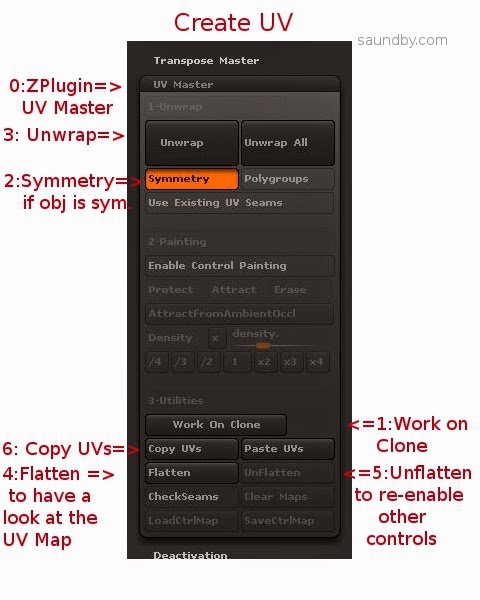
0: Open up UV Master in the ZPlugin menu.

This is where we'll create the UV Map, the Texture itself comes later.

1: Click Work on Clone

This takes care of a bunch of stuff to prepare for making the UV without disturbing your original object. I've screwed up several meshes trying to go without it. My advice is to just use it, it makes things easier.

2: Turn on Symmetry if your object is symmetrical.
Symmetry will try to make a symmetrical UV map, which results in a symmetrical UV texture that's easier to edit by hand. If your object is just sort of symmetrical, you might give it a try, too.

3: Click the big Unwrap button.
This will unwrap the current tool. My advice is to work one tool at a time, and to reduce the number of tools to the minimum necessary before getting to this point to reduce the repetition of exporting meshes and maps.

4: Click Flatten to have a look at the shape of your UV map.
You will see a wireframe of the UV map, this is the form into which your object's polypainting will be projected to make a UV texture. If you're expecting to do any hand editing of the texture's details, make sure that the forms are not too distorted and that seams are not crossing critical areas of the mesh, like across the face of a character. If they are, you can use Control Painting to get a better mesh.

I'm not going to cover that in detail, there are good videos on this at Pixologic and on YouTube, but the short form is:

  • Click Unflatten to get the controls back.
  • Click Enable Control Painting
  • Click Protect, then draw red on the parts of your mesh where you absolutely don't want a seam in the UV map (like the face of a character.)
  • Click Attract, then draw in blue the areas that you'd like the seam to be (like the back of a character's head, or under their chin.)
  • Click Unwrap again and check the results using Flatten.

5: Click Unflatten to get your controls back.

6: Click Copy UVs to put your UVs from the Clone on the Clipboard.


You've now created a UV map, which you need to apply to your original object to guide the creation of a UV texture from its polypainting.


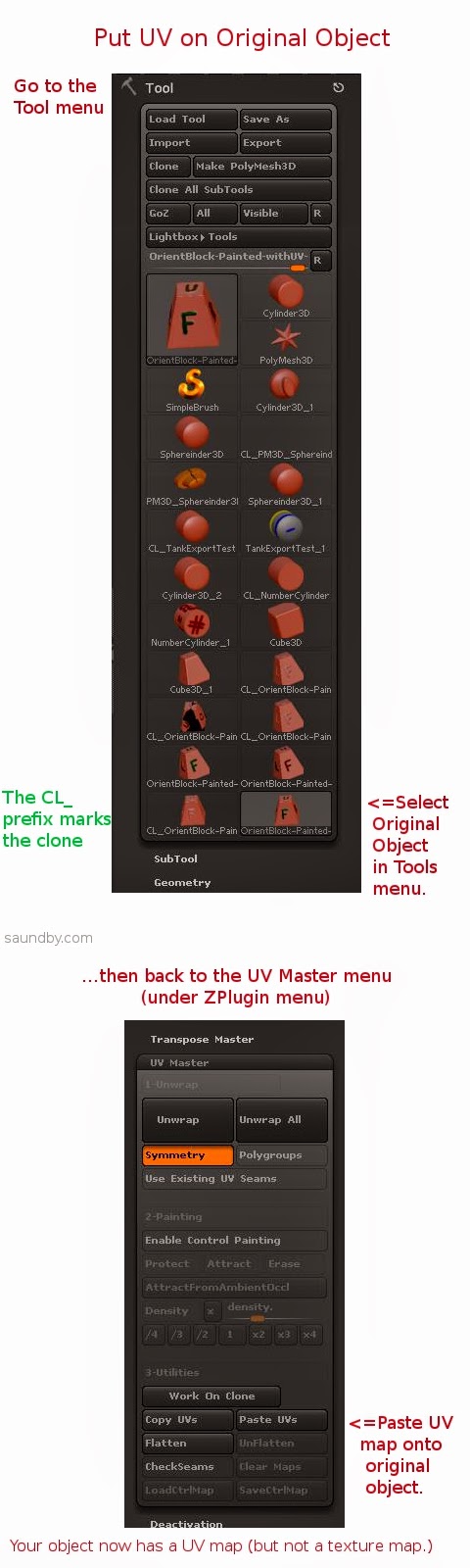
7: Select your original object from the Tool menu.
This will bring it back into the Document view and make it the active object. If something's wrong, or you can't find it, reload it using Load Tool (because you saved it before starting like I advised, right?)

8: Click Paste UVs in the UV Master menu.
This puts the UV from the Clone that's on the Clipboard on your object. It's now ready to have its texture map made from the polypaint on it.

9: Save your tool. Give it a distinctive name, like MyTool-withUVs.ztl.

10: Take a deep breath. The rest is pretty easy.


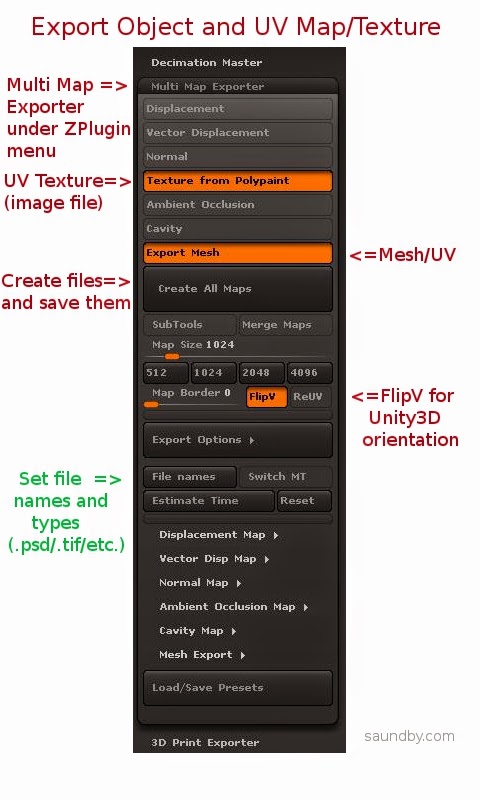
11: Open Multi Map Exporter under the ZPlugin menu.

12: Choose the things you want to export. Mesh and Texture from Polypaint for this example.

13: Choose FlipV to orient maps correctly for Unity.

If you want to have your map files in a specific format, select it in the Export Options and file names sections.

14: Click Create All Maps to create the UV texture and to save the mesh as an .OBJ file. This is one of the most poorly worded bits of button text in ZBrush. Even just "Save" would have made more sense. Oh, well, if we start talking about what's screwy with ZBrush's UI, we'll never finish.

15: Import assets into Unity (Assets=>Import New Asset...).


Gotchas

OK, that's the process. Having it all written out in detail makes it look worse than it really is, it actually happens very quickly once you know it. It's those first few passes that are a problem.

One of the things that really slowed me down in ZBrush is the fact that ZBrush doesn't tell you anything inside ZBrush about what the orientation of the UV map is relative to the base orientation of the mesh. If you open the Tools=>UV Map menu and start clicking the buttons like FlipV, FlipH, Cycle UV, Switch U<>V, it's easy to get lost really quickly as to which transformations you've applied. And there's no simple way to set it back to its base orientation.

Finally, what I ended up doing was creating the UV texture, while applying no transformations at all, then I opened it in GIMP & performed all the tranformations there, saving a clearly marked file for each. Then I pulled the mesh into Unity as well as all the versions of the map. I just drug maps onto the mesh object in Unity until I got the right one (FlipV.)

Colors from ZBrush

To make sure, I saved the map from ZBrush again with FlipV on, and it worked. But then I noticed something. The colors were off on part of the map in Unity. It looked OK in ZBrush and GIMP, but for some reason the color encoding came across wrong in Unity.

Left, Texture map in .psd straight from ZBrush. Right, texture map opened in GIMP and re-saved.

The quick fix was to load the map in GIMP then re-save. It may also be possible to use other file types, like .tif, and have the colors work out perfectly from ZBrush.

The Effects of UV Orientation
The map on the left was saved with FlipV on, the one on the right was saved without. If you get an object looking like the one on the right, check your UV map's orientation, or flip it vertically in an image editor (flip, don't just rotate 180.)

Mesh Orientation

The mesh orientation will get rotated front-for-back when going from ZBrush to Unity, too. It's just a 180 degree rotation, so it's not difficult to fix, just turn it around. If it's facing the camera in ZBrush, it'll be facing away when it comes into Unity.


The object on the left has been rotated to bring the 'F' side (Front) to face the camera, as it was saved in ZBrush, the one on the right is how it came into Unity.

Torn Edges on UVs

You'll notice in that picture of the back of the block above that there's some ragged stuff showing at the edges of the UV map. At first I blamed bringing the map through GIMP, but it does that straight from ZBrush, too. Fortunately the fix for that is simple, too.

For this simple texture, I just did a flood-fill of the black areas of the UV map with the background color (white). With a more complex texture, I would have used smudge or something like to bleed out the edges of the map a few extra pixels.

Map on the left has been cleaned up, UV on the right is as original, with visible seams.

Here are the maps used in the above image:


The original UV texture map from ZBrush.

The UV texture map with the black areas flood-filled with the foreground color of the object.

That's a Wrap

I hope that helps. If you feel I've been unclear anywhere here, or missed something important, please leave a comment or drop me an email message. If I've been helpful, let me know that, too!

Good luck with your ZBrush and Unity endeavors!

Monday, May 5, 2014

Kerbal Space Program + DayZ = ...Firefly?

Beside DayZ, I've recently started playing Kerbal Space Program. It's a game where you build rockets and send little green men off into space to land on their Mün and other planets in their little solar system. The physics engine lets it be moderately realistic in its behavior, enough for a game anyway. The build system is simple enough that a mere mortal can deal with it, or a rocket person who doesn't want to deal with lots of niggling details because nobody is paying them to do this.

I wrung the heck out of the demo version before I bought the full version. There are some significant differences between the two, aside from the obvious lack of features. For one thing, the simulation in the demo is more forgiving than the one in the full game. The full game does have the advantage that the simulation is more "fine grained" than the demo, though. This boils down to meaning that you have to pay more attention to how you build and fly your rockets in the full version, especially the large ones. The demo is more "gamey", in that you can slap together almost anything and get it into orbit. The full version requires a bit more thought and testing.

Recapitulating History

Since the demo's parts are similar to early NASA parts, I decided to get started by just putting together some simple tests to learn about building rockets in KSP.

My first was a capsule with parachute recovery (there's no other capsule or recovery system in the demo, so every flight is a "manned" flight.) I put this on top of a stack separator and a short tank with a large engine on the back and some fins for a bit of stability. I was worried that it would be too short to be dynamically stable along its length, that it would pitch or yaw wildly, but I decided to throw caution to the winds and launch it just to go through the process of getting something off the ground.

The real thing version of where I started in KSP

In spite of a lack of any control system, it flew just fine. It was about a 10 minute flight, surprisingly long for the amount of propellant, I thought. This basic configuration, sans fins, became the core of my next step--build a capsule and service module style combination that I could put on top of different boosters.

I added a dynamic control wheel system and some RCS jets to fill it out. Later, when I tried to use the RCS jets I learned that I needed to add RCS propellant tankage, too. It added a lot of weight, but at the end I had a solid core to build around for an orbital system.

This went on top of another stage separator, a taller tank, and another large engine for another suborbital test.

Mercury Redstone Suborbital Launch

That flight also went well. The fins of the first flight had been removed, and I decided to see how much stability I got with just the reaction wheel system and no fins on the booster. One thing that I missed immediately from the construction information was the lack of a display of the center of pressure on the craft. A basic measure of stability is where the CP sits with respect to the center of gravity (CG) of the craft. CP needs to be behind CG, and the greater the distance between them then generally the more stable the craft will be in the face of perturbations.

The other thing I missed was the lack of a sequencer to control the craft. It's a game, they assume that you want to "fly" the craft. I'm an instrumentation and controls engineer. I expect to build a solid program to get the craft to where I want it, then sit back and let it do its work. A sequencer is sort of a computer that looks at inputs from control instrumentation--acceleration, altitude, etc.--then does certain things at certain times--adjust valve settings, thrust vectoring positions, engine cutoff, etc.

That way you can let the sequencer manage engine throttling on the basis of altitude or velocity, engine shutdown on the basis of same, staging, and firing of the new stage (through that stage's control system.)

In KSP, there are a sequence of events set up linearly that are activated by the space bar. Engine activation (throttling happens elsewhere), stage separation, parachute activation (deployment is controlled by the parachute itself, which deploys as a drogue at high altitude then opens fully at about 500m.)

It more or less works, but having to "fly" each craft gets tedious for me. I'm of the school of aerospace engineer that feels the job is done when the vehicle gets off the ground. Then you just sit back and chew your nails till your bit completes its mission sequence.

Ascent to Orbit

The next step was adding some more power to the booster to get enough velocity for orbit. Given the sort of downrange distance I got with my suborbital vehicles (I flew 3 suborbital flights to different altitudes and downrange distances to get a feel for the craft and the controls), it wasn't hard to get a "seat of the pants" feel for what it would take to stretch the craft for orbital flight. Since the game doesn't give you much in the way of real numbers, that's about all you'll get. The "empirical method" rules here. But since it's just a game, it's not a surprise or much of a problem--I'm just used to having numbers for planning.

I added a second stage between my service module stack and my first stage stack, then added a couple of strap-on boosters to the first stage. Since I hadn't sorted out the sequencing of engines on the first launch, the strap-ons ended up being my first stage, rather than a "stage 0", with the core stage only firing after they burned out and were dropped.

I'd already noticed that the game's world behaves pretty much like our own world. It rotates the same direction, for example, so pitching over to the east would be the most efficient path to orbit. I fired up the booster--fortunately the strap-on boosters had enough thrust to get the whole stack of the ground--rode them up to a decent altitude, staged, then started tipping over to the east.

I took it slow on the tipping, since the whole rocket was so heavy that I wanted to make sure I got enough altitude. As it was, I rode the core stage up, staged, then continued the pitch-over to the east under power the full time. I know it's probably more proper to get the apogee high enough, shut down, then fire up again for a circularization burn at apogee, but I wasn't sweating that at this point.

Having only limited data on the main screen meant popping back and forth between the main screen and the map screen to check my trajectory. I wasn't sure if the game world had the same acceleration due to gravity as Earth, so I didn't know how much I could tell by my altitude and ground-relative velocity (and it bothered me that I didn't have a radar altimeter or some such to know my distance above ground, too. But that really bit me later, when I got to the Mün.)

I did manage to set up a decent orbit, and, yes, with a plenitude of propellant. I would be able to go home again. I played around with raising and lowering the orbit.

And here's where KSP gets really cool.

The immediate display of effects of acceleration on trajectory in the map window is really neat. It's easy to see what happens when you accelerate at different points of your orbit. It also gives players the chance to get stuck in orbit, revealing a bit of physics about energy use. And, even more significantly, changing orbital inclination.

One of the things that irks me is the common perception of "space" being like one big room, where everything that's "in space" is together. It's often presented this way in the simplified presentation of general media, and those people who don't have any direct contact with space work just don't know any better. They see the Hubble Space Telescope as hanging right off the front porch of the ISS, with all the spy satellites, weather satellites, commsats, etc, all right there in a row.

Now, every time I hear someone ask why the astronauts at the ISS can't just grab the Hubble and fix it, or why a Shuttle sent to repair a Hubble can't just ditch out to the ISS if something goes wrong, I'll wish that I could sit them down with a copy of KSP with objects in the respective orbits and let them find out through personal (non-lethal) experience why this doesn't work.

Back to my orbit. I didn't know what my parachute could deal with in the way of incoming velocity, so I decided not to come in from the higher orbit (about 400km), but returned to a lower orbit of about 90km before doing a re-entry burn.

The parachute held up fine. In fact, I learned that the system could deal with returning from orbits beyond 500km, but it was having trouble reducing velocity enough from around 750km. I didn't pancake any spacecraft, but I don't think I'd want to try a direct re-entry from 1000km. I don't know if the game engine does enough simulation to cause the heat shield on the capsule to fail, either. In general, I didn't push it.

I flew several more orbital flights, with minor tweaks to my vehicle design (like having the core booster fire at launch along with the strap-ons). I used different techniques for getting to orbit, in one case going straight up until I had an apogee of 500km, shutting down, then tipping to the east and firing to circularize at apogee. It worked just fine. I also did the routine of going a bit to the east, raising my apogee to about 90km, shutting down then firing a second burn at apogee to circularize. It may have been more fuel efficient than going straight up before circularizing, but it wasn't as easy to fly.

I picked 90km as my altitude just because that's the simulated altitude I've used on numerous test programs to test equipment in space-like conditions of atmospheric pressure (or lack thereof.) I've used other targets as well, like 75km, but I went with 90 because I wanted a little room. And, I was glad to see that KSP seems to pretty well mimic Earth so that I can use familiar numbers like these.

Final Thoughts

KSP should be played in schools, for credit. I would like to think that it can be used without taking away the fun, and that kids could be induced to set objectives for themselves similar to actual space program objectives (rather than just blowing up little green Kerbal people or ramming them into the ground at supersonic velocities.) The game has tremendous potential for teaching, in a "seat of the pants" way, information about ballistics and orbital mechanics. Then, when these subjects are encountered in math and physics classes, the concepts will already be familiar.

While on Facebook, there was a little game someone started of asking what you'd get if you combined the two computer games you were playing presently. In my case it was DayZ and KSP. I figure mixing zombie apocalypse with rickety build it yourself interplanetary space flight gives something like a Firefly game (Reavers=zombies in this case, in case that's not obvious.)

Tuesday, April 22, 2014

Clearance on Propellor Quickstart Boards at Radio Shack!


I love this little board. I had two, now I've got five. Not to mention several other Propeller boards. One of these is probably going to become a terminal for my Ampro Little Board Plus CP/M computer system. I think I'm going to give it an LCD display, the Prop as a dedicated terminal, and build it into an all-in-one. An iAmpro, you might say. ;)

Tuesday, March 4, 2014

DayZ, Diaries of the Damned #23

I saw these and thought "Thank God, I'm going to live!"

Have I been playing too much?

Wednesday, February 19, 2014

DayZ, Diaries of the Damned #22

“I wish I could play, but I’m stuck in this fleabag motel tonight.”

That was the latest text from Eraser, I mean Razor, to our online chat room. He’s one of our team of five that plays DayZ together. Having five of us together had only happened once, and it hadn’t ended well. Razor joined the other four of us without identifying himself, acted weird, and we blew him away.

DayZ is just kinda like that.

But with five of us, it was getting more and more common to get two or three of us togther. We were trying to get a couple more people to join us, so that there’d be less chance anyone would have to solo. We’d all learned how nice it is to have another set or two of eyes in the game, and nobody liked going alone any more.

Tonight we would have three of us online. Razor would have made four, but he was somewhere between somewhere and absolutely nowhere out on the road. Closer to nowhere. The picture he’d posted of the motel’s sign was not promising. Who would even name a place “Axe Clown Inn and Suites” anyway? You’d have to be very, very careful asking for that place with directory assistance.

We commiserated with him in the chatroom, then set up voice chat so that we could talk freely as well played. It took us forever to find one type for voice chat that worked for everyone, though what we’d settled on was a pain in the tookus for me. I had one set of headphones on my ears, and other with a better microphone hanging around my neck.

Trigger found us a good server, then we logged on. Every so often, we’d drop a note in the chatroom so that Razor would follow along to some degree.

“Dang, the airfield is untouched! And the only other players on are ‘LuZer’ and ‘BruZer’. Two to our four. Bet they don’t even want to touch us.”

“That’s great guys,” posted Razor. “If you find an M4, can you get it for me? I’ve already got all the stuff for one.”

“Even the buttstock with the Richard Nixon commemorative coin inlay?” asked Boomer.

“Mine’s got Lyndon Johnson,” posted Razor.

“Does that mean we have to be enemies?” posted Boomer.

“I...don’t even know what you mean,” from Razor.

“Never mind.”

We went through several buildings on the airfield. We couldn’t believe the stuff we were finding. It was absolutely untouched. We got clothes, backpacks, guns, ammo, medical supplies, and, most surprising of all, storage boxes to put it all in. We’d never been so well supplied.

“My inventory is full, but I think I can carry this M4 for you, Razor,” I posted. “I just can’t use my own rifle until I give it to you.”

“What’s its condition,” he replied.

“Pristine. Everything I’ve got it pristine. I’ve been tossing aside ‘worn’ stuff and replacing it with pristine on everything. Even my bootlaces are pristine. You wouldn’t believe the stuff we’ve been finding tonight. Boomer is throwing away shotgun ammo.”

“No way. I’ve got to get in on this. There’s got to be some way I can get on.”

I looked at my screen. I had a red ‘link’ symbol, meaning that my computer wasn’t talking to the server any more.

“Anyone else getting a no-contact message?” said Trigger, over voice chat.

We all came back, we were all getting it.

“Must be server reboot time,” said SoldierA. “You know what that means?”

“Find another server?” said Boomer.

“No, it means we log back in to the same server, and it’ll be totally restocked.”

“No way!”

There was a lot of jubilation on voice chat over that, though we were all stuffed to the gills with everything we could ever want. By the time we actually got kicked off the server, though, Trigger and Boomer decided they were going to call it a night.

“I don’t know what else I’d get,” said Boomer. “I’ve got four plastic cases stacked with shotgun ammo, a can opener, and, like, two cans of beans. Oh, a box of cereal, too, but I think all that’s left is the prize in the bottom.”

“And I’ve got work early tomorrow,” said Trigger. “Maybe we can log on at lunchtime and give some of this stuff away to bambies.”

“Yeah, then they won’t be bambies any more,” I said.

“Right,” said Trigger. “Which means we can shoot them.”

There was a moment of silence.

“If,” added Trigger, “they, you know, become bandits or something.”

“Right,” I said. Funny how there were always more bandits around when Trigger was there.

We dropped a message or two into the chat room letting Razor know what was up.

He came back, “I think I’ve got a way. My laptop’s up. I’ll log in as soon as I see you guys on. You’ve been driving me crazy with all the stuff you’re getting.”

SoldierA and I logged back on. In a moment, Razor was there, too. Even in voice chat. He was a little choppy, but we could understand him just fine.

“Got the internet password from the lobby?” I asked.

“Yeah, but their internet kept kicking me off. The ten minutes I managed to stay on, I couldn’t even get to my email,” said Razor. “Now it’s dead. I called the lobby, but they said the technician won’t be in to fix it till morning. I tried to get them to reset their router, but the lady up there is scared of it. She thinks it’s nuclear, like a microwave oven.”

“Microwave ovens aren’t nuclear.”

“I know that, but she thinks they are because everyone says they ‘nuke’ their food. So I’m on my own, here. Are we going to loot this place or what?”

The three of us backtracked over the course we’d taken before the server reset. The place was packed with stuff. As good as the first pass was, the second was even better.

“SoldierA, did you even know there was a platinum-covered can opener in this game?”

“You’re making that up.”

“Here, look at it,” I dropped it to the floor. A pristine platinum coated can opener. To be honest, I’d been sorely tempted to leave it behind and take the pristine aircraft-grade screwdriver on the shelf next to it.

“Armor piercing ammo!” said Razor.

“Is that good for my Mosin?” I asked.

“No, it’s for my M4!” said Razor. “Wow. That and the underslung M203 grenade launcher. Am I loaded for bear, or what?”

“They’re supposed to add ammo for the grenade launcher next week,” said SoldierA.

“Really?”

“Well, that’s what they said in this morning’s progress meeting, but one of the devs texted to his wife that he thinks next week’s schedule isn’t going to happen,” said SoldierA.

“Where do you get all this stuff?”

“A guy on the boards found the NSA tap on the dev’s phone, so all his texts go out on this Twitter account he set up now. Most of it’s stuff about their kids and cars, but every so often there’s a little gem like that.”

I shook my head. “Insane.”

“You’re the guy who paid for a game where the paint cans kill you,” said Razor.

“Twelve time,” I replied. “Point taken. Are you full on storage boxes yet, Razor? I’ve got a yellow one here. Pristine.”

“Uhhh. I’m looking for a green one now, actually. I want to color code them.”

SoldierA laughed. “Would you listen to us? Now we’re fussing over what color our pristine stuff is! Who would have ever thought we’d get equipped like this?”

“It is amazing,” I said, as I tossed a ‘worn’ trauma plate aside for another ‘pristine’ one. “Too bad they fixed the bean can bug. We’d be driving pristine T-72 tanks if they hadn’t.”

“What?” said Razor. “Tanks?”

“I’ll tell you about it another time,” said SoldierA.

“Portable blood bank,” said Razor.

“What?” said SoldierA.

“I just picked up a portable blood bank. It’s got like twenty slots, with prepared I.V.s of type O positive blood. It was right behind the three hundred round ammunition drum I picked up for my M4. It was full, too, by the way.”

“Guys, we have really struck it rich tonight,” said SoldierA. “Those items weren’t even supposed to be in the game yet.”

We heard a scream and the argh-I’m-dying sound of a character being seriously injured.

“What was that?” I said.

“Bandits? Razor, did you just kill someone?”

“Couldn’t have been someone killing him,” I said. “Not with all that armor on.”

“I don’t see him. Razor, were you by the stairs?”

Nothing.

I closed the door of the building, then crouched inside with my rifle.

“What do you think got him?”

“I don’t see him. Razor, hello?” he was using the in-game audio to call him, in case the voice chat connection had dropped out.

Then we saw something rise out of the floor. A body. It was like a ghost. It floated up into the air, hovered at waist height for a moment, then disappeared into the ceiling above.

“Was that a sign, or something?” I asked.

“Watch the door. I’m going upstairs,” said SoldierA.

“Don’t walk in front of any windows,” I said. “Darn bandit snipers!”

While he ran up the stairs I was wracking my brain, trying to think of whether there was any other way to get in or out of the building. I was reviewing the cover and concealment we had outside, trying to plan a route of escape. If they really had the drop on us, we might have to just log out here.

“He’s not up here. No body, nothing,” said SoldierA.

“Can’t sleep, clown’ll eat me...” I muttered.

“What?”

“Sorry, nothing.”

“Guys? Hey, guys?” It was Razor!

“We hear you,” I said.

“Sorry about that. A call came in on my phone. Do you see me anywhere?”

“No,” said SoldierA. “I’ve been all over. Did someone shoot you?”

“I don’t know what happened. I think I’m dead. But I don’t know where. Can you get my gun? I really don’t want to lose that gun. I’ve think the flares for the Very pistol will shoot out of the M203 until they get the new ammo loaded. I really don’t want to lose that gun. I’d just upgraded the buttstock to the JFK commemorative model, too.”

“Wow,” said SoldierA, “the boards say that one makes it 14% more accurate than either the Nixon or Johnson commemorative buttstocks. We’re looking. You were still inside, right?”

“Yeah,” said Razor. “I was up near the head of the stairs. I went to answer the call, then when I came back the screen said I was dead.”

“Bandits,” I said. “You were right next to a window there. And probably silhouetted, at this time of day.”

“Darn. You can get my stuff, right?”

“I’ll drop my portable surgery,” I said, “and grab one of your containers. If we can find your body.”

“I guess I can give up the vehicle diagnostics kit and the Jerry can of gasoline,” said SoldierA. “We can probably get new ones before they add the vehicles in, anyway. But your body isn’t here.”

“Maybe it went through the wall,” I said, slowly. “Like when I died that other time.”

“When Boomer and I were with you,” said SoldierA. “Yeah. That means it would be outside.”

“Don’t go near the window!” I said.

“I’m not stupid,” said SoldierA. “Usually.”

We sat in the gathering darkness and thought. Razor let us know he’d started a new character, and was running in from the coast. Apparently the rest of the server was in good shape, he’d already picked up a screwdriver and a can of spaghetti, was wearing a Sid Vicious hoodie and a pair of cargo pants.

“They’ve got more pockets than usual, but I think I’m moving slower if I put stuff in the top pockets. They’re like, right at my crotch. Have you found my body?”

SoldierA and I looked at each other. Or, our characters in the game did. I did the ‘winding up’ movement, then moved over to open the doors and rush out. Maybe the bandits figured they’d got the only person here and moved on. There was probably other stuff in the game we didn’t know about yet, like one of those Austrian sniper rifles that can blow over a coffee can at a hundred miles. Maybe they were on a mountaintop somewhere, and not even looking at the airport now. Though SoldierA usually knew about that stuff.

I popped the doors open, then swept from side to side, looking for a target. Nothing. He rushed out, to the north side of the building.

“I found him.”

I rushed out. Fortunately, the body was laying in a clump of bushes. He looked so...peaceful. Except for all the weapons on the body, of course. The chainsaw bayonet on the M4 looked particularly wicked.

“We found your body,” said SoldierA.

“Oh, thank goodness!” relief just melted off Razor’s voice. “Just get the gun. And one of you might want to take the blood bank. You can have it. And anything else off the body. Just, please, bring me the gun.”

SoldierA and I were going through our inventory, deciding what to drop. We’d decided to get as much stuff back to Razor as we possibly could. Bad enough having to spend a night at the Axe Clown motel without losing the coolest equipment you’ve ever had on your character.

“I hate to have you drop the torsion bar,” said SoldierA, “because once they get the tanks in the game that’s the repair item that’s hardest to find.”

“So the Norden bombsight, then?” I asked.

“Yeah. The chances of us getting a bomber back in the air with only five of us are pretty slim. Besides, if we put together a gunship we won’t need a bomb sight.”

We were chucking incredible stuff all over the ground around us, making room. Finally, we’d each given up about a third of our inventory. We came back to the body.

“I just ran past Brezhneviola or something like that,” said Razor. I’ve got a good set of clothes on and a wood axe. Just grab the gun and start running toward me, please?”

SoldierA and I looked at each other. How could we tell him?

“Um,” I started, trying to break it gently, “we can’t get the stuff off your body.”

“What?”

“It’s all here, we see it. It shows up in our inventory. But when we try to take it, it just pops back up in your inventory.”

“You’re kidding,” his voice could have frozen lava.

We heard a scream and arrgh noise over voice chat, then nothing.

I turned to SoldierA. “I’ll give him my .45 with the auto-targeting sight. And the electric can opener.”

He said, “I’ll give him my radioisotope thermonuclear generator so that he can run it. Is it AC or DC?

“I think it’s 220AC, 50 cycles. Looks like a British plug.”

“I’ve got the adapter for that. Yeah, I dropped it over here. Let’s get this stuff up and head toward him.”

“Think we’ll find another M4?” I asked.

“Like that one? No way. Never again.”

“Think we should tell him?”

“Don’t be ridiculous.”

“Hey, guys? You there?”

“Yeah! Razor?”

“Yeah. Well, I just figured out what killed me. Whenever my phone rings it kills me for some reason. I just died again. I’d just found a robot dog or something, too. I was trying to figure it out.”

“Oh, right,” I said, “you’re getting internet through your phone.”

“Did I hear you right?” he said. “you can’t get my stuff?”

“No, we can’t,” said SoldierA. “But we’ll give you some of our stuff, and we’re looking for another M4 for you.”

A dark cloud hung on the other end of the voice chat. We could feel it.

“Look, don’t bother,” Razor said. “The chances of another pristine match-grade Matthew Simmons signature U.S. Olympic Team 2004 M4 rifle with custom trigger job turning up tonight are negligable. I’ll probably never see another JFK stock, either.”

A heavy sigh came across the line.

“At least you know what killed you,” I said. “Can you block calls? I’ll cover you on another airport run tonight. I’ve got nowhere to be tomorrow morning. There’s only, what...two other players on. We’ll practically have the place to ourselves.”

Another sigh.

“No, forget it. I think I need some time to deal with this. I think this killed me before, too, when I gave you all that stuff, Goose. Every time I get stocked up in this game, I die. I’ll talk to you later.”

We heard the line drop on his end.

SoldierA and I looked at each other.

“What are you going to do?” I asked.

“I’ve got work in the morning,” he said. “I’m going to go out into the bushes then log off. What about you?”

“I can stay up a while. I’m going to run for the coast. I’ll pick up some extra food and an M4 if I see one. I’ll be nearby when he comes back.”

“Sounds good.”

What didn’t sound good, though, was the pair of gunshots that came out of the woods to the east of me and SoldierA. LuZer and BruZer did well that night.

Tuesday, February 18, 2014

DayZ, Diaries of the Damned #21

“I’ve got a bug for you,” said SoldierA.

“What, like the last one? Everyone was safe but me?”

“No, you’ll like this one,” he said. “It’s just so...you.”

“OK, lay it on me.” I sighed at my keyboard. I’d just managed to get a couple of cans of beans and a can opener after starting another new character. Other than that I had some clothes, and ammo that would be useless until I found a gun. I was still a 45 minute run from everyone else in our group. Chances were someone would kill me long before I got that far.

“You got ammo?” he said.

“Yeah,” I’d given him my inventory not five minutes ago.

“And a can opener?”

“Uh-huh. Which is how I know someone’s going to kill me. I’m safe with screwdrivers, but as soon as I pick up a can opener, some bandit pops me. This can opener is Pristine, so I’ll probably die horribly this time.”

“Load the ammo into your can opener.”

“What?”

“Just do it.”

I shrugged. I was as good as dead already. At least he didn’t have me fiddling with spray paint cans. Ammo hadn’t killed me yet. At least, not in my own hands.

I opened my inventory window, then drug the box of 7.62x54R ammo onto the can opener. It turned red, then popped back into the inventory slot it had come from. I unboxed the ammo, then tried again.

I heard a noise, like the working of a rifle action. Then my inventory showed a can opener with 20 rounds of ammo loaded.

“What?” I said.

“Hold it in your hands, then shoot it,” said SoldierA.

I looked around. Out there, at long distance, there was a zombie just standing in the field. It was hardly more than a few pixels, but those pixels had that look to them--you knew it was a zombie. I carefully positioned my reticle over the zombie, then clicked my mouse.

Bang! A moment later the zombie dropped. Dead. Well, really dead.

“Incredible!” I said.

“Did I do you a solid, or what?”

“Yeah! What kinds of ammo will it take?”

“Until tomorrow’s patch, anything. And it all acts like high powered rifle rounds. Even the .45. It’ll drop a rhino.”

“There aren’t any rhinos in the game,” I said. “Are there?”

“Not yet, but if it’s like the mod we’ll have lots of animals someday. Have fun with your can opener, and we’ll see you at the airfield tonight, right?”

“You bet! I can’t wait. I’ll go up in a tower and shoot bandits with my can opener.”

As we’d been talking, I’d gone toward a town and knocked over two more zombies with my little can opener. This was great. I almost considered getting a video of it, just for remembrance’ sake. Almost--then I remembered that the video recorder app was why my character was undersupplied and halfway across the map from everyone else.

As I came up to town, I saw a fracas in the middle of the street. Some other bambies had been caught by three fully geared-up guys with burlap sacks over their heads. It looked like they’d handcuffed them. One of the geared up guys shot one of the bambies. He'd been cuffed, and all he had on was a ball cap, jeans, and a t-shirt. Daaang.

I got close to a wall, lined up my can opener, and fired. One down. The other two scattered, leaving the bambi in the street.

I shifted to another building, looking.

One of the bandits appeared.

“Hey, you! Did you just shoot?”

I held up my can opener. “I don’t have a gun. Just this. Please, just take it and let me live!”

“Get out of my way. There’s a sniper here, dumbass!” He pushed past me.

I turned and let him have it, right between the shoulder blades. Yeah, good guys do shoot people in the back, jerk!

I peeked out in to the street. The bambi was trying to roll off to one side while handcuffed and laying on the ground. It looked like he was going in circles. I still didn’t see the other bandit. And there might be another on overwatch, though they didn’t seem that bright.

There. I saw Bandit 3. He’d just shot into a three story building, looking for altitude, no doubt. I positioned myself where I could watch the upstairs windows, then went into what, on a rifle, would be “scope” mode.

A movement. A head. I fired. Down! I waited, just in case. Nothing.

I ran to the building, can opener up. I went in the door, up the stairs. There was his body.

I grabbed his stuff. Tac vest, ballistic helmet, two pistols and an M4 with all the goodies. Sweet! Tomorrow I’d be set. For today, however, I had my can opener!

I went back down. The bambi was struggling to get out of the handcuffs.

“Sorry, I don’t have a key. There’s lots of stuff on these bandits once you get out, though!”

“There’s one more!” he said.

I looked up. Right there, at the end of the street. Another. Burlap sack and everything. He had something in his hand, and he was coming toward us with a look of determination.

I raised my can opener. I fired.

A ricochet. He was still coming. Huh, that’s what I get for taking a snap shot. Whatever was in his hand, it wasn’t a gun. He was closer.

I fired again. Still nothing! I ducked into the doorway to check my ammo. Yeah, inventory still showed it loaded with ten rounds. I came back out, I wasn’t going to miss this time.

As I stepped out I heard the bambi moan and give the death cry. The bandit was right on me. I opened up with the can opener. Bang! Bang! Bang!

Nothing! Did they do a hotpatch?

I went to switch to the M4, but it was too late. The guy bowled me over. Was that a grenade in his hand? No, it was just a can of stinking beans.

I heard my character cry out and die.

The screen was black.

What just happened?

“Hey Goose!”

“Yeah, SoldierA?”

“I got another one for you. Remember how I told you there were vehicles in the mod? Well, the code for one snuck into the last update. But you’ll never guess--”

“It’s the bean can,” I said.

“Right! Did you find it? It’s a T-72 tank. Pretty cool, huh? I’m driving around the castle, up in the woods, right now, with a can of beans in my hand! Too bad there’s no ammo for the main gun.”

“Yeah, SoldierA, that’s just great. Crush a rabbit or something for me, will you? I’m logging off till after the patch.”

DayZ, Diaries of the Damned #1

...

DayZ, Diaries of the Damned #17

DayZ, Diaries of the Damned #18

DayZ, Diaries of the Damned #19

DayZ, Diaries of the Damned #20

Monday, February 17, 2014

DayZ, Diaries of the Damned #20

“It’s real,” said SoldierA.

“No,” I said, “you’re pulling my leg.”

“No, really. I’m on the live feed now. Lots of people are confirming it.”

SoldierA is our tuned-in, tied-in player of the group. He knows the Twitter feed of DayZ developer Rocket’s barber. We don’t know how he manages to hold down a full time job, be father to several kids, a good husband (well, we haven’t heard threats of her leaving yet), and know all this stuff. Probably because the rest of us spend too much time on other things, and just haven’t had as much time on the game as him to build up the contacts in our social media and links in our browsers. He played the Mod, we just joined in on the DayZ standalone.

One thing, though, is that you can usually count on what he says. If what he says turns out to be wrong, there’s usually a correction from the dev team the next day saying he should have been right.

“I’m not going to test it,” I say. “Even paint cans are too much for me.”

“What’s wrong with you? They fixed that over a week ago. Hey, Boomer’s coming in. Howdy, Boomer!”

“Hey guys, what’s happening?”

“There’s a cool new bug,” said SoldierA.

“Sweet! Is it as much fun as the exploding paint cans?”

“Better! This one won’t kill you.”

“What is it?”

“No falling damage.”

“Whaaat? Really?”

“Yeah, I’m watching the live feed on bug reports right now. At least a dozen confos.”

“I’ve got to try this out. Goose, where are you?”

“Just south of the complex, near where we logged out last time.”

“I see you. I’m coming down.”

He runs down the hill.

“Watch this!”

He climbs a ladder up the side of a building. Then he drops.”

“You OK?” I ask. I haven’t got a thing for splints, and my medical supplies are low. “I can hit you with morphine.”

“No, I’m fine. But I think I hit the dumpster on the way down. That wasn’t a good test. Hang on.”

“Is he jumping?” says SoldierA, over our voicechat outside the game. “Where are you guys? I want to see.”

“We’re over at that military base you showed us. You know, the one that’s kind of hidden?”

“On my way! Don’t die before I get there.”

“Here I go!” Boomer is on top of a sentry tower. I see him drop to the ground. My stomach churns.

“Whoa! That was cool! You should try it!”

“You’ll find me with a paint can in my hand first...”

“No, really! I didn’t even grunt. Here I go again!” His body falls again. He gets up.

“Hey, there are some really tall buildings in town. Can you climb up the water towers?”

“The tallest things in the game,” says SoldierA, “are the communications towers.”

“Yeah, but I want to do this where someone can see me!” says Boomer. “Hey, let’s go to that tall building in the big city down there.”

“Fine,” I say. “Maybe I’ll try a molehill.”

“Chicken,” he says.

“I’ll meet you there!” says SoldierA. “I’ll record video! We can put it on the internet. This is so cool!”

“Great. Hey, we can go together! Tandem! Goose, can you record video on your system?”

“I’m sure I can, somehow.”

“Here’s a link,” says SoldierA. “I’ll meet you guys at the construction crane.”

“Too bad we can’t, like, let people know. You could go around collecting admission.”

“Collecting bullets is more like it,” I say. “Just lead the way. I’m following, but I might lag a little. I’ve got a download for John’s video recorder software going in the background.”

On the way, Boomer climbs a few buildings then jumps off them just for the heck of it. I watch a couple of times, but mostly I pop out to check my download, then install the app, while he’s doing his birdman routine. Every time I see it, it makes me a little sick. I’ve seen my buddies take a bad step or miss a ladder one too many times. Then it’s a long run back to the coast with a spare can opener and food.

I got the movie recorder ready, and we collected up at the foot of the construction tower.

“There, that one,” said SoldierA, pointing at a building. “That one has the longest drop in the game, other than the communication towers. I’ll record us from above. Goose, you get us from the ground. Then we’ll do a second jump, and you can record us from up above as we drop. Sound good?”

“I’ve got to go up there, too?”

“If you fall, you won’t get hurt. Why don’t you believe me?”

“Because these things always seem to bite me in the keister. OK, I’ll go up there for the second run. First, I’m going to just stay down here on Terra Firma.”

They climbed up the building. I had my rifle out, sweeping for bandits. They stood out on the edge of parts of the building as they climbed time after time. It’s like they forgot where they were. It’d be just our luck if someone with a Mosin took them out right before they jumped.

“OK, we’re in place. Ready?”

Boomer and I both said we were. I hit the key combo to start the recorder, and a little red dot came on at one corner of my screen.

Boomer jumped just before SoldierA, so that he’d show up in SoldierA’s recording.

They came down, down, down. Man, that’s a long drop.

Boomer hit the ground, then SoldierA.

There was a horrible groan. The death sound.

“What happened? What happened?” said SoldierA.

“I”m fine! I’m OK!” said Boomer.

“What happened?” I said. “My screen is black. Do you see me?”

“No...you’re gone!” said Boomer. “You were right there!”

“Wait, there he is!” said SoldierA. “Whoa. Freaky!”

“What? What?”

“You’re body. I just saw it rise up into the air. It flew up next to the building. I think it’s up there somewhere now.”

“Can you get my stuff? My rifle!”

“Yeah, I see it,” said Boomer. “Up there, stuck in that ladder.”

“How did that happen? You guys didn’t hit me! I was ready for that. There I was, thinking, ‘Now’s the time you get it, Goose, because they won’t suffer any falling damage but they’ll run into you and surely crush you!’”

“You are so paranoid!” said Boomer.

“I’m dead!”

“Yeah, well, I didn’t say that you don’t have a reason to be paranoid.”

“Did you get the video?” said SoldierA.

“Yeah. I think so. I’d just stopped it...hey! Do you think that video app killed me? I heard myself die right as I hit ‘Stop’ for the record controls.”

“Yeah. It does that sometimes,” said SoldierA. “Didn’t I tell you?”

“No! No you did not tell me! I never heard the words ‘by the way, the video app will kill you sometimes, sure you still want to run it’, not once!”

“Oh, well. There you are. Now you know.”

“Aaaagh!”

“Should we meet you at the coast or something?”

“Can you get my stuff?”

“Boomer?”

“Nope. I tried climbing up to where your body is. I tried the ladder first, but I couldn’t get to your stuff. Then I went inside, because, y’know, your body was kinda sticking through the wall. But when I walked up and clicked when it showed me the gun and bullets logo, your body just disappeared. It’s not anywhere around here.”

“Really?”

“Yeah, I swear. It’s gone.”

“I haven’t even restarted,” I said.

“No body, anywhere," said Boomer. "I’ve got an extra can of beans, and we can probably find an axe around here somewhere.” You could tell from the sound of his voice that even he thought that sounded lame.

“Want to send me that video?” said SoldierA. “I was looking the wrong way when I fell, so mine is useless.”

“Yeah, I can’t wait to see it,” said Boomer.

“File...delete.” I said.

DayZ, Diaries of the Damned #1

...

DayZ, Diaries of the Damned #18


DayZ, Diaries of the Damned #19

...

DayZ, Diaries of the Damned #21


DayZ, Diaries of the Damned #22